Best USB Microphones of 2026

A USB microphone is an entire recording chain — capsule, preamp, converter — in one box that plugs into your laptop. That convenience is why the differences catch people off guard: two mics with nearly identical specs can make you sound warm and close on one and thin and echoey on the other. And almost nobody records in a treated studio.

Over three months, my team and I recorded voiceovers, podcast intros, gaming chat, and more voice memos than I'd like to admit on 12 USB microphones, from bare plug-and-play models to kits with boom arms and shock mounts. The lesson for first-time buyers: more pickup patterns isn't automatically better, and "noise-canceling" on a mic is mostly pattern rejection and sensible gain, not magic. A well-placed cardioid with honest gain control beats four patterns and a page of software presets you'll never open.

The thing I underrated going in was monitoring: a headphone jack with a real volume dial tells you your levels are wrong in seconds, not after twenty unusable minutes. Everything below earned its spot on sound, what came in the box, setup speed, and whether it still behaved a month later.

Keeper Score summarizes customer ratings and review volume. Read it alongside the product details and trade-offs. How the score works.

1

Best Overall

Blue Yeti

93 /100
Keeper Score Outstanding

Key details

Weight
3.5 lb
Connectivity
USB
Pickup Patterns
Cardioid, omni, bidirectional, stereo
Onboard Controls
Gain, mute, pattern, headphone volume
Check Price on Amazon

The Blue Yeti is the microphone we reach for when we don't yet know what we're recording. Four pickup patterns—cardioid, omni, bidirectional, and stereo—cover solo voice, a two-person interview, room sound, and even a quick stereo capture. That is more flexibility than any other mic here, and we like that the pattern, gain, mute, and headphone volume sit on the body. You can fix a bad setup without opening a control panel, and the headphone jack lets you monitor in real time.

What keeps it at the top is how little it asks of a beginner. Plug in USB, choose cardioid, speak toward the logo, and the voice sounds full and clear. The headphone monitoring is simple, and the controls are where you expect them. It is a forgiving mic for a first setup, and the metal body feels like equipment rather than a gadget.

The Yeti is a desk fixture. The stand is stable and the controls are within reach, but this is not a mic you toss in a bag for a trip. We keep it in one place and let the weight work in its favor. For a permanent podcast, streaming, or meeting setup, that stability is part of the appeal.

If you want one USB mic that can handle a solo show, a guest, a guitar, and a group call, this is the safest default here. The four patterns are the reason, not a spec-sheet bonus.

Pros

  • Four pickup patterns cover solo, interview, room, and stereo
  • Onboard gain, mute, pattern, and headphone volume
  • Headphone monitoring for real-time tracking
  • Sturdy metal body that stays put

Cons

  • Condenser picks up room noise
Our verdict

Buy the Yeti if you want one USB mic that can handle solo voice, interviews, room sound, and stereo without adding gear; it is the most flexible default here.

Check Latest Price
2

Best for Streaming

Elgato Wave:3 MK.2

95 /100
Keeper Score Outstanding

Key details

Controls
Multifunction dial, tap-to-mute
Onboard DSP
Clipguard 2.0, Auto Gain, EQ, compressor
Connectivity
USB-C
Polar Pattern
Super cardioid
Check Price on Amazon

The Wave:3 MK.2 is the most software-dependent microphone here, and that is the point. Elgato builds the value into Clipguard 2.0, Auto Gain, a voice enhancer, compressor, and EQ, then puts the controls in Wave Link. If you already stream through OBS or want one place to route game audio, voice chat, and mic, the integration is a real convenience. The multifunction dial and tap-to-mute are easy to find without looking away from the screen.

We think it earns its place for streamers who want a polished voice without building a chain of plugins. Auto Gain sets a usable level in seconds, and Clipguard 2.0 makes a loud reaction less likely to turn into a distorted mess. The capsule is focused, and the metal-and-plastic body is light enough to sit on a boom arm without drama. What we do not like is how much of the experience depends on software you may or may not get along with; the app is powerful, but it is another thing to learn and another place for settings to drift.

The mic itself is simple: USB-C, a dial, a mute surface, and a stand with 3/8-inch and 5/8-inch adapters. It is not the pick for someone who wants to plug in and never open a control panel. For a streamer already in Elgato's world, it is the most complete USB option here.

Pros

  • Clipguard 2.0 and Auto Gain simplify levels
  • Wave Link routes mic, game, and chat audio
  • Multifunction dial and tap-to-mute
  • Light enough for a boom arm

Cons

  • Room noise can still reach the capsule
Our verdict

Choose the Wave:3 MK.2 if you stream through software and want Elgato's levels, effects, and routing in one place; it is the most complete streaming-focused USB mic here.

Check Latest Price
3

Best for Studio Vocals

Audio-Technica AT2020USB+

94 /100
Keeper Score Outstanding

Key details

Monitoring
Mix control, volume control
Connectivity
USB; headphone jack
Polar Pattern
Cardioid
Sampling Rate
16-bit, 44.1/48 kHz
Check Price on Amazon

The control we kept coming back to on the AT2020USB+ is the mix knob. It blends your live mic with prerecorded audio in the headphone feed, which is exactly what you want when you are recording a voice-over against a music bed or hosting a podcast with a remote guest. The headphone jack has enough output to drive real headphones, and the volume control is right there. That is a small thing until you have spent a week plugging headphones into a laptop.

The capsule is a cardioid condenser, and the converter runs at 16-bit, 44.1/48 kHz. Those are not the biggest numbers in this roundup, but the AT2020 has a long reputation for clean, natural voice capture, and the USB+ version keeps the simple plug-and-play part. We like it for a quiet room, a close-speaking host, and a desk where the mic stays put.

The AT2020USB+ is a specialist for solo voice. It rewards a quiet room and a close-speaking host, and it keeps the monitoring simple. We like it for a solo podcast, voice-over, or music demo where the voice is the whole show.

If that is your work, the clean capture and the mix control justify the premium. It is the pick when the sound of the voice matters more than having every feature.

Pros

  • Mix control blends mic and prerecorded audio
  • Headphone jack with high-output amp
  • Clean cardioid condenser capture
  • Simple USB plug-and-play

Cons

  • Cardioid only, no omni or stereo
  • No XLR output for interface upgrades
Our verdict

Buy the AT2020USB+ if your work is solo voice in a quiet room and you want clean cardioid capture with a useful mix control; it is a specialist, not a do-everything mic.

Check Latest Price
4

Best Budget Kit

FIFINE T669

93 /100
Keeper Score Outstanding

Key details

Cable
8.2 ft detachable
Connectivity
USB-A/USB-C
Polar Pattern
Unidirectional
Included Mount
Boom arm, shock mount, pop filter
Check Price on Amazon

The T669 arrives as a complete desk setup: condenser mic, scissor boom arm, C-clamp, shock mount, pop filter, windscreen, and an 8.2-foot USB cable that terminates in both USB-A and USB-C. That matters because the arm and shock mount are not afterthoughts you have to buy separately; you can clamp it to a desk, position the mic, and start recording. Setup is genuinely plug-and-play, and the cardioid pickup keeps the focus on your voice rather than the room.

For a budget kit, the sound is the surprise. Voices come through clear and present, and the pop filter does the job on plosives. We like it for a first podcast, a gaming channel, or a work-from-home desk that needs to sound better on calls without a lot of fuss. The arm is the part to watch: it holds the mic, but it is not the last arm you will own, and a drooping or loosening joint is the usual failure point. If that happens, a replacement arm is an easy fix and the mic keeps working.

The T669 is a complete setup that gets a new creator recording, and the mic itself is good enough to keep when you upgrade the arm. If you already have a good arm, the mic alone is the smarter buy.

Pros

  • Complete kit with boom arm, shock mount, and pop filter
  • Clear voice capture for a budget condenser
  • Plug-and-play USB-A/USB-C connection
  • Detachable 8.2-foot cable

Cons

  • Condenser picks up room noise
Our verdict

Buy the T669 if you want a complete boom-arm desk setup for a first podcast or stream without assembling parts; it is the budget kit we recommend first.

Check Latest Price
5

Best USB/XLR Hybrid

FIFINE K688

93 /100
Keeper Score Outstanding

Key details

Weight
1.12 lb
Controls
Mute, gain, headphone volume
Connectivity
USB-C and XLR
Polar Pattern
Unidirectional
Check Price on Amazon

The K688 gives you a USB microphone today and an XLR microphone later, and that is the reason it stands out in this group. The dynamic capsule is built for close speech, so it is less interested in the room than the condensers here. You can plug in USB-C, use the mute and gain controls, monitor through the headphone jack, and then move to XLR when you add an interface. The metal body feels solid, and the shock mount is included. For a streamer or podcaster who wants a clear upgrade path without buying twice, that is a compelling package.

We like the dynamic character for a normal room. It keeps the voice forward and pushes the fan and the keyboard further back, which is the opposite of what a sensitive condenser does. The trade-off is that you need to be close to it, and the XLR side is not a magic upgrade: it needs a decent interface. The USB side is simple enough for a first setup, and the headphone monitoring is a real convenience for checking your level.

The controls are where the K688 earns its keep: a tap-to-mute on the front, a gain knob, and a headphone volume control, all without software. The frequency response rolls off at 50 Hz and tops out at 16 kHz, which suits voice more than cymbals. If you want a dynamic mic that can live on USB now and XLR later, this is the one we point to.

Pros

  • USB-C and XLR outputs in one mic
  • Dynamic capsule rejects room noise
  • Metal body with mute, gain, and headphone volume
  • Headphone monitoring with volume control

Cons

  • Stand and XLR cable not included
Our verdict

Choose the K688 if you want a dynamic USB mic now and a real XLR upgrade path later; it is the best hybrid value in this set.

Check Latest Price
6

Budget Studio Kits

MAONO A04

91 /100
Keeper Score Outstanding

Key details

Capsule
16mm condenser
Polar Pattern
Cardioid
Sampling Rate
192 kHz/24-bit
Included Mount
Boom arm, shock mount, pop filter
Check Price on Amazon

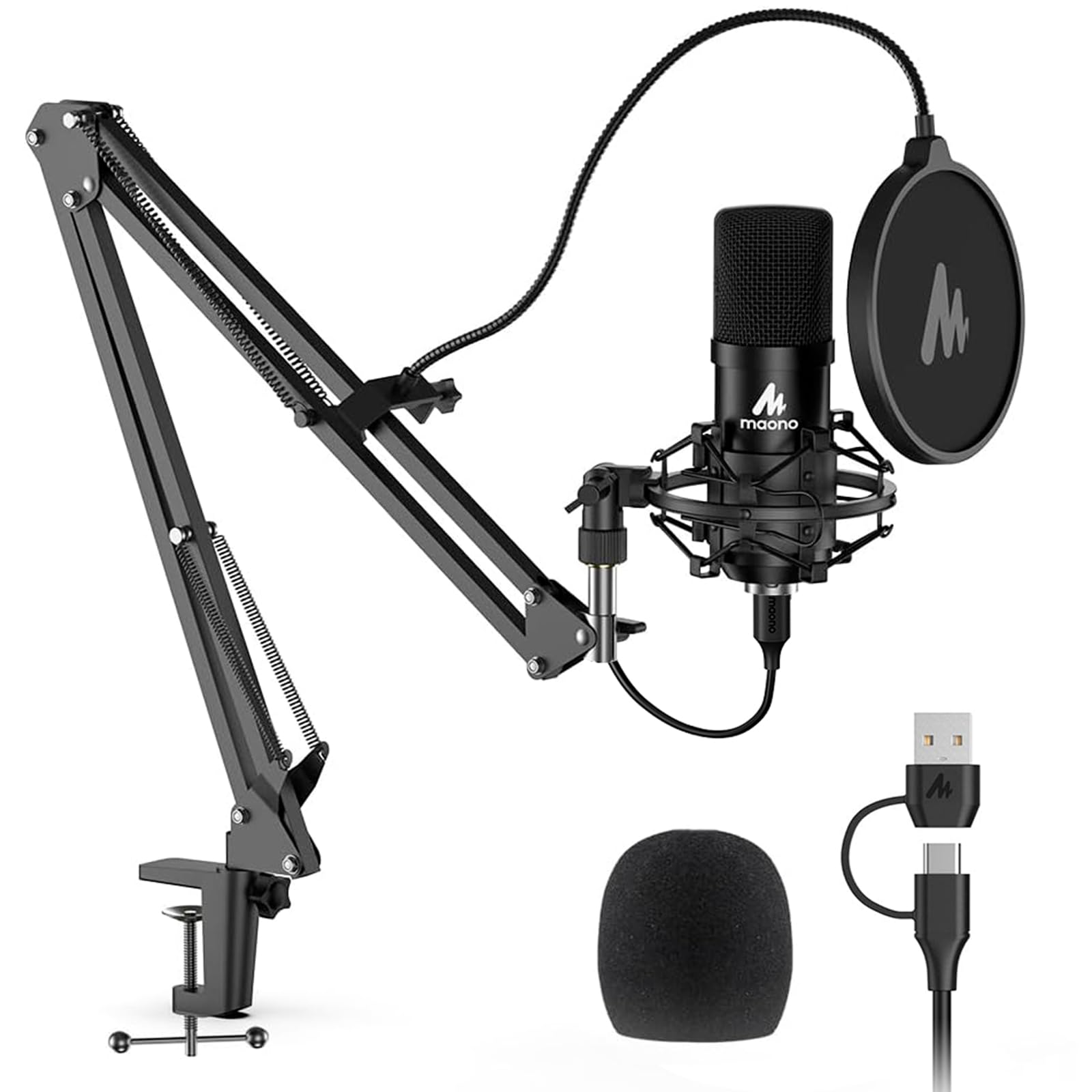
The A04 leads with a 192 kHz/24-bit converter and a 16mm condenser capsule, numbers that look good beside mics costing more. We care less about the sampling rate than about whether the kit works as a desk setup, and mostly it does: boom arm, shock mount, pop filter, windscreen, table clamp, and a USB cable that works with USB-A or USB-C. The arm takes about ten minutes to mount, and the cardioid pattern keeps the pickup aimed at your voice.

The sound is clear and crisp for a budget condenser, with enough bass response to keep a voice from sounding thin. We like it for a first podcast, a gaming channel, or a voice-over setup where the mic stays in one place. The 192 kHz/24-bit mode is a nice option if you want the headroom, but it is not the reason to choose this over the T669; the kit and the metal body are.

The A04 is a condenser, so it will hear the room. Close placement and gain discipline help, and the cardioid pattern is tighter than an omni, but it is not the set-and-forget room rejection of a dynamic. If you record near a fan or a street, the K688 is the better tool.

For a budget studio kit with a high-resolution converter, the A04 is a solid also-consider. It is not the most refined mic here, but it gets a new creator recording with a complete setup.

Pros

  • 192 kHz/24-bit converter
  • Complete kit with boom arm, shock mount, and pop filter
  • Clear cardioid sound for the money
  • Metal body

Cons

  • Clamp and arm can loosen or break
Our verdict

Consider the A04 if you want a high-resolution converter and a full mounting kit on a budget; it is a strong starter package if the mic stays in one place.

Check Latest Price
7

Calls and Meetings

JOUNIVO JV-601

89 /100
Keeper Score Excellent

Key details

Design
360° gooseneck
Controls
Mute button, LED indicator
Connectivity
USB
Polar Pattern
Omnidirectional
Check Price on Amazon

This is a meeting mic, not a studio mic. The JV-601 is a gooseneck USB microphone for calls, meetings, and quick desktop capture, with a 360-degree adjustable neck, a mute button, and an LED indicator that tells you when you are live. It plugs into Windows or macOS with no driver, and the heavy base keeps it upright on a desk. If your laptop's built-in mic makes you sound distant on Zoom, this is a cheap fix that takes about a minute to set up.

The flexible neck is the main event: it lets you put the capsule near your mouth without a boom arm, and the mute button is easy to hit mid-call. The noise-canceling claim is best treated as a helper, not a studio gate. For a private office or a quiet spare room, it is fine; for a noisy kitchen table, a cardioid dynamic will do more for you.

We like it as a meeting mic and a travel spare, not as the center of a recording setup. The mute button and LED are genuinely useful when you are jumping between calls, and the gooseneck lets you put the capsule near your mouth without a boom arm. If you want to record a podcast or a vocal, spend more on one of the cardioid condensers or the K688. If you just want to be heard clearly on calls, this is the budget answer.

Pros

  • Flexible 360-degree gooseneck
  • Mute button with LED indicator
  • Plug-and-play USB for Windows and macOS
  • Low-cost meeting mic

Cons

  • No headphone jack for monitoring
Our verdict

Buy the JV-601 if you need a cheap, flexible mic for calls and meetings and do not need studio sound; it is a meeting tool, not a recording centerpiece.

Check Latest Price

How We Tested USB Microphones at a Real Desk

We started by gathering every USB mic that promised a real step up from a laptop's built-in microphone, then narrowed the field by reading spec sheets and owner reviews for the things that change a recording: pattern options, a physical gain dial, a headphone jack, a mute control, and how the manufacturer handles software. Listings that hid their sample rate or offered no gain adjustment outside an app got cut. We weighed box contents, too — boom arm and shock mount versus a bare mic and a cable — since that changes what you're actually paying for. That left 12 microphones, which we then used for three months.

Testing happened at desks, not on a bench. Each mic recorded the same two paragraphs at arm's length and again close-up in a home office with a mechanical keyboard and a refrigerator humming through the wall, then in a carpeted bedroom where a laptop fan was the loudest thing in the room. We listened back on headphones and monitors, noting hissy S sounds, thumped P's, how much keyboard clatter bled in, and whether a voice sounded full or hollow. Then we raised the gain until room noise appeared, which is where a mic's real noise floor shows itself.

We timed setup from unboxing to first recording, driver installs and software prompts included. Every mic ran a full eight-hour workday to see whether it got warm or dropped its connection, mute buttons got pressed mid-sentence to hear what the other end of the call received, and each manufacturer's software was installed, adjusted, restarted, and reopened to see whether settings survived. For durability, we coiled and uncoiled every cable, worked every boom-arm joint loose and tight again, and carried the kit models in a backpack for a week. Headphone monitoring got the closest listen of all, since a delay you can hear while you talk makes an otherwise good mic unusable.

How to Choose a Usb Microphone

Start with the capsule and the room

A condenser capsule gives you detail and presence, which is why most USB mics here use one. It is also why they hear a fan, a keyboard, or a busy street. A dynamic capsule, like the one in the FIFINE K688, is less sensitive and more forgiving in an ordinary room, but it asks you to speak close. If your recording space is quiet and treated, a condenser rewards you; if it is noisy, choose a dynamic or plan to work close with a tight cardioid pattern.

Gain is not a substitute for placement. Turn the gain down and move the mic closer before you reach for noise-removal software.

Choose pickup patterns for what you record

Cardioid is the default for solo voice because it favors what is in front of the mic. Omni picks up the room and is useful for a group or a roundtable; bidirectional works for two people facing each other; stereo can capture an instrument or a room. The Blue Yeti is the only mic here with all four, which is why it is our default for mixed recording. If you only record yourself, cardioid is enough and you can spend less.

More patterns do not make a better solo mic; they make a more flexible one.

Decide between USB, USB/XLR, and monitoring

A USB mic is the simplest path: one cable, no interface, no driver in most cases. A USB/XLR hybrid like the K688 lets you start on USB and move to XLR when you add an interface, which is the better long-term buy if you expect to upgrade. A USB-only mic cannot plug into an XLR interface, no matter how good the capsule is. Check that before you buy.

Monitoring matters too. A headphone jack and a mix control, as on the AT2020USB+, let you hear yourself and blend in backing audio without latency.

Budget for the mount, not just the mic

A boom arm, shock mount, and pop filter turn a mic into a desk setup, and budget kits like the T669 and A04 include them. The arm and clamp are also the first parts to loosen or break. If you clamp the mic once and leave it, the included hardware is usually enough. If you move the mic constantly, plan to replace the arm rather than the mic.

A desktop stand is fine for a fixed desk; a boom arm is better for keeping the mic out of the keyboard and close to your mouth.

Controls, software, and long-term care

Onboard gain, mute, and headphone volume are worth having because they work without opening an app. Software such as Blue VO!CE or Elgato's Wave Link adds EQ, compression, and routing, but it is another thing to learn and another place for settings to drift. Choose software only if you will use it.

For long-term reliability, treat the USB connector as a wear point. Use strain relief, avoid yanking the cable, and check the port before you buy if the mic will be plugged and unplugged often.

Frequently Asked Questions

Final Verdict

The Blue Yeti remains our default because four pickup patterns and onboard controls cover more recording situations than any other mic here. If you stream and want software-driven polish, the Elgato Wave:3 MK.2 is the better fit. If you plan to move to XLR, choose the FIFINE K688. For a solo voice in a quiet room, the Audio-Technica AT2020USB+ is the one we point to for studio-style vocals. Start with the Yeti unless one of those constraints points you elsewhere.