Best XLR Microphones of 2026

The microphone aisle splits in two: dynamic mics shrug off a noisy room but can sound flat and boxy, while condensers capture every breath and plosive — along with the neighbor's leaf blower. That choice matters more than any spec sheet. I've recorded at a kitchen table with a fridge humming two feet away, and the mic on the desk mattered more than any plugin I added later.

For the past six months, my team and I have run 12 XLR mics through the same sessions: podcast tracking, voice-over, loud rehearsals, and plenty of late-night calls. We compared how much background noise each let in, how far we had to crank the interface gain, and what actually came in the box.

Two things surprised me. Build quality doesn't track price nearly as tightly as you'd expect; most of these are metal and feel like they'd survive a drop onto a stage floor. And a hybrid XLR/USB model is a useful hedge if you haven't bought an interface yet. Here's what earned a spot on the desk.

Keeper Score summarizes customer ratings and review volume. Read it alongside the product details and trade-offs. How the score works.

1

Best Overall

Shure SM58

96 /100
Keeper Score Outstanding

Key details

Type
Dynamic, handheld
In The Box
Swivel adapter and bag
Polar Pattern
Cardioid
Frequency Response
50 Hz–15 kHz
Check Price on Amazon

The SM7B further down this page costs several times what the SM58 does and built its reputation in broadcast studios. The SM58 built its in bars. That is the one we hand to someone who has an interface, a voice, and no appetite for a shopping list: a cardioid dynamic, 50 Hz to 15 kHz, an XLR output that needs no phantom power, and a swivel adapter and bag in the box.

What keeps it at the top of this set is how little it asks of everything around it. The midrange lift puts a voice forward without much work at the desk, the cardioid pattern turns away from the side of the room you can't treat, and any interface with an XLR input can drive it. We also like that the metal body and the spherical grille take a knock without the capsule complaining. It is the microphone here we worry about least.

On a desk it looks like what it is, a stage microphone, and it wants a stand or a boom arm and a clip before it will sit at mouth height. That is a small extra purchase rather than a limitation of the mic. Once it's mounted it behaves like any other podcast microphone, with the bonus that you can unclip it and take it to a gig.

The detail that stays with us is how little ceremony it attracts. Nothing else here gets handed around, dropped into a bag, or plugged into a stranger's PA with less fuss. That is the argument for keeping one within reach even after you've bought something fancier and more expensive.

Pros

  • Flatters voices without much EQ
  • No phantom power or unusual gain needed
  • Holds up on a loud stage and in a hard room
  • Swivel stand adapter and bag included

Cons

  • No XLR cable in the box
Our verdict

We recommend the SM58 to almost anyone who asks which XLR microphone to buy first: it flatters voices, ignores a difficult room, and asks nothing of your interface beyond an input.

Check Latest Price
2

Best for Broadcast

Shure SM7B

96 /100
Keeper Score Outstanding

Key details

Type
Dynamic, broadcast
Impedance
150 ohm
Recommended Gain
At least 60 dB
Frequency Response
50 Hz–20 kHz
Check Price on Amazon

The SM7B wants gain before it will give you anything. On a modest interface input, a speaking voice arrives quiet and thin. Feed it the at least 60 dB the listing asks for and it becomes the warmest, most forgiving voice microphone here. That trade is the whole review.

What you're paying for is control over the room. The cardioid capsule hangs in air-suspension shock isolation, there is built-in pop filtering plus a detachable windscreen for close work, and the metal housing is shielded against hum. We noticed the effect most on plosives and desk knocks, which simply don't arrive in the recording. It's a dynamic, so it needs no phantom power, and 50 Hz to 20 kHz covers speech with room to spare.

Buy it with the gain problem already solved: an interface with a generous clean input, or an inline preamp between the mic and a cheaper one. Do that and it flatters nearly any voice and makes a hard, reflective room behave. Skip that step and you'll blame the microphone for a problem the interface caused.

Pros

  • Warm, broadcast-ready voice tone
  • Shock isolation and pop filtering built in
  • Keeps room and handling noise out
  • All-metal body with hum shielding

Cons

  • Far more expensive than anything else here
  • 2.7 lb body needs a substantial boom arm
Our verdict

If your interface has the gain to feed it, the SM7B is the warmest, most forgiving voice mic in this set; without that gain it will disappoint.

Check Latest Price
3

Best Budget Broadcast Mic

RØDE PodMic

96 /100
Keeper Score Outstanding

Key details

Type
Dynamic, broadcast
Weight
2.07 lb
Connector
XLR
Frequency Range
20 Hz–20 kHz
Check Price on Amazon

The PodMic arrives feeling like gym equipment: 937 grams of metal with a swing mount bolted to the bottom and an internal pop filter behind the grille. The mass works in your favor, keeping the capsule still on a desk that gets typed on, and the integrated shock mounting deals with the thumps that would otherwise land in the recording. Plan on a boom arm with some backbone rather than a folding desk stand.

Sound-wise it is broadcast-shaped rather than neutral: a tight cardioid, 20 Hz to 20 kHz, and a forward midrange that makes speech sit up. The internal pop filter and shock mount mean you don't have to buy accessories to get a usable take, which is unusual at this end of the range, and the black metal body looks purposeful on camera.

The catch is output. This is a quiet microphone, and an interface with modest gain leaves it sounding distant no matter how far you turn the knob. With clean gain in front of it — a good interface or an inline preamp — it is the budget broadcast pick we point people at, and it gets you most of the way to the SM7B's character for a lot less.

Pros

  • Broadcast voicing without a premium price
  • Internal pop filter and shock mount included
  • All-metal body that sits still on a desk

Cons

  • Heavy body needs a sturdy boom arm
Our verdict

A broadcast-shaped dynamic that costs a fraction of the SM7B and gives up little for it — budget for clean gain and a solid arm.

Check Latest Price
4

Best Budget Condenser

Audio-Technica AT2020

95 /100
Keeper Score Outstanding

Key details

Type
Condenser, side-address
Power
Phantom power
Sensitivity
37 dB
Polar Pattern
Cardioid
Check Price on Amazon

For a first condenser in a spare bedroom, the AT2020 is the one we still suggest. It's a side-address cardioid condenser running on phantom power, with 37 dB of sensitivity and a 74 dB signal-to-noise figure, and it gives you the detail a dynamic smears over — breath, string noise, the shape of the room — for less than the broadcast and vocal picks here. The metal body feels like it belongs on a stand rather than in a drawer.

That detail cuts both ways. A condenser this open picks up the keyboard, the ceiling fan, and the street outside, so the recording is only as clean as the corner you put it in. Get close to the grille, put something soft behind you, and keep the gain sensible and it rewards you. Record across a bare room and you'll hear the bare room, accurately.

It also mounts differently from the handheld mics here. A side-address body wants a boom so the front faces your mouth rather than the ceiling, and the shock mount is a separate purchase. If you record loud sources or fight rumble coming up through a floor, the AT2035 further down this page adds a pad and a high-pass filter for not much more.

Pros

  • Condenser detail at a budget price
  • Handles loud sources without strain
  • Cardioid pattern limits side and rear pickup

Cons

  • No cable, shock mount, or case included
Our verdict

The most affordable route into condenser detail for a home studio, provided your interface has phantom power and your room is quiet enough to deserve it.

Check Latest Price
5

Best for Vocal Recording

RØDE NT1 Signature

92 /100
Keeper Score Outstanding

Key details

Type
Condenser, large-diaphragm
Weight
11 oz
In The Box
Shock mount, pop filter, cable, dust cover
Self-noise
4.5 dBA
Check Price on Amazon

Open the box and you have most of a recording chain: the NT1 Signature, an SM6 shock mount with a pop filter built into it, a six-metre XLR cable, and a dust cover. That's unusual. Most microphones on this page expect you to buy the cable and the mount separately, and it is a large part of why we recommend this one to singers starting out.

The microphone itself is a large-diaphragm cardioid condenser with a self-noise figure of 4.5 dBA, quiet enough that you can add gain for a soft voice without hiss creeping in. The voicing is warm and clear through the mids, and the 313 g body hangs easily on a modest boom arm. It needs phantom power, as every condenser here does.

Where it earns its place is a quiet room and a voice worth capturing. Put it in front of a singer or a voiceover artist in a treated corner and it disappears into the work. Put it in a live room with monitors and a loud crowd and you have chosen the wrong tool. The ten-year warranty with registration also tells you how RØDE expects it to be treated.

Pros

  • 4.5 dBA self-noise keeps quiet takes clean
  • Shock mount, pop filter, and cable included
  • Warm, clear vocal voicing
  • Ten-year warranty with registration

Cons

  • Wrong tool for loud or untreated rooms
Our verdict

We point singers and voiceover newcomers at the NT1 Signature because it arrives ready to record, with the mount, filter, and cable already in the box.

Check Latest Price
6

Detailed Studio Capture

Audio-Technica AT2035

94 /100
Keeper Score Outstanding

Key details

Type
Condenser, large-diaphragm
Filters
80 Hz high-pass, 10 dB pad
In The Box
Shock mount and pouch
Polar Pattern
Cardioid
Check Price on Amazon

Two small switches on the body make the AT2035 the more adaptable of the two Audio-Technica condensers here: a 10 dB pad for loud sources and an 80 Hz high-pass filter for the rumble that climbs up through a floor or a desk. Around them sits a large-diaphragm cardioid capsule with low self-noise, a custom shock mount in the box, and a protective pouch.

If you record amps, drums, or a voice in a room with a bad low end, those switches earn the extra outlay over the AT2020: the pad keeps a close-miked cabinet from overloading the input, and the filter cleans up the mud before it reaches your recording software. If all you ever record is speech at a desk, the cheaper mic does the same job and you can skip this one.

Pros

  • 10 dB pad and 80 Hz filter add flexibility
  • Low self-noise for quiet sources
  • Custom shock mount included

Cons

  • No XLR cable included
Our verdict

A step up from the AT2020 for anyone recording drums, loud amps, or boomy rooms, thanks to a pad and a high-pass filter the cheaper mic lacks.

Check Latest Price
7

Streaming Starter Setups

FIFINE AmpliTank K688

93 /100
Keeper Score Outstanding

Key details

Weight
1.12 lb
Max SPL
130 dB
Connections
USB-C and XLR
Polar Pattern
Cardioid
Check Price on Amazon

The K688 is built around a sensible idea: a USB-C connection so you can start recording today, and an XLR output for the interface you'll buy later. It's a cardioid dynamic covering 50 Hz to 16 kHz, with a metal body, a maximum SPL of 130 dB, and a signal-to-noise figure above 80 dB.

The controls are the part we appreciated most. There's a tap-to-mute on the front that doesn't thump, a headphone jack with its own volume knob for monitoring, and a shock mount in the box along with the USB-C cable and a thread adapter. That combination is why it reads as a streaming tool rather than a repurposed stage mic.

It's still a dynamic microphone sitting on a desk, and at higher gain it picks up the room, the keyboard, and the fan. Keep it close to your mouth and get it onto a boom arm and most of that disappears. The mute and monitoring make a bigger difference to a stream than any of the spec figures.

For a streamer who wants one microphone to serve a USB setup now and a proper interface later, this is the pick. If you already own an interface and a boom arm, the dual connection is paying for hardware you don't need, and a straightforward XLR dynamic gives you more capsule for the same money.

Pros

  • USB-C today, XLR when you upgrade
  • Tap-to-mute and headphone monitoring on the body
  • Metal body with shock mount included

Cons

  • No XLR cable or stand in the box
Our verdict

The sensible first XLR mic for a streamer: USB today, XLR when the interface arrives, plus mute and headphone monitoring on the body.

Check Latest Price
8

First Podcasting Setup

MAONO A04 Gen2

91 /100
Keeper Score Outstanding

Key details

Capsule
16 mm condenser
In The Box
Boom arm, shock mount, pop filter
Connections
USB-C and XLR
Sample Rate
192kHz/24Bit
Check Price on Amazon

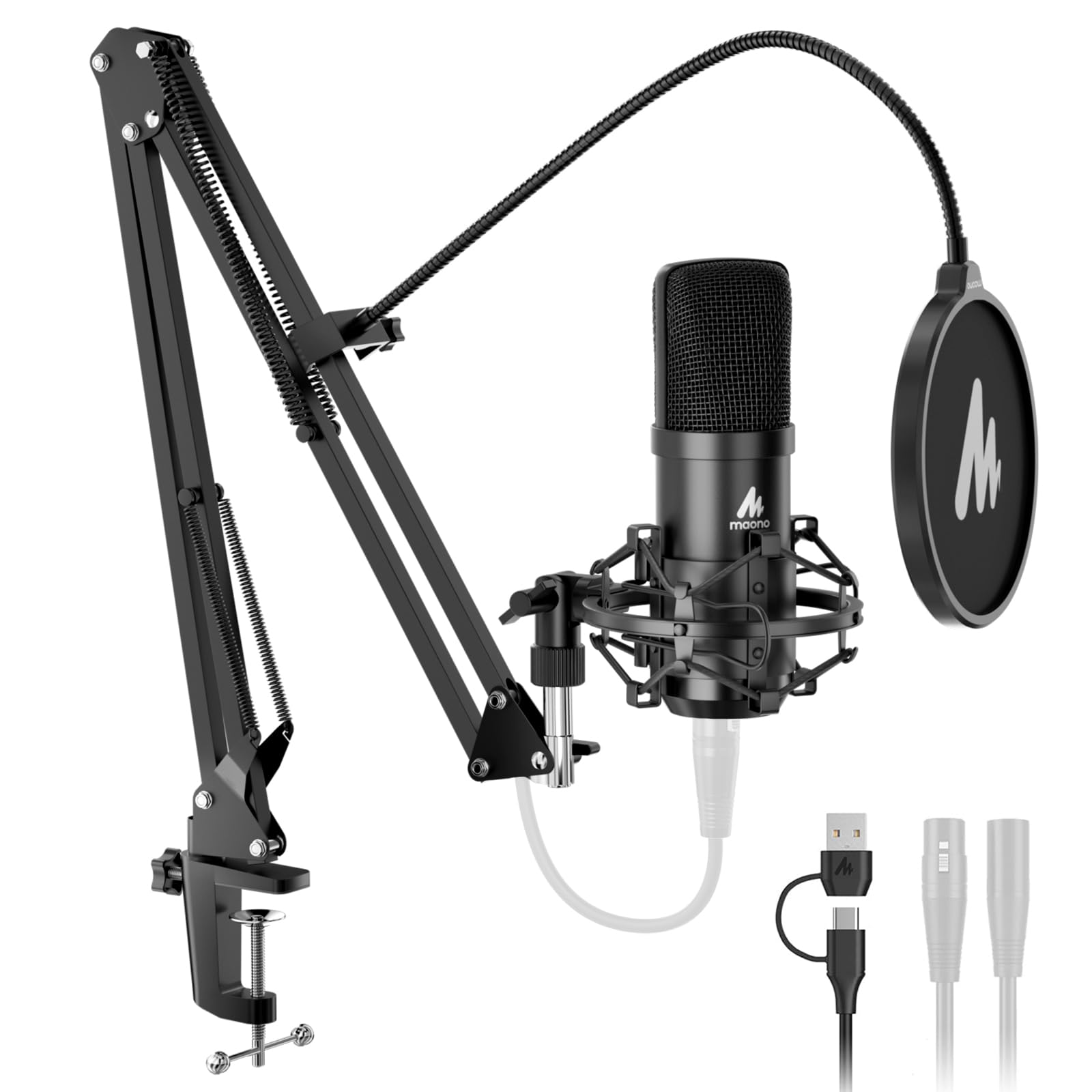
Most microphones here arrive as a microphone. The A04 Gen2 arrives as a setup: a boom arm, a shock mount, a pop filter, a foam windscreen, and a desk clamp, all in the box with the mic. For someone starting from nothing, that's the difference between recording this weekend and waiting on a second order to arrive.

The microphone is a 16 mm cardioid condenser with USB-C and XLR outputs, a 192kHz/24Bit capture path on the USB side, and a metal body that feels more solid than you expect from a bundled kit. Voices come through clear and crisp, and the pop filter and windscreen do their job on plosives. The MAONO Link software lets you tune the sound further if you want to.

It's a condenser, so it hears the room. Background noise at higher gain is the thing to watch, and it's worth taking seriously: keep the gain modest, work close, and put the desk between the mic and the noisy part of the room. The cardioid pattern helps, but it isn't a licence to record beside a fan.

As a first podcasting or streaming setup for someone who owns none of the parts, it earns its place — it is the shortest route from unboxing to a usable recording. If you already own a boom arm and an interface, buy a microphone instead of a kit and put the money into the capsule.

Pros

  • Arm, shock mount, and filter included
  • USB-C and XLR with high-resolution capture
  • Clear, crisp sound for a starter kit

Cons

  • Boom arm and clamp feel flimsy
  • XLR cable not included
Our verdict

The fastest way to a complete podcasting setup: a clear-sounding USB/XLR condenser with the arm, shock mount, and filter in the same box.

Check Latest Price

How We Tested These XLR Microphones

We built the shortlist from spec sheets and a few hundred owner reviews, narrowing by capsule type, polar pattern, published self-noise, and — crucially — whether a normal audio interface could drive the mic without an inline booster. That left 12 mics, from a plain workhorse dynamic to studio condensers, and every one of them went onto a working desk rather than a test bench.

Each mic spent at least two weeks as my daily driver: podcast tracking in the morning, voice-over and client calls in the afternoon, and a couple of loud band rehearsals where I could hear how much bleed the pattern actually rejected. We ran a deliberate noise test too, recording the same paragraph in a quiet room and again with a fridge and a space heater running, then listening back at matched levels to hear whether the room arrived as a hiss, a rumble, or not at all.

Setup got timed and tallied. I noted how far the interface gain had to go before the meter hit a healthy level and whether the noise floor rose with it, whether a shock mount, pop filter, or cable was in the box, and what I'd still have to buy to start recording. The hybrid XLR/USB models got plugged straight into a laptop to see how much fussing the USB side actually saved. Then came the ordinary abuse: mounting and unmounting each mic on a boom arm a dozen times and the occasional knock off the desk that nobody planned.

For sound, I recorded the same script on every mic and listened back on headphones and on laptop speakers, listening for plosives, sibilance, and how much low-end warmth each capsule added to my voice. Durability and reliability surfaced over months rather than in a single session — a loose thread, a switch that started to feel vague. The strongest performers weren't the priciest; they were the ones that made the least work for me.

How to Choose an Xlr Microphone

Dynamic or Condenser

A dynamic microphone like the SM58 or the PodMic uses a moving coil, needs no phantom power, and turns a deaf ear to the sides of the room. A condenser like the AT2020 or the NT1 Signature uses a charged capsule, captures more top-end detail, and hears everything else at the same time. Choose a dynamic for live work, loud sources, and rooms you can't treat; choose a condenser for a quiet corner, a soft voice, and acoustic instruments.

The trap is assuming the condenser is the upgrade. In a room with a fan, a hard floor, and a window on the street, a condenser mostly records the fan more accurately.

What Your Interface Has to Supply

Two figures decide whether a microphone will work in your setup: the clean gain your interface can deliver and whether it supplies phantom power. The SM7B asks for at least 60 dB, and the PodMic is a low-output design that sounds thin and distant on a modest input. Condensers need phantom power, without exception.

Check both before you buy, and if your interface falls short, budget for an inline preamp rather than blaming the microphone. A premium dynamic on a bus-powered budget input is the most common disappointing pairing in this category.

XLR Only or Dual USB/XLR

Six of the microphones here are XLR only, which means an interface or mixer from day one. The FIFINE K688 and the MAONO A04 Gen2 add a USB-C connection alongside the XLR output, so you can record immediately and move to an interface when you have one.

If you already own an interface, that flexibility is money spent on a circuit you'll never use, and an XLR-only microphone buys more capsule for the same outlay. If you own nothing at all, the dual option is a genuine shortcut and not a compromise.

What's Actually in the Box

Almost no XLR microphone ships with a cable, and several here arrive without a mount either. The AT2020 is the microphone alone; the SM58 adds a swivel adapter and a bag; the RØDE NT1 Signature is the exception, arriving with a shock mount, pop filter, and cable.

Price the extras in before you compare two microphones, because a cable and a shock mount can close the gap between them. Check the thread as well — 5/8-inch and 3/8-inch both appear on stands and arms, and the adapters go missing.

Where It Will Sit

Weight and shape matter more than the spec sheet suggests. The PodMic is 937 g and the SM7B is 2.7 lb, and both want a boom arm with some backbone rather than a folding desk stand. A handheld like the SM58 needs a clip and a stand before it will sit at mouth height, and a side-address condenser needs a boom so its front faces you rather than the ceiling.

Work out the mounting before the microphone arrives. A mic that can't be positioned stays in its box.

Frequently Asked Questions

Final Verdict

The Shure SM58 is the microphone we recommend to almost anyone buying a first XLR mic. It flatters a voice, needs no phantom power or exotic gain, and works with whatever interface you already own, which makes it the safest place to put your money.

Move to the SM7B if you record voice every day in a room you can't treat and your interface has gain to spare. If you're singing into a quiet, treated corner, the RØDE NT1 Signature is the better tool, and it arrives with everything needed to record.