Best PC Cases of 2026

Every case looks good in a product render. The one that matters is the one sitting under your desk six months later, with a dust filter you keep forgetting to clean and a side panel you've had off four times. I've rebuilt my own system more times than I'd like to admit, and the cases that earn their keep are the ones where the graphics card slides in without a fight and the cables vanish behind the tray.

Over the past eight months, my team and I built full systems in 12 cases, from compact mid-towers to a full tower that barely cleared the desk. We moved the same parts between them — the same long graphics card, the same 360mm radiator, the same nest of cables — because that's the only honest way to compare clearance and airflow.

What separates them rarely shows up on a spec sheet. Glass looks stunning until you realize it holds heat and shows every fingerprint, and pre-installed fans are a real convenience until you hear them at load. The picks below are the ones we'd happily build in a second time.

Keeper Score summarizes customer ratings and review volume. Read it alongside the product details and trade-offs. How the score works.

1

Best Overall

Lian Li V100RX

94 /100
Keeper Score Outstanding

Key details

GPU Clearance
Up to 420 mm
Included Fans
4 x 120 mm ARGB PWM
Radiator Support
Up to 360 mm top
Motherboard Support
ATX, Micro-ATX, Mini-ITX
Check Price on Amazon

The V100RX is the case we recommend first because it puts the money where a build actually needs it: four PWM ARGB fans, 420 mm of GPU clearance, and a 360 mm top radiator mount in a mid-tower that still feels affordable. We like that the fans are daisy-chainable and the side panels are tool-less, so the first build and the later upgrade are both less fussy.

The glass front and side make the hardware the focal point, and the 26-LED ARGB strip adds light without needing a separate accessory. It is a showpiece, but not a fragile one: the steel chassis and tempered glass feel appropriate for the price, and the dust filter is a practical touch rather than a spec-sheet extra.

Clearance is the real reason it works as a default. The 420 mm GPU figure covers long cards, the 178 mm cooler height handles big air coolers, and the 360 mm top mount is enough for most AIOs. A 420 mm radiator is not on the menu, so if you are planning an extreme cooling loop, the Antec Flux Pro is the better fit.

The case is 8.2 kg before you add parts, so it is not the one to carry to a LAN party every week. For a stationary ATX build, though, the V100RX is the easiest yes on this list.

Pros

  • Four PWM ARGB fans included
  • Fits 420 mm GPUs and 360 mm radiators
  • Tool-less side panels simplify access
  • Back-connect motherboard support

Cons

  • One-year warranty is short
Our verdict

We recommend the V100RX as the default ATX case here because it pairs four ARGB fans, 420 mm GPU clearance, and tool-less panels with the fewest compromises.

Check Latest Price
2

Best Mainstream Airflow

Corsair 4000D RS ARGB

92 /100
Keeper Score Outstanding

Key details

Dimensions
19.17 x 9.41 x 19.13 in
Included Fans
3 x RS ARGB PWM
Radiator Support
Dual 360 mm
Motherboard Support
ATX, Micro-ATX, Mini-ITX
Check Price on Amazon

The 4000D RS ARGB is built around Corsair's FRAME system: the motherboard tray, side panel, and fan rails are meant to be swapped or moved rather than fixed for good. The InfiniRail mounts are the detail that makes it more than another mesh box, because you can slide the front and roof fan positions instead of fighting pre-drilled holes.

What we like is the balance: three RS ARGB PWM fans come installed, the front panel uses a 3D Y-pattern for low restriction, and the case supports two 360 mm radiators. That is the package we point to for a mainstream airflow build that may grow later.

The case is easy to open for a filter clean, and the front I/O is practical rather than flashy. It makes a clean, airy build without asking for a full-tower footprint, and the removable side panel near the motherboard tray doubles as a cable cover or a fan mount depending on how you set it up.

If you want a case that can be reconfigured as your build changes, this is the one we recommend; if you want the most solid-feeling panels here, the Antec Flux Pro is a step up.

Pros

  • Three RS ARGB PWM fans included
  • InfiniRail fan mounting
  • Supports dual 360 mm radiators
  • Modular FRAME system

Cons

  • Panel rigidity feels lighter than expected
Our verdict

We recommend the 4000D RS ARGB for mainstream airflow builds that may change later, thanks to its modular frame and three included fans.

Check Latest Price
3

Best Compact Value

NZXT H5 Flow

91 /100
Keeper Score Outstanding

Key details

USB Ports
2 x USB 3.0, 2 x USB 2.0
Included Fans
2 x 120 mm
Radiator Support
360 mm front, 240 mm top
Motherboard Support
ATX, Micro-ATX
Check Price on Amazon

The H5 Flow is a compact ATX mid-tower with two 120 mm Quiet Airflow fans, a 360 mm front radiator mount, and mesh on the top, front, and side. It is aimed at first builds and small desks, and it keeps the price low by including only the fans you need to get started.

We think that is the right trade-off for most first builds. The ultra-fine mesh filters dust, the front panel is open enough for air, and the two included fans are enough to get a midrange system running. You are not paying for a light show or a control hub, and that is exactly why the value holds up.

The perforated PSU shroud is a neat idea: it lets two 120 mm fans feed the GPU from below, but those fans are not included, so the benefit only arrives if you add them. The rest of the layout is straightforward, with wide channels and hooks for the main cables.

For a compact air-cooled build, the H5 Flow is easy to recommend. If you need more show or more cable room, the O11 Vision Compact is the upgrade; if you need a full-tower, the Flux Pro is the other direction.

Pros

  • Two 120 mm Quiet Airflow fans included
  • 360 mm front radiator support
  • Fine mesh filters dust on three sides

Cons

  • Rear cable channel is tight
Our verdict

For a compact first build, we think the H5 Flow is the smart spend: two fans, 360 mm front radiator room, and mesh where it matters.

Check Latest Price
4

Best Glass Showcase

Lian Li O11 Vision Compact

93 /100
Keeper Score Outstanding

Key details

Dimensions
17.6 x 11.3 x 17.57 in
Glass Panels
Front, top, left side
Radiator Support
360 mm top
Motherboard Support
E-ATX, ATX, Micro-ATX, Mini-ITX
Check Price on Amazon

Three glass panels are the whole point of the O11 Vision Compact, and they are executed with more care than most show cases: the front, top, and left side are tempered glass, and the included top mesh panel lets you swap the roof for a 360 mm AIO when cooling matters more than the view. We think it is the best-looking case in this group, and the hidden AIO tube routing is the detail that keeps it clean.

The dual-chamber layout puts the power supply and cables behind the motherboard, and the back-connect support means you can build without a thick cable bundle crossing the glass. The tool-free panels come off quickly, which makes the first assembly and later cleaning less of a chore.

The glass top also means you need to think about exhaust: fit the mesh panel and a 360 AIO if you are running a hot CPU, or rely on the side and bottom fans for a simpler air build. The case is wide enough for large GPUs and multiple radiators, but the glass is the defining feature, not a fallback.

For a build that is meant to be looked at, the O11 Vision Compact is the one we recommend. If you need a case you can move easily or you want a simpler mesh box, the V100RX and H5 Flow make more sense.

Pros

  • Three-panel tempered glass
  • Hidden AIO tube routing
  • Back-connect motherboard support
  • Tool-free panel access

Cons

  • Heavy at 26.4 pounds
Our verdict

We think the O11 Vision Compact is the glass showcase to beat here, provided you want the view more than a simple budget build.

Check Latest Price
5

Best Full-Tower Build

Antec Flux Pro

91 /100
Keeper Score Outstanding

Key details

Case Type
Full tower
Included Fans
6 PWM
Radiator Support
420 mm + 360 mm
Motherboard Support
E-ATX, ATX, Micro-ATX, ITX
Check Price on Amazon

The Flux Pro is the case that looks least like a computer: the walnut front, metal frame, and glass side give it a furniture-like presence that most mesh towers cannot match. It is a full tower, though, and it makes no attempt to hide that.

Inside, the space is the point. It supports E-ATX boards, a 420 mm radiator plus a 360 mm radiator at the same time, and up to 12 fans. Six PWM fans come installed, the PSU mounts at a 90-degree angle, and the CPU/GPU temperature display is a genuinely useful extra rather than a gimmick.

We recommend it for a high-end build that needs room and does not need to move. The removable cooling brackets make a big radiator install less painful, and the cable management loops are already in place. The 90-degree PSU mount also keeps the power supply and its cables out of the main airflow path.

If you are building a standard ATX gaming PC, the V100RX is easier to live with and easier on the budget. The Flux Pro earns its place when the build is large, hot, and meant to stay put.

Pros

  • Six PWM fans included
  • 420 mm + 360 mm radiator support
  • Walnut front looks like furniture
  • CPU/GPU temperature display

Cons

  • Huge 29-pound full tower
Our verdict

We recommend the Flux Pro for E-ATX and 420 mm radiator builds, where its size, six fans, and furniture-grade front finally make sense.

Check Latest Price
6

Best RGB Dual-Chamber

NZXT H9 Flow RGB+

91 /100
Keeper Score Outstanding

Key details

USB Ports
2 x USB 3.0
Fan Capacity
10 fans
Included Cooling
RGB fans and control hub
Motherboard Support
ATX, E-ATX
Check Price on Amazon

The H9 Flow RGB+ is the closest thing here to a plug-and-play light show: the RGB fans and control hub are already installed, the glass wraps around the main chamber, and the dual-chamber layout keeps the power supply and drives out of view.

The airflow design is more thoughtful than the glass suggests. Perforated steel panels and angled front-right fans feed the main chamber, and the case supports up to nine 140 mm fans plus one 120 mm rear fan. That is a lot of cooling capacity for a mid-tower.

We like that the RGB is synced from day one, because it saves the usual hunt for a hub and a pile of adapters. The control hub keeps the fan wiring in one place, which makes the back chamber easier to close, and the wraparound glass gives the build a clean, continuous look.

For a premium dual-chamber build where the lighting is part of the plan, the H9 Flow RGB+ is easy to recommend. If you want the same show without the software layer, the O11 Vision Compact is the cleaner choice.

Pros

  • Pre-installed RGB fans and control hub
  • Dual-chamber cable management
  • Ten-fan capacity
  • Wraparound tempered glass

Cons

  • Requires NZXT CAM for lighting
  • Premium price for the RGB package
Our verdict

We like the H9 Flow RGB+ for a dual-chamber build where synced RGB out of the box is the priority and the fan setup should be ready on day one.

Check Latest Price
7

Best Statement Case

HYTE Y70 Touch Infinite

92 /100
Keeper Score Outstanding

Key details

Display
14.9 in 2.5K touchscreen
Fan Capacity
10 fans
Included Riser
PCIe 4.0 x 16
Motherboard Support
ATX
Check Price on Amazon

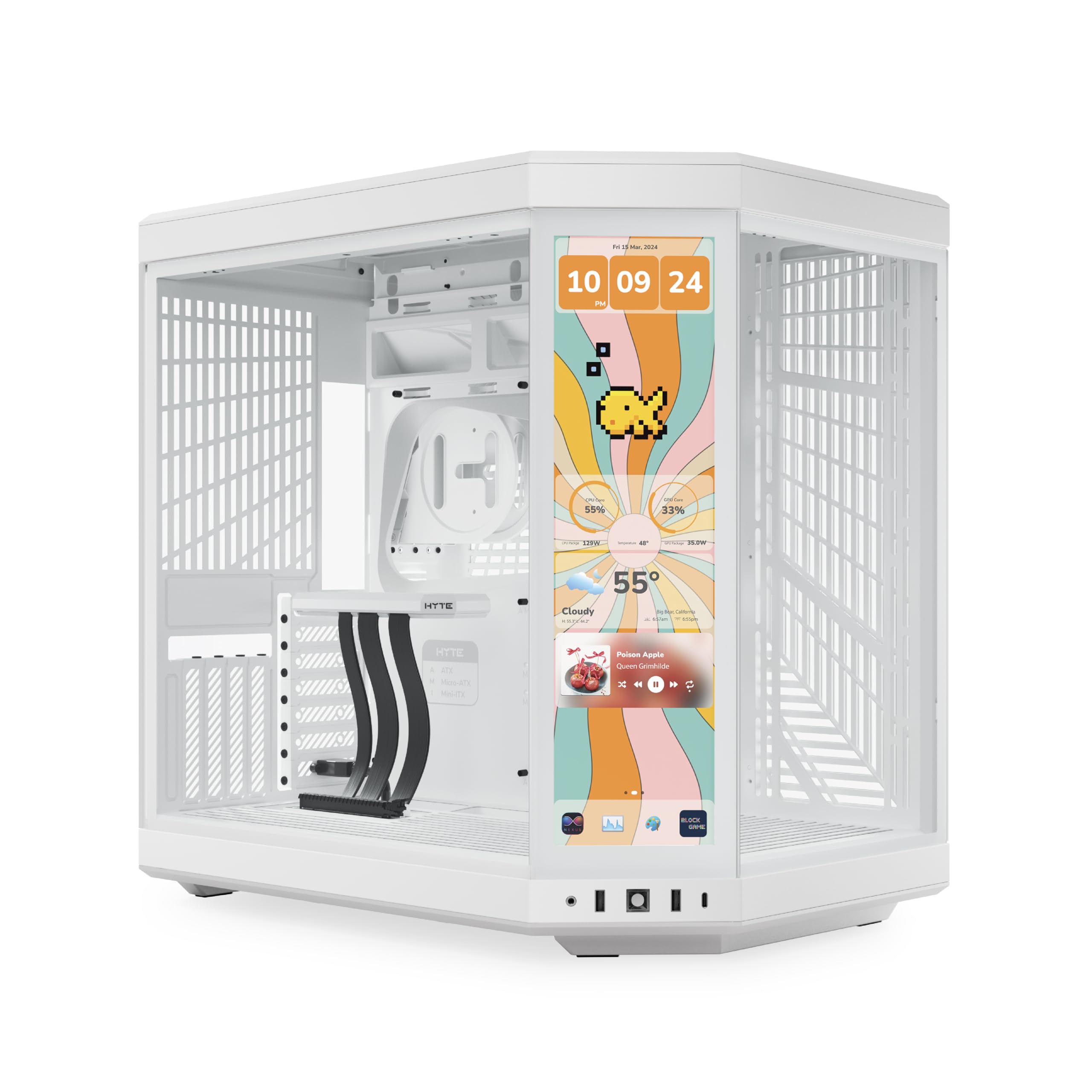
The Y70 Touch Infinite is less a case than a display piece: a 14.9-inch 2.5K touchscreen is built into the front corner, with 10-point multi-touch and a 60 Hz panel that is 43% brighter than the previous generation. If that sounds like overkill, it probably is—but it is also the reason this case exists.

The rest of the hardware is serious. The dual-chamber interior has three-piece panoramic glass, a four-slot vertical GPU mount with an included PCIe 4.0 x 16 riser, and room for a 360 mm radiator on the side and another on top. The case supports up to 10 fans.

Building in it is a big-case job: there is plenty of room for cables and large graphics cards, but the footprint is wide and the glass is everywhere. This is not the case you tuck under a desk and forget about.

We think the Y70 Touch Infinite earns its price only if the touchscreen and vertical GPU display are the reason you are building. If you just want a glass showcase with strong airflow, the O11 Vision Compact does the same job for less.

Pros

  • 14.9-inch 2.5K touchscreen
  • Vertical GPU with PCIe 4.0 riser
  • 360 mm side and top radiators
  • 10-fan capacity

Cons

  • Fans are not included
  • Large 24.4-pound footprint
Our verdict

We think the Y70 Touch Infinite earns its price only if the touchscreen and vertical GPU display are the reason you are building.

Check Latest Price
8

Budget RGB Builds

MUSETEX K2

91 /100
Keeper Score Outstanding

Key details

GPU Clearance
Up to 400 mm
Included Fans
7 PWM ARGB
Radiator Support
Up to 360 mm
Motherboard Support
ATX, Micro-ATX, Mini-ITX
Check Price on Amazon

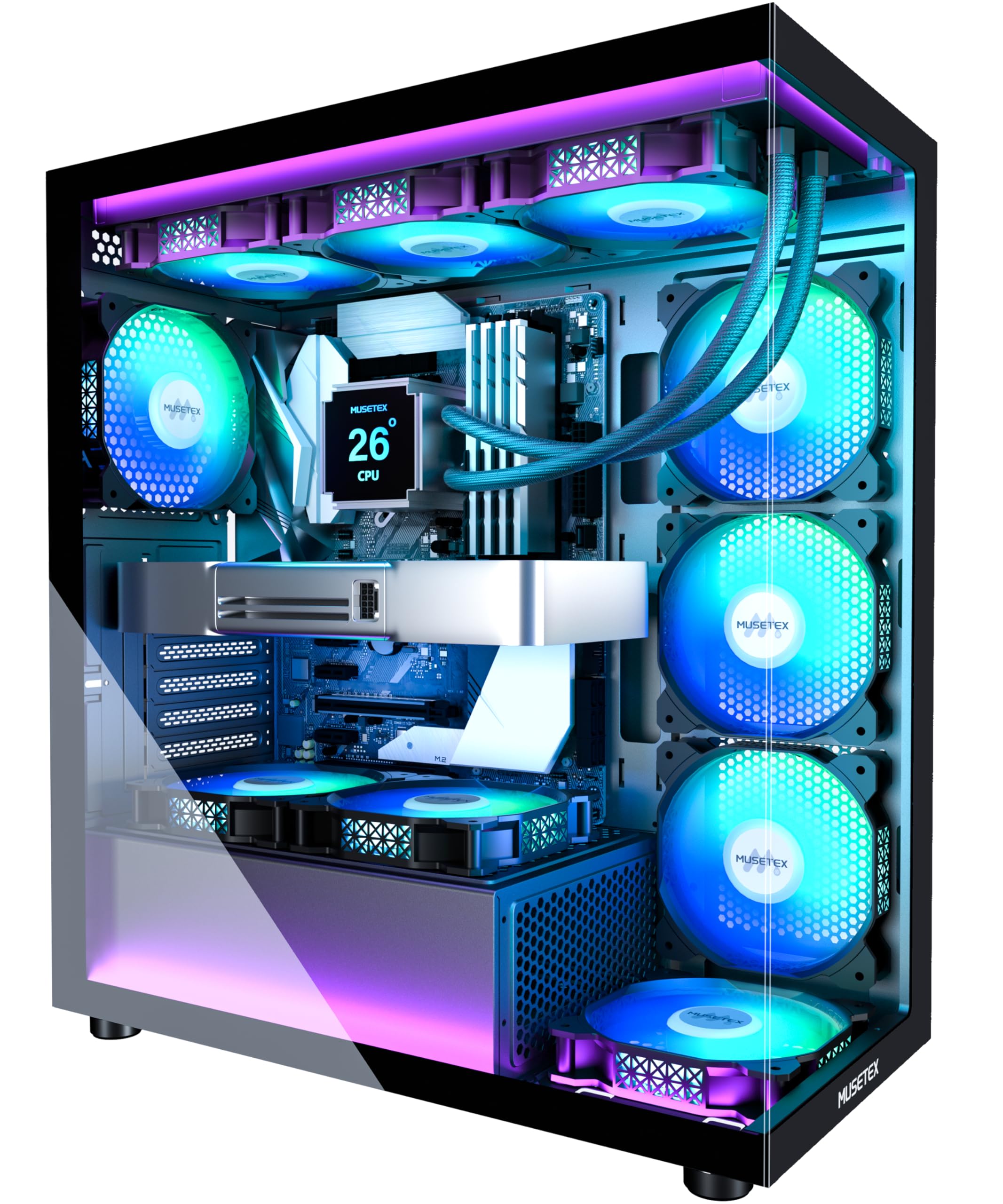
The K2's pitch is simple: seven PWM ARGB fans, a Type-C front port, and two tempered-glass panels for less than many bare chassis. That is a lot of hardware in the box, and it is the reason this case keeps showing up in budget build lists.

Clearance is reasonable for the money. It fits GPUs up to 400 mm, CPU coolers up to 165 mm, and a 360 mm radiator. The power supply is the part to watch: with the hard-drive holder in place you are limited to a 140 mm unit, and without it you can go to 150–180 mm.

The rear cable channel has Velcro straps and enough room for a normal build, but it is not generous. If you use stiff custom cables or a lot of RGB controllers, the back panel gets crowded in a hurry.

We recommend the K2 for a budget RGB build that fits those limits, not for a premium feel. If you want a case to keep for a decade, spend more.

Pros

  • Seven PWM ARGB fans included
  • Type-C front port
  • Fits 400 mm GPUs
  • Tempered glass on two sides

Cons

  • Build quality is mixed, especially screws
Our verdict

We recommend the K2 for budget RGB builds that fit its 400 mm GPU and 165 mm cooler limits, not for a premium feel.

Check Latest Price
9

Cheap Mesh Builds

DARKROCK EC2

86 /100
Keeper Score Excellent

Key details

Fan Capacity
Up to 8 x 120 mm
GPU Clearance
Up to 340 mm
Included Fans
1 x 120 mm
Motherboard Support
ATX, Micro-ATX, Mini-ITX
Check Price on Amazon

At the bottom of the price scale, the EC2 gets the basics right: a mesh front panel, a tempered-glass side, a Type-C-ready front panel, and mounting for up to eight 120 mm fans. It is a simple, clean box rather than a showpiece.

The mesh front is the right call at this price: it feeds air without a glass panel in the way, and the magnetic dust filters on the top and bottom make cleaning less of a project. The door-style side access is also handy when you need to get inside quickly.

Clearance is tighter than the mid-tower norm, and the front radiator mount is the one to measure carefully before you buy. A 360 mm AIO can be a tight or failed fit depending on the hardware.

Cable management is workable but not generous. The rear channel has room for a normal build, yet the pass-through openings are small and there is no opening above the motherboard, so a clean build takes more planning.

We see the EC2 as a fair budget starting point for a mesh-front build with a mid-length GPU and an air cooler. It is not the case we recommend for a 360 mm radiator or a premium-feeling build.

Pros

  • Mesh front and glass side
  • Type-C-ready front panel
  • Eight 120 mm fan mounts

Cons

  • Only one fan included
  • 340 mm GPU limit
Our verdict

We see the EC2 as a fair budget starting point for a mesh-front build with modest parts, but not as a long-term showcase.

Check Latest Price

How We Tested PC Cases

We started with research: listing every case in the mid-to-upper price range that could take a 360mm radiator up top or in front, offered front-panel USB-C, and claimed room for a full-length graphics card. Anything that couldn't clear those bars was dropped, which left 12 cases to build in.

Each one got a complete build on my kitchen table over a weekend, then moved under a desk as someone's daily machine for at least a few weeks. We timed how long each side panel took to remove and noted whether it needed a screwdriver. The same long graphics card went into every case so we could see exactly how much room was left between its end and the front fans, and the same 360mm radiator went up top wherever it fit.

Cable management got the honest test. We routed the 24-pin, the GPU leads, and a fat bundle of fan and RGB cables behind the tray, then closed the panel without pushing. Where a case supported a back-connect motherboard, we built that way and noted how painless the swap was. For airflow, we logged CPU and GPU temperatures through hour-long load runs, then sat beside each build and listened to the fans at idle and under load.

Build quality came down to touch: whether the tempered glass seated flush, whether panels buzzed at idle, how the screw threads felt after the third teardown, and whether any edge drew blood. We pulled every dust filter out twice and judged it on how easily it went back in. We also lived with the built-in fan hubs and temperature displays long enough to know whether we'd actually use them.

How to Choose a Pc Case

Match the case to your motherboard and desk

An ATX mid-tower is the safe default for most gaming and work builds, with enough room for a long GPU and a front or top radiator. A full tower only earns its footprint when you need E-ATX, a 420 mm radiator, or a lot of drives. A compact case can still be deeper than the name suggests, so measure the desk or floor spot before ordering.

Check clearance before you fall for the glass

The number that matters is not the case's outside size but what it accepts inside: GPU length, CPU-cooler height, radiator thickness plus fan depth, and PSU length. A 360 mm radiator mount is not a guarantee if the top is shallow or the motherboard has tall heatsinks. Compare those figures with your parts list, and leave a little slack for cables and fittings.

Decide how much airflow you actually need

For an air-cooled build, a mesh front with two or three fans is usually enough, and the V100RX's four-fan bundle is more than most systems need. Glass-front showpieces can work well, but they depend on side or bottom intake and a sensible fan curve. If you plan a big radiator, check that the case supports the fan size and thickness, not just the radiator length.

Look for build-friendly details

Tool-less panels, a removable top bracket, wide cable channels, and Velcro straps save more time than a long feature list. A removable top bracket makes a 360 mm AIO far less frustrating, and a motherboard cutout lets you swap a cooler without pulling the board. These details are easy to overlook in photos, so check the build guide or the case's own diagrams before buying.

Budget for the whole case, not just the box

A cheap case with one fan and no hub can cost more than a midrange case with four fans once you add airflow. Factor in fans, a hub or splitters, and the cost of replacement stock fans if you want quiet. Warranty length also varies from one to three years, which is worth noticing on a case you plan to keep.

Frequently Asked Questions

Final Verdict

The Lian Li V100RX is the case we recommend first for most ATX builds. It gives you four ARGB fans, 420 mm GPU clearance, a 360 mm top radiator mount, and tool-less panels without charging a premium.

If your priority is a smaller footprint, the NZXT H5 Flow is the better fit; if you want a glass display, the O11 Vision Compact is the one to look at. Start with the V100RX unless one of those needs clearly applies.