Best Keyboards of 2026

Under every keycap sits either a rubber dome or a mechanical switch, and that one piece of hardware decides almost everything else — how the keys feel under your fingers, how loud the board is on a call, whether you can change the feel later or you're stuck with it. Since your hands spend more hours on a keyboard than on almost anything else you own, the wrong one shows up as wrist ache by mid-afternoon, keys that miss when you type fast, and a roommate or coworker who can hear every word you write.

My team and I have spent the past eight months typing on 14 keyboards — full-size, tenkeyless, 75%, split, membrane, mechanical — running them through ordinary workdays rather than a bench test. We paid attention to the things that only surface after a week: whether the sound wears on you, whether the Bluetooth connection holds when you walk to the kitchen, and whether the thing you're paying extra for is actually the thing you'll notice. Some of the best-feeling boards we tried cost less than a nice dinner; a couple of expensive ones got returned to the closet.

The one feature worth understanding before you shop is hot-swappable switches. On those boards you can pull a key and swap the switch underneath without a soldering iron, which turns feel and noise into something you can change later instead of a decision you have to get right the first time. The picks below cover the whole spread, from a $20 office workhorse to boards built for all-day ergonomics.

Keeper Score summarizes customer ratings and review volume. Read it alongside the product details and trade-offs. How the score works.

1

Best Overall

SteelSeries Apex 3

93 /100
Keeper Score Outstanding

Key details

Key Count
104
Connection
Wired USB
Switch Type
Whisper Quiet
Water Resistance
IP32
Check Price on Amazon

The Apex 3 is the keyboard we point most people to, and the reason is a sound: the whisper-quiet switches land with a soft thud instead of a clack, so a shared office, a bedroom desk, or a late-night session doesn't announce every sentence. SteelSeries rates them for 20 million presses, and the board is heavy enough at 1.27 kilograms to stay planted when you type hard.

It's a full-size 104-key layout with a dedicated volume roller and media controls, which matters more than it sounds when you're muting a call ten times a day. The magnetic wrist rest snaps off for cleaning, the top panel carries an IP32 rating so a knocked-over glass is a wipe rather than a replacement, and the USB connection means no charging, no pairing, and no dropouts. It also works with an Xbox or a PlayStation, which helps if the desk doubles as a console station.

The lighting is the weakest part. Ten RGB zones look good in photos, but at full brightness the number row still sits in shadow, so late-night number-crunching runs on muscle memory. Everything else about this board is aimed at the hours you don't think about it, which is exactly what we want from the one keyboard on a desk.

Pros

  • Near-silent keys suit shared rooms
  • Magnetic wrist rest for long sessions
  • IP32 spill resistance handles desk accidents
  • Full-size layout with a volume roller

Cons

  • Wired USB only, with no wireless option
  • Gaming styling looks out of place in some offices
Our verdict

We recommend the Apex 3 to anyone who wants one quiet, comfortable keyboard for work and the occasional game; the wrist rest and spill protection seal it.

Check Latest Price
2

Best Compact

AULA F75 Pro

91 /100
Keeper Score Outstanding

Key details

Switches
Hot-swappable linear
Key Count
81 (75% layout)
Connection
Bluetooth 5.0, 2.4GHz, USB-C
Dimensions
12.7"L x 5.64"W x 1.7"H
Check Price on Amazon

Set the F75 Pro next to the full-size Apex 3 and it's roughly five inches narrower, 12.7 inches across against about 17.5. That's the argument for a 75% layout in one line: the arrow keys and the function row survive, the number pad goes, and your mouse hand gets the space back.

Where it wins is typing. The pre-lubed Reaper switches are linear, so there's no bump to push through, and the silicone padding and gasketed mounting take the harshness out of bottoming out. We found it the most satisfying board here to type on for long stretches, and the hot-swap sockets mean that feel isn't fixed: pull a switch, press in a different set, no soldering.

The tri-mode connection is the practical half. A 2.4GHz dongle for a desktop, Bluetooth for a laptop or tablet, USB-C when the battery runs down, and up to five paired devices without re-pairing. Side-printed keycaps keep the legends facing you rather than the ceiling, a small thing that makes a compact board easier to live with.

Pros

  • Smooth, pre-lubed linear switches
  • Hot-swap sockets for changing switches
  • Tri-mode Bluetooth, 2.4GHz, and USB-C
  • Compact 75% body frees desk space

Cons

  • Six-month warranty is short for the price
Our verdict

Our pick if your desk is small or you like to tinker: the F75 Pro types beautifully and lets you swap switches, as long as you can live without a number pad.

Check Latest Price
3

Best Premium

Logitech MX Keys S

89 /100
Keeper Score Excellent

Key details

Battery
10 days, USB-C rechargeable
Key Count
104
Connection
Bluetooth or Logi Bolt
Dimensions
18"L x 6"W x 1.5"H
Check Price on Amazon

The keys on the MX Keys S barely move. It's a low-profile board, 1.5 inches thick including the frame, with spherically dished caps that cup your fingertips, and the travel is short enough that you type with a light touch instead of a hammer. The first hour feels odd; the second week feels fast.

The backlight rises as your hands approach, which sounds like a gimmick until you're working at dusk and don't have to find a key to wake it. It pairs with three machines and switches with a keypress, charges over USB-C, and Logitech rates the battery at ten days with backlighting on. At 2.4 pounds it doesn't skate around the desk, and 18 inches of width leaves room for a number pad and a proper arrow cluster.

For a desk shared by a work laptop and a personal machine, this is the board we reach for: one keyboard, one cable, three computers, and typing quiet enough to sit through a call. The upkeep is the catch — ten days is nothing like the year-plus you get from a battery-first wireless board, so plan on a charging cable living on the desk.

Pros

  • Three-device pairing with a keypress
  • Backlight wakes as your hands approach
  • Quiet, low-profile dished keys
  • USB-C charging with ten-day battery

Cons

  • Premium price without spill protection
  • Bluetooth can drop and need re-pairing
Our verdict

Buy it if one desk has to serve two or three computers; we haven't typed on a quieter, faster low-profile board here, provided you can live with the cable.

Check Latest Price
4

Best Ergonomic

Logitech Ergo K860

89 /100
Keeper Score Excellent

Key details

Tilt
0, -4, -7 degrees
Key Count
105
Connection
Bluetooth or USB receiver
Wrist Rest
Pillowed memory foam
Check Price on Amazon

If your wrists are the reason you're shopping, start here. The K860 splits the keyframe down the middle and angles each half outward, so your hands sit closer to shoulder width instead of turned in, and the keys are scooped rather than flat.

The wrist rest is the part we noticed most: a pillowed memory-foam ledge across the full width, with tilt legs that set the board at 0, -4, or -7 degrees to match a sitting or standing desk. It's a big piece of kit, more than nine inches deep once the rest is included, so measure the keyboard tray before you commit.

Bluetooth or the included USB receiver gets it onto Windows, macOS, Linux, and Chrome OS machines, which makes it a sensible one-board answer for a mixed house. Give the split layout a couple of weeks; the first few days of reaching for the wrong half pass.

We think it earns its price for anyone who types all day and feels it by Friday — the cushioned rest and the neutral hand position change how a long session ends. If you mainly want quiet and comfort without relearning anything, the Apex 3 or the MX Keys S will do the job.

Pros

  • Split, curved keyframe for neutral wrists
  • Pillowed memory-foam wrist rest
  • Three tilt angles for sitting or standing
  • Bluetooth and USB receiver in one board

Cons

  • Keys and tilt feet have failed after months of use
Our verdict

Choose the K860 if wrist position is the problem you're solving; the split frame and pillowed rest change a long day, and the two weeks of adjustment pay off.

Check Latest Price
5

Best Budget

Logitech K120

93 /100
Keeper Score Outstanding

Key details

Key Count
104
Connection
Wired USB
Dimensions
17.7"L x 6.1"W x 0.9"H
Spill Resistance
Yes
Check Price on Amazon

There's one of these in a drawer in nearly every office: a plain black rectangle with a number pad, deep keys, and a cable. The K120 hasn't changed much in years because it doesn't need to.

The deep-profile keys have real travel and the layout is the one your hands already know, so there's nothing to learn. Logitech rates the top for spills, fits sturdy tilt legs, and backs it with a two-year warranty, among the longest stated here. Installation is a USB plug and nothing else.

It's a Windows keyboard, and the point of it is what it doesn't ask of you: no software, no receiver, no battery. If a wireless board has started dropping keystrokes mid-sentence, this is the least expensive way to stop noticing your keyboard at all.

Pros

  • Full-size layout with a number pad
  • Spill-resistant top and tilt legs
  • Two-year warranty
  • Plug-and-play with no software

Cons

  • No backlight or wireless option
  • Key noise is louder than a chiclet board
Our verdict

We tell people to buy the K120 as a spare, a second-desk board, or a first keyboard; it's plain, tough, and gets nothing wrong.

Check Latest Price
6

TV and Couch

Logitech K400 Plus

89 /100
Keeper Score Excellent

Key details

Battery
Up to 18 months
Touchpad
Built-in
Key Count
84
Connection
Wireless Unifying receiver
Check Price on Amazon

The touchpad is the whole idea. The K400 Plus puts one on the right side of the keyboard so a PC plugged into a TV can be driven from the couch without balancing a mouse on a cushion. That's a narrow job, and it's the one we keep coming back to when a living-room setup needs a keyboard.

It's light at under a pound and 14 inches wide, so it sits on a lap or a sofa arm without sliding off. Logitech rates the two AA batteries at up to 18 months, the receiver reaches about 33 feet, and the media and volume keys sit on the top row where you want them. Windows, Android, and Chrome OS are all covered, which takes in most streaming boxes and small-form-factor PCs.

Typing is the compromise: the keys are shallow and closely packed, fine for search boxes and passwords, tiring for anything longer. Treat it as a remote control with a keyboard attached and it makes perfect sense.

Pros

  • Built-in touchpad for couch control
  • Up to 18 months on two AA batteries
  • 33-foot wireless range
  • Media keys and volume controls

Cons

  • Touchpad can feel sticky and slow
  • Some units have failed within a year
Our verdict

For a PC plugged into a TV, this is the keyboard we recommend: the touchpad saves the mouse and the batteries last the better part of two years.

Check Latest Price
7

Budget Wireless

AULA S99

85 /100
Keeper Score Excellent

Key details

Key Count
99
Connection
Bluetooth 5.0, 2.4GHz, USB-C
Dimensions
17.4"L x 7.28"W x 2"H
Switch Type
Membrane
Check Price on Amazon

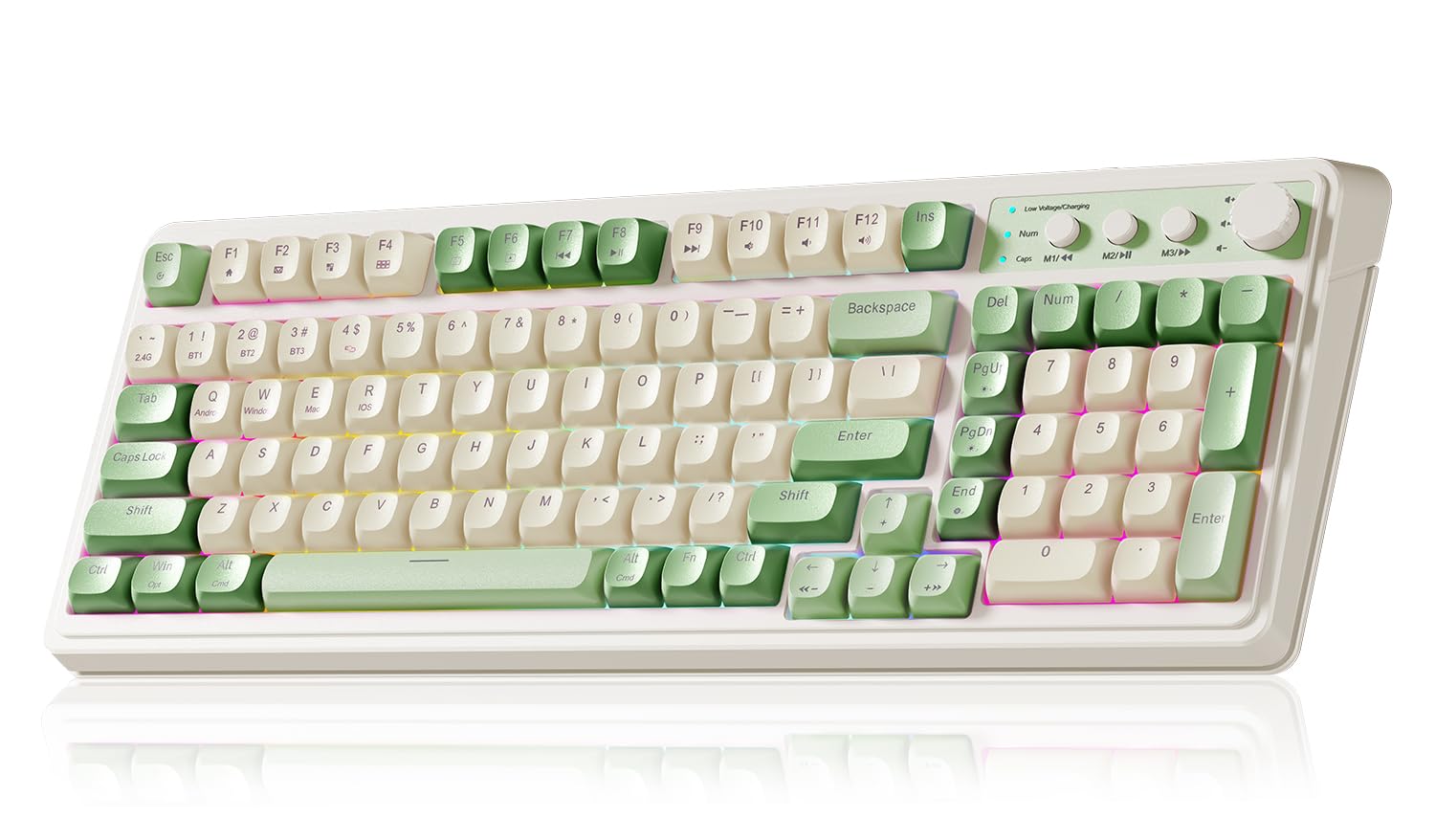
The S99 arrives in green and beige with round-edged caps and a two-tone case, closer to a typewriter than to the black slabs most keyboards come in. On a desk it reads as furniture, a strange thing to say about a gaming keyboard and entirely the point.

Under the caps it's a membrane board with a silicone structure, and that's where the soft, muted sound comes from: quieter than a mechanical switch, with a longer and cushier press. The 99-key layout keeps the number pad and the arrows while shaving a little width off full size, and every key can be programmed with a macro.

For a first wireless board with some personality, we rate it highly: tri-mode Bluetooth, 2.4GHz and USB-C, a number pad, and a one-year warranty at a budget price. It isn't the board for a fast typist chasing snap — the silicone bottoms out with a squish rather than a click, and that's the trade you're making for the sound.

Pros

  • 99 keys keep the number pad
  • Soft, muted silicone typing sound
  • Tri-mode Bluetooth, 2.4GHz, USB-C
  • Macro programming for every key

Cons

  • Battery needs frequent charging
  • Bluetooth pairing can be finicky
Our verdict

If you want a full-size wireless board with a number pad and some character, the S99 delivers at a budget price; just charge it often and keep the dongle handy.

Check Latest Price
8

First Gaming Setup

Redragon K521

88 /100
Keeper Score Excellent

Key details

Backlight
Rainbow LED
Key Count
104
Connection
Wired USB-A
Anti-ghosting
19 keys
Check Price on Amazon

A single button runs the light show on the K521: tap it and the rainbow LEDs step through their modes, hold it and you get three breathing speeds. It's the least expensive way here to put a lit keyboard on a desk.

The keys are membrane with a mechanical-style action, 104 of them, plus 12 multimedia shortcuts along the top row. Redragon lists 19-key anti-ghosting, which is the number that matters in games where three keys and a click land at once.

The board is heavier and sturdier than the budget price suggests, with an ABS plate that keeps it from skating across a desk. The spacebar is the weak point — it rings with a springy vibration that carries on voice chat — and the whole thing sounds hollow if you type hard.

As a first gaming keyboard it earns its place: lights, anti-ghosting, console compatibility, and a two-year warranty, all at a budget price. What it isn't is a mechanical keyboard, whatever the mechanical-feeling wording suggests; if switch feel is the goal, the AULA F75 Pro is the one to save for.

Pros

  • One-touch rainbow backlight
  • 19-key anti-ghosting
  • Sturdy ABS plate stays put
  • Two-year warranty

Cons

  • Preset rainbow modes only, no per-key color
  • Backlight is dim in a bright room
Our verdict

A first gaming keyboard for someone on a tight budget: the lights and anti-ghosting are real, and the membrane switches are the compromise you accept.

Check Latest Price

How We Tested the Best Keyboards

We built the shortlist from spec sheets first: every board we could find across three price bands, sorted by layout, switch type, and whether it connected by wire, dongle, or Bluetooth. Anything with no track record or a price that didn't match its parts got cut before it ever reached a desk. That left 14 keyboards, which we rotated through eight months of ordinary use.

Each one lived on a desk for at least two weeks and handled full workdays of typing plus evening gaming sessions, with one parked in the living room for couch browsing and one carried in a bag on trips. We kept a running log of missed keystrokes, double-typed letters, and dropped connections, including how far we could walk from the laptop before a wireless board started stuttering. To judge noise, we recorded a paragraph of typing from arm's length and compared the clips side by side; to judge responsiveness, we typed fast passages and played games where a late keypress is obvious. Setup counted too — we paired each board to three devices without opening the manual and timed how long it took.

Backlighting got tested twice, once in a dark room and once next to a bright window, since a board that glows impressively at night can wash out entirely in daylight. Durability meant spilling coffee near the spill-resistant models and checking what happened, and checking whether keycaps developed shine or wobble after a month of daily use. Value was the last question we asked of every board: whether the extra money bought something we could feel, or just a longer feature list.

How to Choose a Keyboard

Start With the Layout and the Space It Takes

The number pad question decides more than any other choice. A full-size board runs about 17.5 to 18 inches wide; a 75% board like the AULA F75 Pro is around 12.7, and those five inches go straight to your mouse hand. If you enter figures all day, keep the pad. If you don't, the width is better spent on pointing room. A 99-key board such as the AULA S99 splits the difference, keeping the number pad while trimming the frame.

Wired, 2.4GHz, or Bluetooth

A cable is still the most reliable connection and the cheapest: no charging, no pairing, no dropouts, which is why the K120 and the Apex 3 suit a desk that never moves. A 2.4GHz dongle is nearly as dependable and gets the wire off your desk. Bluetooth is the one to pick when the keyboard has to move between machines, since a single board can pair with three or five computers. Battery life swings wildly, from ten days on the MX Keys S to eighteen months on the K400 Plus, so decide whether you want to charge weekly or annually.

Key Feel, and What Mechanical Really Means

Three different things get sold as mechanical. Real mechanical boards use individual switches, and a hot-swap model such as the F75 Pro lets you change their weight and feel later. Mechanical-feel boards like the K521 use a membrane with a snappier dome: better than a mushy office keyboard, not the same thing. Plain membrane, as on the K120 or the S99, gives long, soft travel and the quietest typing. If you share a room, prioritise quiet switches over lighting — nobody on the other end of a call cares how the board looks.

Wrist Support, Tilt, and Desk Fit

A wrist rest changes the footprint as much as the comfort. The Apex 3's magnetic rest adds roughly an inch of depth; the K860's pillowed ledge pushes its depth past nine inches, which can overhang a keyboard tray. Measure the tray, not the desk. Tilt matters for the same reason: a slight negative angle keeps some typists' wrists straighter, while a raised back helps others. Ergonomics is a fit question more than a specification question, and a split layout is worth the adjustment only when wrist position is the problem you're solving.

Warranty, Spills, and What Actually Fails

Keys, feet, and finishes are what give out first, so warranty length is a fair proxy for how long the maker expects the board to last: two years on the K120 and the K521, one year on the Apex 3, six months on the F75 Pro. Spill resistance is worth having, but read it precisely — the Apex 3's IP32 rating covers a splash, not a flooded desk. If your keyboard shares space with coffee, a rated board with a real warranty beats a cheaper one without.

Frequently Asked Questions

Final Verdict

The SteelSeries Apex 3 is the keyboard we recommend most people buy: quiet enough for a shared office, comfortable for a full day thanks to the magnetic wrist rest, and spill-resistant enough to survive the desk it lives on.

Move to the AULA F75 Pro if desk space or switch customization matters more than a number pad, and to the Logitech Ergo K860 if your wrists are the reason you're shopping. Everyone else can stop at the top of this list.