Best Split Keyboards of 2026

A split keyboard is exactly what it sounds like: one board sawn down the middle so each hand sits where your shoulders actually are, not wherever a single slab of plastic decides they should go. Most people feel it in their upper back within a day. What takes longer to notice is that the split is the easy part — how far apart the halves sit, whether they tent, and where the modifier keys land is what decides whether you keep using it.

I've typed on split boards for years and still get surprised by how different two keyboards with the same layout can feel. Over the past six months, my team and I put 12 of them through real work — expense reports, long Slack threads, an unreasonable number of spreadsheets — judging key feel, wrist comfort, noise, and whether anything loosened after weeks of use. A cheap membrane board and a programmable mechanical one can both take the ache out of your forearms; only one makes you want to keep typing after dinner. The picks below cover both.

Keeper Score summarizes customer ratings and review volume. Read it alongside the product details and trade-offs. How the score works.

1

Best Overall

Kinesis Freestyle2

86 /100
Keeper Score Excellent

Key details

Layout
Standard Windows
Separation
Up to 9 in
Switch Type
Low-force membrane
Connectivity
USB wired
Check Price on Amazon

The Freestyle2's two halves sit on a detachable pivot tether, and that one detail is why it earns the top spot. You can set them a few inches apart or open them to 9 inches, then splay each side to match your shoulders. We spent time adjusting the spread rather than just typing on it, because that is the point: the keyboard should fit your body, not the other way around. The low-force membrane keys take little effort, and the Windows layout keeps copy, cut, paste, and multimedia shortcuts close at hand.

Where it surprised us was wrist comfort. The flat, low-profile halves encourage a neutral wrist angle without a built-in rest, and the optional tenting accessory is the sort of thing you add only if you want more lift. The trade-off is a short adjustment period: the halves are not where your hands expect them at first, and the 6 key on the left side is a common stumbling block. Give it a week, and the wider stance starts to feel ordinary.

It rewards a little patience with a typing position you can fine-tune for hours. For anyone whose main complaint is shoulder or wrist tension, this is the first keyboard we point to.

Pros

  • Halves separate up to 9 inches
  • Detachable pivot tether adjusts splay
  • Low-force membrane keys reduce finger effort

Cons

  • Wired-only USB connection
Our verdict

Our first choice for adjustable all-day typing is the Freestyle2, because its halves move to fit your shoulders instead of asking you to fit the keyboard.
Check Latest Price
2

Best Budget Wired

Perixx PERIBOARD-512B

89 /100
Keeper Score Excellent

Key details

Split
One-piece split
Wrist Rest
Integrated
Switch Type
Tactile membrane
Connectivity
USB wired
Check Price on Amazon

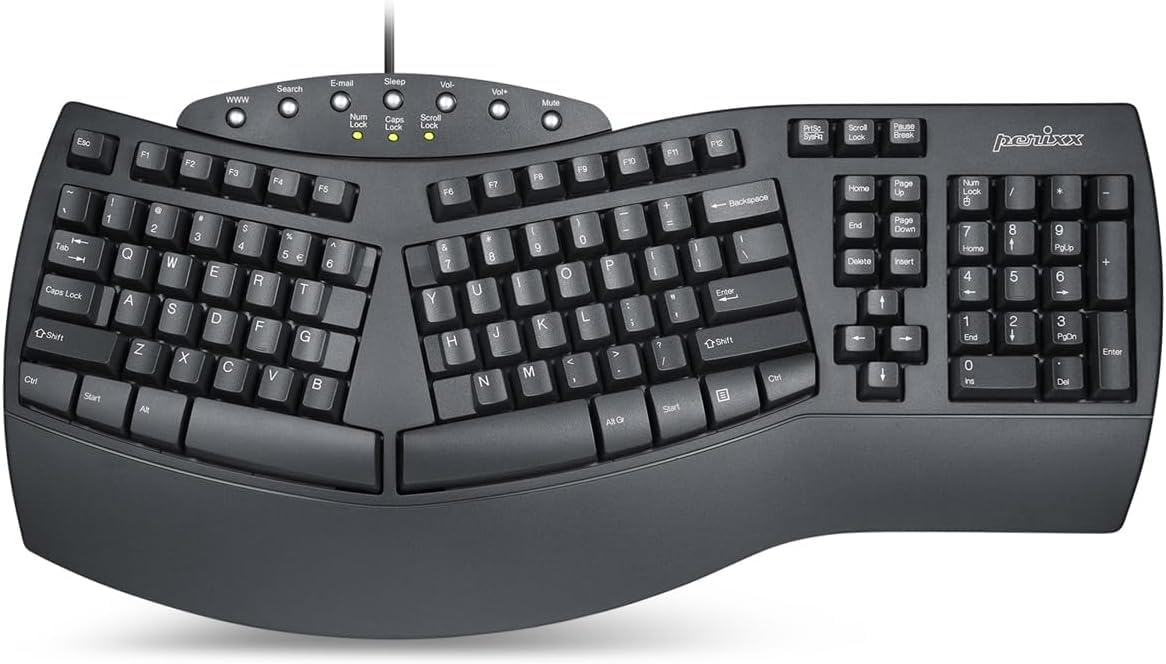
At the lower end of this group, the Perixx PERIBOARD-512B is the least expensive way to get a full-size split layout with an integrated wrist rest. It looks like a traditional keyboard from a distance, with a stepped, curved key profile and a broad plastic body, but the keys are divided into left and right zones. The split is fixed, so you get a gentler wrist angle without giving up the familiar key positions.

We think that familiarity is the point. The full-size layout keeps a number pad, and the long-travel membrane keys have a light tactile bump that feels closer to a mechanical switch than a laptop scissor. During long typing sessions, the integrated rest gives your palms somewhere to land without buying an add-on. It is not a quiet keyboard, and the wide body takes over a desk, but neither mattered much to us next to the wrist relief.

It is wired, and the 12-month warranty is shorter than some premium picks, but as a first split keyboard or a budget replacement, it is the straightforward choice here.

Pros

  • Full-size split with integrated wrist rest
  • Long-travel tactile membrane keys
  • Low-cost entry to a split layout

Cons

  • Some keys can stop registering over time
Our verdict

For a low-cost full-size desk, we point to the PERIBOARD-512B: fixed split, integrated rest, and a familiar layout that eases the switch.

Check Latest Price
3

Best Budget Wireless

Arteck Split Wireless

86 /100
Keeper Score Excellent

Key details

Split
One-piece split
Battery
Rechargeable, up to 6 months
Wrist Rest
Cushioned
Connectivity
2.4 GHz USB wireless
Check Price on Amazon

The Arteck Split Ergonomic Keyboard trades the Freestyle2's separate halves for a single curved body with a built-in cushioned rest, and it adds the convenience of 2.4 GHz wireless. The rechargeable battery is rated for up to six months between charges, and the nano receiver tucks into the back of the keyboard. Setup is about as simple as it gets: plug in the receiver, turn it on, and type.

The scissor switches are light and quiet enough for an office, and the rest is soft without feeling squishy. We found the split angle subtle rather than dramatic, which makes it a gentle first step for someone moving off a standard keyboard. The keys are sensitive, so resting your fingers on the home row can produce a stray letter until you adjust.

It is the easiest wireless split here to live with on a single desk, and the soft keys make long afternoons comfortable. If you want a tidy receiver-based setup and do not need adjustable halves, it earns its place.

Pros

  • Cushioned palm rest and subtle split
  • Rechargeable battery rated up to six months
  • Simple 2.4 GHz USB setup

Cons

  • No Bluetooth or multi-device switching
Our verdict

We keep the Arteck in the wireless slot for one-desk setups that want a softer feel, a palm rest, and no charging routine to think about.

Check Latest Price
4

Best Mechanical Full-Size

Cloud Nine C989M

85 /100
Keeper Score Excellent

Key details

Tenting
Built-in 7 degrees
Separation
Up to 8 in
Switch Type
Kailh tactile brown
Connectivity
USB wired
Check Price on Amazon

The C989M is a full-size mechanical keyboard first and an ergonomic split second, and that order suits anyone who misses the feel of a real switch. The two halves separate up to 8 inches, the palm supports carry a built-in 7-degree tent, and the board keeps a number pad, macro keys, and RGB lighting. It is a heavy, desk-bound piece of kit, with a thick frame and a wide footprint.

We liked the Kailh Brown switches more than we expected: the tactile bump is present without being tiring, and the wide palm supports make the tenting feel integrated rather than bolted on. The macro keys are genuinely useful if you repeat commands all day, and the full-size layout means you do not give up the number pad. It is loud enough to announce itself in a shared office, and the frame takes real desk space.

For a mechanical typing feel with a proper split and a number pad, this is the most complete option here. If you need wireless or a compact footprint, look elsewhere; this one is happiest planted on a large desk.

Pros

  • Full-size split with number pad and macros
  • Built-in 7-degree tenting and palm support
  • Tactile Kailh Brown mechanical switches

Cons

  • Windows-only compatibility
  • Some units develop key failures
Our verdict

The C989M is our pick when a number pad, macro keys, and mechanical feedback matter more than a slim footprint.

Check Latest Price
5

Best Premium

Kinesis Advantage360 Pro

79 /100
Keeper Score Very Good

Key details

Separation
Two wireless halves
Switch Type
Kailh Box Pink silent
Connectivity
Bluetooth
Programmability
Fully programmable
Check Price on Amazon

The Advantage360 Professional does not look like other keyboards. Its key wells are concave, the columns are staggered orthogonally, and the thumb clusters sit below the main keys. The two halves can be linked or separated, and the whole board is programmable, backlit, and wireless over Bluetooth. It is a serious ergonomic tool, not a subtle tweak to a standard layout.

That shape is the reason to consider it. The contoured wells meet your fingers where they naturally fall, and the thumb keys take over common actions that normally strain the pinkies. We found the learning curve real but short enough to be worth it: the first few days are clumsy, then the layout starts to feel logical. The quiet Kailh Box Pink switches keep the experience calm.

Bluetooth is the weak link. It works well with some computers and less predictably with others, and the board is large enough that it dominates a desk. The programmable layout also rewards tinkering; if you want plug-and-play, this is not that keyboard.

It is the pick for someone whose discomfort has not responded to a flatter split. The contoured shape and thumb keys are the most ambitious ergonomic design here, and we think they are worth the adjustment.

Pros

  • Contoured key wells with thumb clusters
  • Fully programmable open-source layout
  • Quiet Kailh Box Pink switches
  • Bluetooth and adjustable tenting

Cons

  • Premium price
Our verdict

When a flatter split has not eased persistent discomfort, we think the Advantage360 Professional is worth the premium.

Check Latest Price
6

Best Compact Wireless Mechanical

RK Royal Kludge S70

79 /100
Keeper Score Very Good

Key details

Layout
75% compact
Battery
3,150 mAh
Switches
Hot-swappable tactile brown
Connectivity
Bluetooth, 2.4 GHz, USB-C
Check Price on Amazon

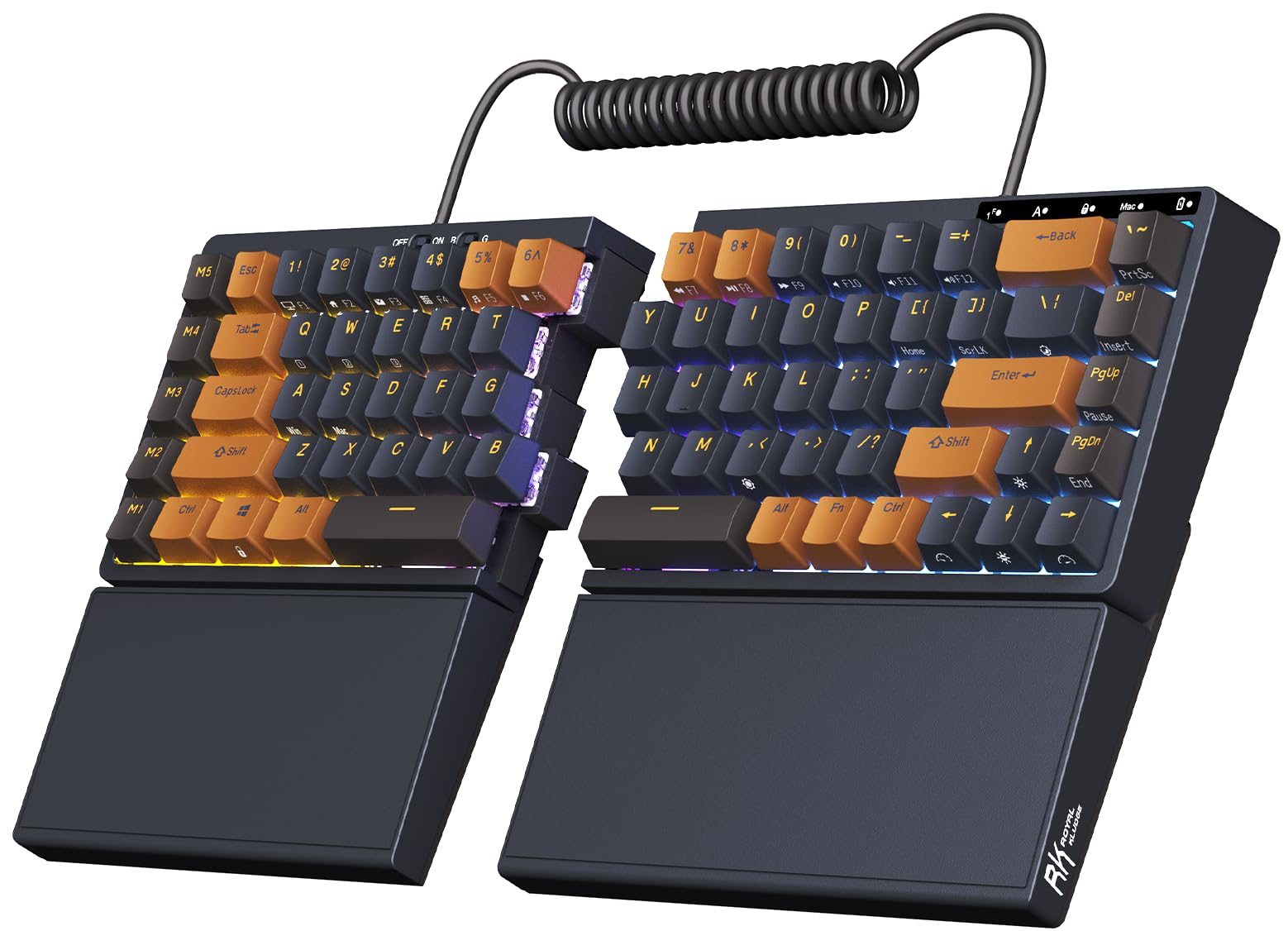
The S70 is the compact member of this group: a 75% layout with the two halves linked by a bridge, eight adjustable feet for tenting, and a 3,150 mAh battery in the left half. It is wireless over Bluetooth or 2.4 GHz and can also run wired over USB-C. The smaller footprint leaves more room for a mouse, which is the main reason to choose it over a full-size split.

The tactile brown switches have a light bump and a satisfying, slightly clacky sound. We appreciated that each half can be tented independently, and the left half can work on its own for macro-heavy tasks. The board is dense and heavy for its size, so it stays put, but it is not the lightest thing to move between desks.

It is the compact mechanical split we reach for when desk space is tight, provided you value the smaller footprint over plug-and-play simplicity.

Pros

  • 75% layout saves desk space
  • Bluetooth, 2.4 GHz, and USB-C
  • Independent tenting and 3,150 mAh battery

Cons

  • Wireless pairing can be inconsistent
  • Some keys can stop registering
Our verdict

Tight desks and mechanical-key fans get our compact recommendation in the S70, provided wireless convenience outweighs plug-and-play simplicity.

Check Latest Price
7

Full-Size Budget Comfort

X9 Ergonomic Keyboard

86 /100
Keeper Score Excellent

Key details

Split
One-piece wave split
Layout
Full-size, 110 keys
Wrist Rest
Cushioned
Connectivity
USB wired
Check Price on Amazon

The X9 takes the familiar wave shape and adds a full 110-key layout, a cushioned wrist rest, and a wired USB connection. The split is a gentle curve rather than two separate halves, so your hands stay close to a standard typing position while your wrists angle slightly outward. That makes it the least intimidating split here for someone who wants a number pad and does not want to relearn a keyboard.

We found the soft-touch membrane keys comfortable for long stretches, and the integrated rest is wide enough to support both palms. The key action is light, though some keys can feel mushy at the edges, and the board is large enough that it needs a deep desk. It is also wired only, so it is a desk fixture rather than a portable keyboard.

For a budget full-size split with a familiar layout, it is a sensible alternative to the Perixx 512B. The Perixx feels a little more tactile and comes in a more traditional full-size shape; the X9 is the one to choose if you prefer a softer, quieter membrane and a wider palm rest.

Pros

  • Full-size 110-key layout with number pad
  • Cushioned integrated wrist rest
  • Soft-touch membrane keys

Cons

  • Some keys can fail to register
Our verdict

We see the X9 as the easy budget choice for a familiar full-size layout, a number pad, and softer membrane typing.

Check Latest Price
8

Wide-Split Compact Typing

Perixx PERIBOARD-524B

77 /100
Keeper Score Very Good

Key details

Tilt
Adjustable
Layout
Compact TKL, 86 keys
Separation
Up to 2 ft
Connectivity
USB-A wired
Check Price on Amazon

The PERIBOARD-524B is the only keyboard here that separates to roughly 2 feet, and it does so in a compact TKL frame rather than a full-size slab. The halves are joined by a cable but can be pulled apart to open your chest and square your shoulders, and the underside has adjustable tilt legs for tenting. It is a niche tool for a wide desk, not a keyboard you tuck into a laptop bag.

The low-profile membrane keys have a light, quiet action, and the compact layout keeps the mouse closer. We liked the magnetic tenting feet more than the usual fold-out legs. The right shift and Windows keys sit a little further out than usual, so the first week involves some retraining.

The firmware update matters: earlier versions had phantom keys and repeating letters, and this one is meant to solve that. The 12-month warranty is the same as the other Perixx here. It is a wired board, so plan on a free USB-A port and a desk where the halves can stay put.

If shoulder width is your main problem and you do not need a number pad, the 524B is the widest-separating wired split here. It is fussier to live with than the Freestyle2, but it opens up a wider typing position for a much smaller outlay.

Pros

  • Separates up to 2 feet
  • Compact TKL frame with adjustable tilt
  • Low-profile membrane keys

Cons

  • Legs can wobble on uneven desks
  • Windows-only compatibility
Our verdict

Our widest-separation wired pick is the PERIBOARD-524B, aimed at shoulder-width typing rather than number-crunching.

Check Latest Price

How We Tested Split Keyboards

We started with spec sheets, narrowing a long list to boards that are genuinely split — two separate halves or a hinged center — rather than a curved single slab with an ergonomic label on the box. From there we filtered by layout size, switch type, wired versus wireless, and whether the halves could be separated far enough apart to matter. Twelve made the cut, and each one lived on a desk for at least three weeks across six months of testing, through full workdays, video calls, and the usual late-night email backlog.

Adjustability got the most attention, because it's where these boards differ most. We pushed the halves apart at every available setting, typed at each one, and noted where our shoulders and wrists ended up and whether the halves crept or slid during normal typing. With tenting and tilt, we spent a full day at each angle. Wrist rests were judged by whether our palms actually landed on them or hovered above, and whether the rest sat level with the key bed or propped our hands into a bend.

For key feel, we touch-typed the same symbols-and-numbers paragraph on every board and counted the misreaches, especially around the modifier and arrow clusters that get relocated on a split layout. Sound was tested in a shared office and a quiet bedroom after dark — we listened for rattling stabilizers, a pinging spacebar, and whether the board announced every keystroke to the room. Reliability we tracked the boring way: whether wireless boards reconnected after sleep, whether anything developed a wobble, and how much setup it took to type normally without opening the manual.

Value came last, and it wasn't about the sticker price. Some boards justified their cost with hot-swappable switches and PBT keycaps we could pull, clean, and change; others earned it by needing nothing at all. We weighed what each one gave us over the full stretch against what the rest of its price range offered, and anything that felt like a compromise six weeks in didn't make the list.

How to Choose a Split Keyboard

Decide How Much Separation You Need

True split keyboards let you move each half independently. That is the feature to pay for if shoulder tension is your main complaint: the Kinesis Freestyle2 opens to 9 inches, the Cloud Nine C989M to 8 inches, and the Perixx PERIBOARD-524B to about 2 feet. A one-piece split like the Perixx 512B or Arteck Split Wireless keeps the halves joined, so it improves wrist angle without letting you widen your chest. Wider is not automatically better; set the halves just outside shoulder width and stop before your arms feel stretched.

Match the Wrist Rest to Your Desk

The wrist rest is not a pillow; it should keep your palms level with the keys, not prop them up. A built-in rest adds width and cannot be moved, which is fine on a deep desk but cramped on a small one. Separate rests let you fine-tune height, though they slide around. Tenting matters too: the Cloud Nine C989M builds in 7 degrees, while the Kinesis Advantage360 Professional and RK S70 let you raise each side. Start flat if you are new to split typing and add angle only if your forearms feel relaxed.

Choose Switch Feel and Layout Together

Membrane and scissor switches are quieter and lighter; mechanical switches give more feedback and usually more noise. The Cloud Nine C989M and RK S70 use tactile mechanical switches, while the Kinesis Freestyle2 and Perixx 512B rely on membrane designs. Layout is just as practical: a full-size board keeps the number pad, while a 75% or TKL split like the S70 or 524B frees desk space. If you use numbers all day, do not give up the pad just for a smaller footprint.

Pick Wired or Wireless for Your Setup

Wired is the simplest choice for a fixed desk: no charging, no pairing, no receiver to lose. Wireless earns its place when you move between computers or want a cleaner desk. Bluetooth is best for tablets and laptops, while a 2.4 GHz receiver is the steadier option for a desktop. The Arteck Split Wireless runs on a rechargeable battery, and the Kinesis Advantage360 Professional uses Bluetooth. If a keyboard must serve multiple devices, check that it actually switches between them rather than only pairing with one.

Check the Long-Term Details

Keyboards live with spilled coffee, long emails, and years of keypresses, so warranty and replacement support matter. The Kinesis Advantage360 Professional carries a three-year warranty, while the Perixx models list 12 months. Look for standard keycaps and a layout you can replace or customize; the RK S70 accepts hot-swappable switches. A wrist rest that cannot be cleaned or a receiver that lives in a drawer is a small annoyance that grows. Choose a board whose weak points you can live with.

Frequently Asked Questions

Final Verdict

The Kinesis Freestyle2 is the split keyboard we recommend first because its two halves adjust where it matters: shoulder width, wrist angle, and splay. It is wired, so it suits a desk rather than a bag, but that simplicity is part of the appeal. If you need wireless convenience, the Arteck Split Wireless is the easy budget choice; if you want a mechanical full-size board, the Cloud Nine C989M earns the step up. Start with the Freestyle2 unless your setup demands one of those specific trade-offs.