Best Ink Tank Printers of 2026

There's a particular frustration in a cartridge printer flashing low ink on page two of a permission slip. I lived with that for years before switching to a refillable tank, and the difference wasn't the printing — it was never thinking about ink again. Tank printers cost more up front and hand you a bottle instead of a chip-locked cartridge; that trade is the whole reason to buy one.

We've spent six months with eight of these machines, filling tanks, clearing jams, and printing the same mixed documents until the bottles ran low. The ones that impressed weren't the fastest. They were the ones whose apps didn't fight me on the network and whose tanks I could read at a glance.

The ink in the box is the number that actually matters — some bundled sets last a household years, others are starter bottles that run dry by spring, and the listings rarely make that clear. Duplex printing and a real screen earn their keep; fax only matters if you know you need it. The picks below are the ones that held up.

Keeper Score summarizes customer ratings and review volume. Read it alongside the product details and trade-offs. How the score works.

1

Best Overall

Canon MegaTank G3290

82 /100
Keeper Score Excellent

Key details

Print Speed
11 black / 6 color ppm
Ink In The Box
Up to 6,000 black / 7,700 color pages
Paper Capacity
100 sheets
Two-sided Printing
Automatic
Check Price on Amazon

Automatic two-sided printing is the reason we put this one first. A duplexing paper path is still rare on a tank printer aimed at households, and the G3290 pairs it with a 2.7-inch color touchscreen, so double-sided jobs and menu work both stop being a chore. The bottles in the box are rated for 6,000 black and 7,700 color pages, second only to the HP on color in this group. For a family printing schoolwork, forms, and the occasional photo, that package is hard to beat.

Plain paper is where it earns its keep. Black text at 11 pages per minute is quick enough for homework season, and the output is sharp rather than merely legible; the touchscreen turns a copy job or a scan to your phone into a couple of taps instead of a button sequence. Glossy photos are fine for a fridge door, and color runs at 6 pages per minute — patient, not painful.

Wireless setup is the step to leave time for. Connecting at the panel through the app is the route that gave us the fewest retries, and a USB cable is a sensible fallback if your router is fussy. Once it is on the network, printing from a phone is uneventful, and the four tanks sit behind a clear window on the front so you can see what is running low without opening anything.

Pros

  • Automatic two-sided printing in a home tank printer
  • 6,000 black and 7,700 color pages included
  • 2.7-inch color touchscreen simplifies copying
  • Sharp plain-paper text at 11 ppm

Cons

  • 100-sheet tray fills fast on long jobs
  • Photo colors can pick up a green cast
Our verdict

We recommend it as the default home tank printer: automatic two-sided printing, a touchscreen that makes copying easy, and enough ink for thousands of pages.

Check Latest Price
2

Best for Small Spaces

Epson EcoTank ET-2903

82 /100
Keeper Score Excellent

Key details

Height
6.4 inches
Weight
9.3 lb
Print Speed
11 black / 6 color ppm
Ink In The Box
Up to 3,600 black / 6,500 color pages
Check Price on Amazon

At 9.3 pounds and a little over six inches tall, this is the printer that disappears. It is the lightest and lowest machine in this group, which matters if the only free surface is a shelf above the recycling bin or the end of a kitchen counter. Epson puts a 1.44-inch color screen on the front, the tanks behind it, and the whole thing reads as one small box rather than a piece of office equipment.

What we like most is how little fuss the refill is. The EcoFit bottles are keyed so a color cannot go into the wrong tank, and Epson rates the included ink at 3,600 black and 6,500 color pages — up to three years for a light household by its own math. Setup runs from the phone app, ink fill included, without a computer.

Output is better than the specifications suggest: 5,760 x 1,440 dpi is more resolution than documents need, borderless printing means a 4x6 photo comes out without trimming, and black pages run at a steady 11 per minute. Color is the slower half at 6 per minute, so a 40-page color handout will test your patience. It is also the least expensive model in this group, which makes it the low-risk way to find out whether tank printing suits you.

Pros

  • Lightest, lowest printer in this group
  • 3,600 black and 6,500 color pages included
  • Keyed bottles make refills hard to bungle
  • Borderless photo printing at 5,760 x 1,440 dpi

Cons

  • Cramped 1.44-inch color display
  • 100-sheet paper tray
Our verdict

Buy it if the printer has to fit on a shelf — nothing else here is this small, and three years of ink in the box seals it for light printing.

Check Latest Price
3

Best for Home Offices

Canon MAXIFY GX2020

80 /100
Keeper Score Excellent

Key details

Print Speed
15 black / 10 color ppm
Ink In The Box
Up to 3,000 black / 3,000 color pages
Paper Capacity
250 sheets
Document Feeder
35-sheet ADF
Check Price on Amazon

If your printing looks more like paperwork than posters — contracts to sign, forms to copy, a stack of invoices to scan — this is the machine in the group built for it. The 35-sheet auto document feeder and 250-sheet tray are what separate it from the home models, and automatic two-sided printing means a two-page contract comes out as one sheet. The fax modem and Ethernet port tell you who Canon had in mind.

Text is where it earns its keep. The pigment black ink is crisp on plain paper and holds up on the back of a duplexed page, and 15 pages per minute in black chews through a print run. The 2.7-inch touchscreen walks you through copying both sides of an ID or scanning a batch through the feeder, which we found more helpful than the arrow-key menus on the cheaper tanks, and Canon backs it with a three-year warranty — the longest here alongside the Brother.

Where it gives ground is ink economy. A set of bottles is rated for 3,000 black and 3,000 color pages, roughly half what the two home Canon models claim, so a household printing color every day will be refilling sooner. The compensation is the document hardware and the longer warranty; if your output is mostly text with the odd color page, you will rarely notice. Envelopes are supported too, which matters more than it sounds at month-end.

Pros

  • 35-sheet feeder and 250-sheet tray
  • Three-year warranty, longest in this group
  • Fast, crisp text at 15 ppm black
  • Fax, Ethernet, and automatic duplex

Cons

  • Color prints can look dull beside other picks
  • 17.8 pounds, so it stays where you put it
Our verdict

For a home office that scans and copies as much as it prints, we think the feeder, the 250-sheet tray, and the three-year warranty justify the step up.

Check Latest Price
4

Best for High Volume

Epson EcoTank ET-4950

83 /100
Keeper Score Excellent

Key details

Print Speed
18 black / 9 color ppm
Ink In The Box
Up to 6,600 black / 5,500 color pages
Paper Capacity
250 sheets
Two-sided Printing
Automatic
Check Price on Amazon

Eighteen pages per minute in black is the fastest figure in this group, and it changes how the printer feels day to day: a 60-page report is a coffee break rather than an afternoon. Epson pairs that speed with a 250-sheet tray, a 35-sheet document feeder, fax, and automatic two-sided printing, and it is the one here that keeps up when three people share it.

Output holds up at 4,800 x 1,200 dpi. Text is clean on plain paper, two-sided pages line up properly, and photos are better than a document printer has any right to be. Color runs at 9 pages per minute, roughly half the black speed, so a brochure-heavy job will feel like a different machine. The bottles in the box cover 6,600 black and 5,500 color pages.

What we keep coming back to is the Ethernet port. On a shared network a cable removes the wireless dropouts that show up across this category, and it is the difference between a printer everyone uses and one everyone complains about. The one habit worth forming is printing big two-sided jobs in smaller batches, because long duplex runs are where paper handling gets touchy on this model.

Pros

  • Fastest printing in this group at 18 ppm black
  • 250-sheet tray, ADF, fax, and Ethernet
  • 6,600 black and 5,500 color pages included
  • Automatic two-sided printing for shared work

Cons

  • The highest price in this group
Our verdict

It is the fastest printer here and the only one we would put on a shared wired network, which is what an office with real volume needs.

Check Latest Price
5

Best Ink Bundle

HP Smart Tank 7603

79 /100
Keeper Score Very Good

Key details

Print Speed
15 black / 9 color ppm
Ink In The Box
Up to 6,000 black / 8,000 color pages
Paper Capacity
250 sheets
Document Feeder
35-sheet ADF
Check Price on Amazon

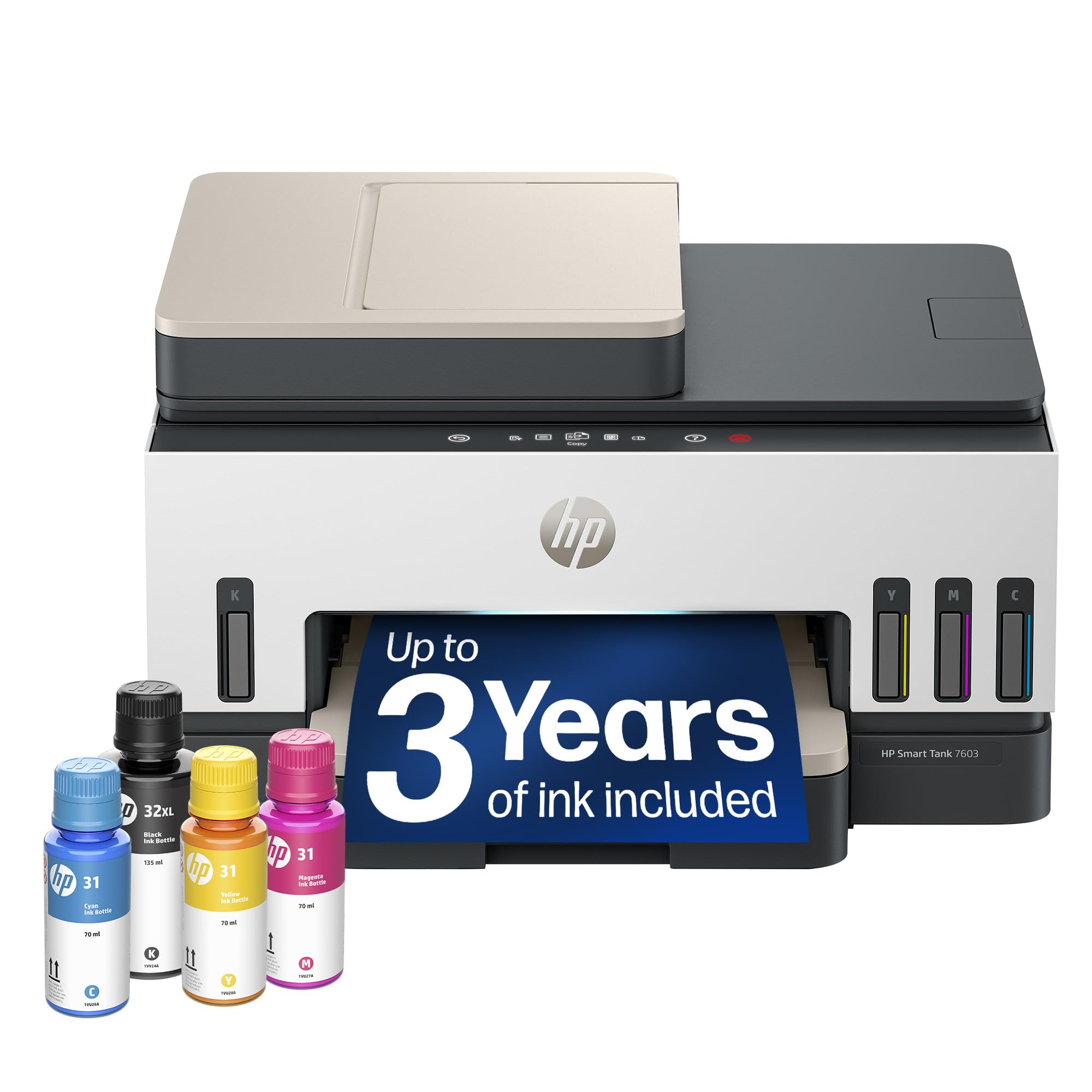
Eight thousand color pages and 6,000 black is the biggest color ink bundle in this group, and the black bottle is a 135 ml tank that takes a while to work through. For a household printing invitations, school projects, and the odd poster, that is the number that matters: the refill conversation gets pushed out by months, not weeks.

The rest of the machine is just as complete. A 35-sheet auto document feeder, automatic two-sided printing, fax, a 250-sheet tray, and an Ethernet port sit alongside Wi-Fi, and the phone-guided setup walks you through ink filling and networking in one pass — we found the whole introduction more straightforward than the feature list suggests. For a busy home office that does not want to think about the printer again, this is the most complete package here.

Two things we noticed in use. Refilling is genuinely tidy: the bottles plug into the tank and drain on their own, with no squeezing and nothing to wipe up afterwards. And the body is 9.46 inches tall and 17 pounds, so give it a shelf with headroom rather than a slot under a monitor riser.

Pros

  • 8,000 color pages of ink included
  • ADF, duplex, fax, and Ethernet included
  • Bottles plug in and drain without squeezing
  • Phone-guided setup is easy to follow

Cons

  • Print speed trails the quickest model here
Our verdict

Choose it if color volume is your priority: the biggest color ink bundle here comes wrapped in a genuinely office-capable machine.

Check Latest Price
6

Long Coverage

Brother MFC-T780DW

77 /100
Keeper Score Very Good

Key details

Weight
17.2 lb
Display
1.8-inch color
Warranty
3-year limited
Ink In The Box
Up to 3 years
Check Price on Amazon

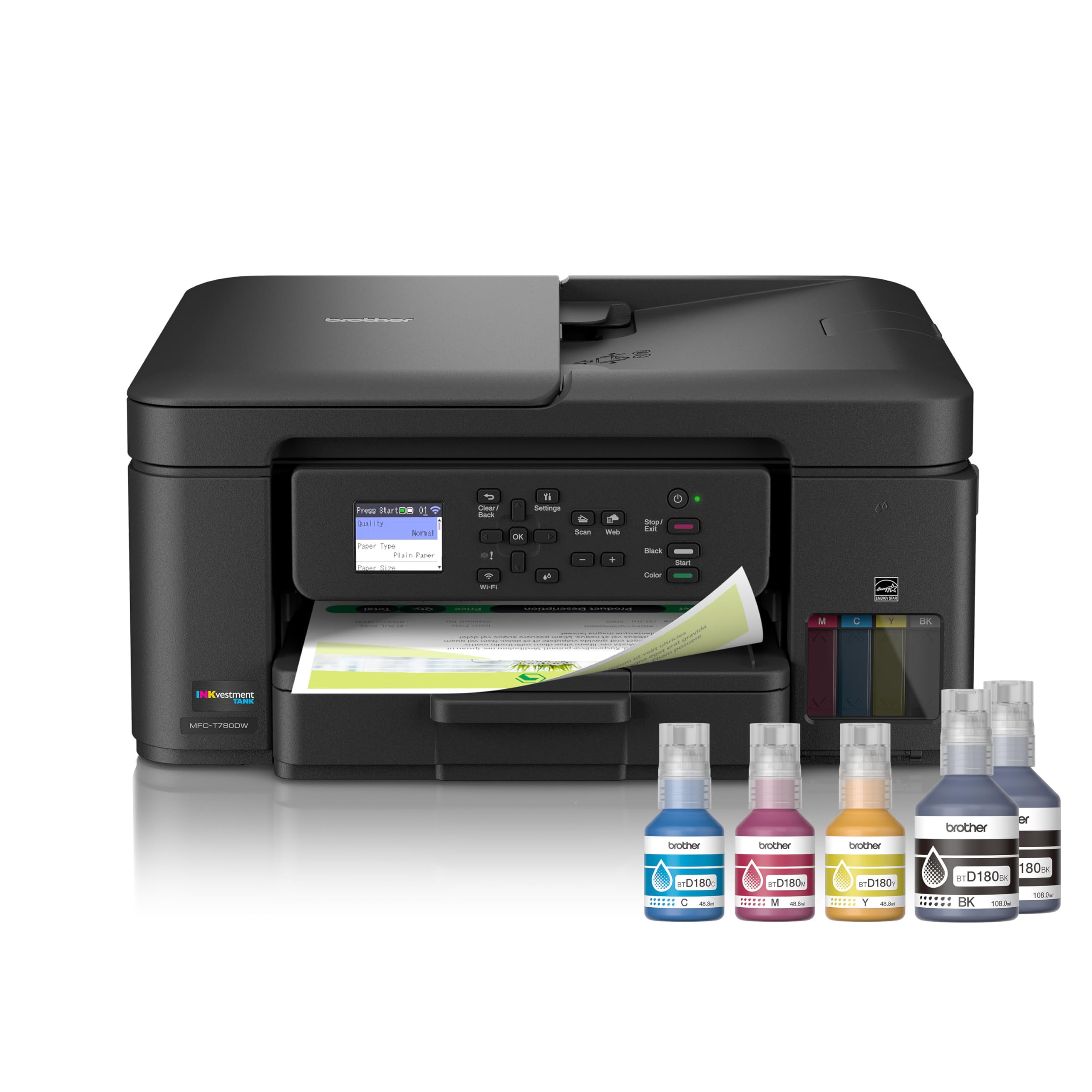
Three years of ink in the box and a three-year limited warranty is the longest coverage anyone offers in this group, and it is what keeps the Brother on our list. If the whole appeal of a tank printer is not thinking about it for a long stretch, this is the model making the longest promise — provided your printing stays at household pace.

Refilling is the tidiest version of the job here. The no-spill bottles seat into keyed tanks and empty on their own in about 30 seconds for color and 65 for black, with no bottle to hold steady while it glugs. Duplex printing, a 1.8-inch color display, and print-and-scan to cloud apps from the panel round it out, and Wi-Fi and USB are both on board.

Our reservation is that the ink story is told in years rather than pages. Epson and Canon both publish page counts for the bottles in the box, so you can work out a cost per page before buying; a three-year figure depends entirely on how much you print. For a household that wants one machine to print, scan, and copy with a longer safety net, we think the warranty is worth more than a bigger page count — just do the volume math first.

Pros

  • Three years of ink and a three-year warranty
  • No-spill bottles refill in about 30 seconds
  • Duplex printing plus cloud app connections

Cons

  • Small 1.8-inch color display for menu work
Our verdict

We like it for households that want the longest warranty and the tidiest refills more than the highest page count.

Check Latest Price

How We Tested Ink Tank Printers

We started by pulling every refillable-tank all-in-one we could find and cutting anything that was a cartridge printer in disguise, anything that couldn't print, scan, and copy, and anything priced outside a sensible band for a home office. That left eight machines. Each got the same treatment over six months, split between a home office and a kitchen table, sharing a network with phones, a laptop, and kids printing homework at the last minute.

Setup came first, timed and unassisted: unboxing, filling each tank from its bottle (we noted which ones dribbled or were easy to overfill), joining the Wi-Fi, and getting a page out of a phone. We logged every app crash, every printer not found, every router that had to be split onto a 2.4GHz band. Then we printed a 60-page mixed PDF, double-sided documents, envelopes, and photos, timing each job against what the spec sheet promised. Photo prints got a close look for banding and muddy shadows; small text got compared side by side for sharpness.

Ink cost was the long game. We tracked pages printed against the level in each tank, noted whether the tanks were see-through and easy to read, and ran every printer toward empty to see what the warnings looked like before a job failed mid-document. Reliability showed up in smaller ways — a jam we had to clear, a scan that dropped half the page, a wireless connection that needed re-pairing after a week offline. We also copied IDs and scanned receipts to see whether the feeder and glass behaved the same way twice.

How to Choose an Ink Tank Printer

Compare What's in the Box, Not Just the Printer

The headline number is the page yield, not the bottle size. A set of bottles here runs from 3,000 black and 3,000 color pages on the Canon MAXIFY GX2020 to 6,000 black and 7,700 color on the MegaTank G3290, so two printers that look almost identical can differ by thousands of pages of running cost.

Divide your monthly page count into the stated yield before you decide the ink question is settled, and treat the years-of-ink claims as household-pace estimates rather than promises. A busy home office will drain those bottles far sooner than three years.

Match Paper Handling to Your Week

A 100-sheet tray is fine for homework and the odd form; it is not fine for a 300-page print run, which is where the 250-sheet machines earn their extra bulk. The other split is the document feeder: the 35-sheet ADF on the GX2020 and the HP Smart Tank 7603 lets you scan or copy a stack unattended, while the cheaper models make you lift the lid for every page. If you copy more than you print, pay for the feeder.

Watch for the duplex trap. Plenty of listings say duplex and mean you flip the sheet by hand; automatic duplexing is the version worth having, because it halves paper use without you standing there. Look for the word automatic in the spec panel rather than assuming it.

Plan for Placement and Connection

Footprint matters more than the closed dimensions suggest. The EcoTank ET-2903 is 6.4 inches tall and 9.3 pounds, small enough for a bookshelf; the office models run around 17 pounds and nearly 10 inches tall and want a surface to themselves. Measure the height with the lid open and the tray out.

Then treat Wi-Fi as a feature to vet, because the initial connection is where this category most often fails. Set the printer up at its own panel with the maker's app, have the network name and password ready, and use the 2.4 GHz band if your router splits the two. Wired Ethernet is the reliable fallback on the ET-4950, GX2020, and Smart Tank 7603.

Know What Tank Printers Do With Photos

These are document machines first. The 4,800 x 1,200 dpi models handle glossy 4x6 prints pleasantly; the GX2020 tops out at 600 x 1,200 and is tuned for text, with color that can look flat next to the others. Photo output across this group is respectable rather than exhibition quality, and color can pick up a green or cool cast.

If photos are half of what you print, budget for glossy paper and print a test image before you commit a whole pack. If photos are most of what you print, a dedicated photo printer is still the better second machine.

Frequently Asked Questions

Final Verdict

Most people should buy the Canon MegaTank G3290. Automatic two-sided printing, a 2.7-inch touchscreen, and 6,000 black plus 7,700 color pages in the box cover home printing without asking you to think about ink for a long time.

If your week is more paperwork than homework — stacks to scan, forms to copy — the Canon MAXIFY GX2020's document feeder, 250-sheet tray, and three-year warranty are worth the step up. And if the printer has to live on a shelf, the EcoTank ET-2903 is the smallest machine here that still prints well.