Best Hard Drive Enclosures of 2026

Somewhere in my apartment is a drawer of orphaned laptop drives — 500GB disks pulled from dead machines, still holding photos I never got around to rescuing. An enclosure is the cheapest fix in storage: a bridge board and a shell that turn a bare SATA drive into a plug-and-play USB drive. A bad one drops a transfer halfway through, runs hot, or whines from across a quiet room. Over eight months, my team and I lived with 12 of them, and the weak ones showed themselves within a week of daily use.

The spec sheet rarely covers what actually decides it. A 2.5-inch drive draws power straight from the cable, while a 3.5-inch drive needs its own adapter, so a desktop-drive enclosure is never truly portable. What separates them is the bridge board, the connections it offers, and the shell around it — UASP support, honest transfer speeds, whether heat escapes or builds up. Below are the ones we'd trust with our own drives, from a pocket-sized single-bay to four-bay towers that sit on a shelf.

Keeper Score summarizes customer ratings and review volume. Read it alongside the product details and trade-offs. How the score works.

1

Best Overall

Sabrent EC-UASP

93 /100
Keeper Score Outstanding

Key details

Install
Tool-free slide lid
Interface
USB 3.0, 5 Gbps, UASP
Max Capacity
16TB
Drive Support
2.5-inch SATA HDD/SSD
Check Price on Amazon

Most people arrive at this decision holding one drive: the 2.5-inch SSD or hard disk that came out of a laptop, or a spare bought on sale and never installed. The Sabrent EC-UASP is the enclosure we hand over for that job, because nothing about it asks for instructions. The lid slides off, the drive pushes onto the connector, the lid goes back, and the far end is an ordinary USB drive. No screws, no driver, no software.

It is also the smallest thing in this group at 2 ounces and about half an inch thick, so it lives in a laptop bag without announcing itself. UASP over USB 3.0 means the interface is not what limits a SATA SSD — the drive is — and the listing puts the capacity ceiling at 16TB, well beyond any 2.5-inch drive you are likely to own.

What we do not love is the lid. The tabs holding it shut are thin plastic, and this is the one part of the design that has us handling the case deliberately rather than tossing it in a bag with a charger. At this end of the market that is a fair trade, and it is the reason the aluminum Sabrent further down earns its place for a drive that travels.

Two checks before ordering. It takes 2.5-inch SATA drives only, so an M.2 stick or a 3.5-inch desktop drive will not fit. And the box lists a USB 3.0 cable rather than a USB-C adapter, which matters if your laptop has nothing but USB-C ports — the Benfei below solves that for the same kind of money.

Pros

  • Tool-free install in seconds
  • 2 ounces and pocket-thin
  • UASP over USB 3.0 for SATA SSDs
  • Cheapest route back to a spare SSD

Cons

  • Lid tabs are thin plastic
  • Only a USB 3.0 cable is listed
Our verdict

Buy this if you have a spare 2.5-inch SSD or laptop drive and want it working in under a minute — it is the least fuss here for the smallest outlay.

Check Latest Price
2

Best Budget

Benfei 2.5-Inch Enclosure

91 /100
Keeper Score Outstanding

Key details

Interface
USB 3.0, 6 Gbps, UASP
In The Box
USB-C and USB-A cable
Max Capacity
6TB
Drive Support
2.5-inch, 7 or 9.5mm
Check Price on Amazon

The cable is the reason to pick this one. Benfei ships the enclosure with a lead that carries both a USB-C and a USB-A adapter, so it works with the port on a current laptop and the port on the desktop in the spare room without a trip to the cable drawer.

For the money, the rest of it is better than we expected. The lid pushes open, a 7mm or 9.5mm drive sits snug with no room to slide, and the JMS580 chipset with UASP puts the interface at 6Gbps — more headroom than a SATA SSD can use. The listed ceiling is 6TB, which covers every 2.5-inch drive worth installing, and the plastic shell is light enough to forget about.

Two things to know. A drive pulled from another computer usually needs formatting before it appears, which catches people moving a disk between a Mac and a PC. And the 18-month warranty is the longest here short of the two-year multi-bay boxes; register it, because the part that fails on any of these is the bridge board rather than the shell.

Pros

  • Ships with USB-C and USB-A adapters
  • Snug fit for 7mm and 9.5mm drives
  • JMS580 bridge with UASP at 6Gbps
  • 18-month warranty

Cons

  • 6TB is the listed drive ceiling
  • Reused drives may need reformatting first
Our verdict

The budget pick for a USB-C-only laptop: the one enclosure here that ships with both a USB-C and a USB-A cable, and it fits a drive snugly.

Check Latest Price
3

Best for 3.5-Inch Drives

Sabrent EC-KSL3

89 /100
Keeper Score Excellent

Key details

Power
12V/2A adapter included
Interface
USB 3.0, 5 Gbps, UASP
Max Capacity
22TB
Drive Support
2.5 and 3.5-inch SATA
Check Price on Amazon

Aluminum does something plastic cannot here: it gives a spinning desktop drive a rigid box to sit in and a surface that spreads heat rather than trapping it. The EC-KSL3 is the enclosure we reach for when a 3.5-inch drive has to live within reach of a monitor, and the shell is most of the reason.

Installation is genuinely tool-free — the tray slides out, the drive drops in, the tray slides home — and it swallows 2.5-inch drives too, so one box covers both sizes. The 12V/2A adapter comes in the box and is mandatory; nothing here runs off the USB port. Capacity reaches 22TB, and the listing quotes up to 625 MB/s over USB 3.0 with UASP, which is the interface ceiling rather than a figure any hard drive will hit.

One line in the specs is easy to skip and worth knowing: S.M.A.R.T. data does not pass through the USB bridge, so you cannot read the drive's own health counters while it is in the enclosure. If you monitor drive age, the drive goes back on a SATA port for that.

The real caveat is longevity. The shell will outlast the electronics inside it, and the part that gives out is the bridge board, so keep the receipt and the one-year warranty. Buy it for a drive you can back up elsewhere, not for the only copy of a photo library.

Pros

  • Aluminum shell with a shock-absorbing tray
  • Tool-free tray takes both drive sizes
  • 22TB ceiling with UASP
  • 12V/2A adapter included

Cons

  • S.M.A.R.T. health data is not passed through
  • Needs a wall outlet to run
Our verdict

The one to buy for a 3.5-inch desktop drive that will sit on a desk: a rigid aluminum shell, tool-free tray and its own power supply.

Check Latest Price
4

Best Vertical Stand

GODO 3.5-Inch Enclosure

87 /100
Keeper Score Excellent

Key details

Stand
Detachable vertical base
Interface
USB 3.0, 5 Gbps, UASP
Max Capacity
18TB
Drive Support
3.5-inch SATA HDD/SSD
Check Price on Amazon

The base is a separate plastic stand, and that one detail changes how the box lives: the drive stands vertically in a footprint about the size of a paperback, and the enclosure lifts off the stand when it needs to go to another desk. On a crowded edit table, that is the difference between a place for it and no place for it.

At this price we expected plastic and got aluminum, which gives a 3.5-inch drive a metal surface to shed heat into, and the 12V/2A supply comes in the box along with the USB cable. Setup is the part to budget for: screws and a screwdriver are included, so this is a five-minute job with the leaflet rather than the snap-and-go you get from a 2.5-inch case.

Where we are less convinced is the connection. A drive that mounts fine can drop off mid-transfer, and the first things to swap are the cable and the port rather than the drive, so keep it on a rear USB port with the supplied lead for long copies. Capacity reaches 18TB and UASP keeps USB 3.0 moving, which is more than enough for a single archive disk.

Pros

  • Aluminum housing helps shed drive heat
  • Upright stand saves desk space
  • 12V/2A adapter, screws and screwdriver included
  • Takes 3.5-inch drives to 18TB

Cons

  • Screws and a screwdriver are required
  • The stand is a separate piece to keep track of
Our verdict

A budget single-drive box that stands upright on its own base, worth it if desk space is tight and you have five minutes and a screwdriver.

Check Latest Price
5

Best Three-Bay

Cenmate 3-Bay Enclosure

86 /100
Keeper Score Excellent

Key details

Bays
3, tool-free trays
Cooling
2.7-inch fan, 40 to 50 dB
Max Capacity
60TB total, 20TB per bay
Drive Support
2.5 and 3.5-inch SATA
Check Price on Amazon

Cenmate's own listing warns that the fan runs at 40 to 50 decibels, which is unusual honesty from a manufacturer and about right in a quiet room. Under a desk in a home office you will notice it; in a cupboard next to the router you will not.

What the noise buys is three tool-free trays, a 2.7-inch fan moving air across all of them, and an aluminum body that stays cool while drives are working. Each bay takes a 2.5-inch or 3.5-inch drive up to 20TB, 60TB in total, and hot-swap means a tray comes out without shutting the box down.

The part we appreciate most is that it does not pretend to be a NAS. There is no RAID controller and no software: three drives appear as three volumes and you decide what goes where. For a photographer keeping the archive drive, the working drive and the backup drive all online, that is simpler than a NAS — though one USB 3.0 link at 5Gbps is shared, so three simultaneous transfers will not each run at full speed.

Two things to watch. The clips holding a drive in its tray are the fragile part of the design; they work, but treat them as consumables and seat drives gently. And 5Gbps is the ceiling for the whole box, so a plan built around several SATA SSDs belongs with a 10Gbps enclosure instead.

Pros

  • Three tool-free, hot-swap trays
  • Aluminum body with a 2.7-inch fan
  • 60TB across the three bays
  • No RAID or software to configure

Cons

  • Fan is audible in a quiet room
  • Tray clips are the fragile part
Our verdict

Buy it if you want three drives online at once without a NAS: tool-free hot-swap trays and genuine cooling, and you will hear the fan.

Check Latest Price
6

Best Four-Bay

TerraMaster D4-320

82 /100
Keeper Score Excellent

Key details

Bays
4, hot-swappable
Cooling
Temperature-controlled fan
Interface
USB 3.2 Gen2, 10 Gbps
Max Capacity
88TB
Check Price on Amazon

Ten gigabits over USB-C sounds like overkill for a box of spinning disks, and for one hard drive it is — a single 3.5-inch drive cannot come close to filling that pipe. It stops being overkill the moment a SATA SSD goes into one of the four bays, and that is the case for the D4-320.

The rest of the design aims at the same buyer: trays that slide out without tools, hot-swap on every bay, a fan that ramps only as drives warm, and 88TB across four drives. It is a DAS, not a NAS — no RAID, no network port, no app. Four drives appear as four volumes over one cable, which is exactly right for a small edit library feeding a mini PC.

The housing is plastic rather than aluminum, and at 1.3 pounds it is easy to move between rooms; the fan does the thermal work. The two-year warranty is the longest in this group, alongside the Wavlink.

Where it slips is consistency. This is a box that can refuse to spin up a drive, develop a fan rattle, or drop a connection under sustained load, which is the profile of gear that is fine until it is not. We still point to it because the alternatives cost more or ask you to run NAS software — just mirror the contents somewhere else and keep the drives' originals.

Pros

  • Four hot-swap trays, no tools
  • 10Gbps USB-C for SATA SSDs
  • Temperature-controlled fan
  • Two-year warranty

Cons

  • Plastic housing at this tier
  • Four bays share a single 10Gbps link
Our verdict

Our four-bay default for a small edit library: 10Gbps USB-C and tool-free trays, as long as the drives inside are one copy and not the only one.

Check Latest Price
7

Dock Plus Storage

Wavlink 4-Bay Enclosure

85 /100
Keeper Score Excellent

Key details

Bays
4, individual switches
Extras
4K HDMI and USB-C port
Interface
USB 3.2 Type-C, 10 Gbps
Max Capacity
128TB
Check Price on Amazon

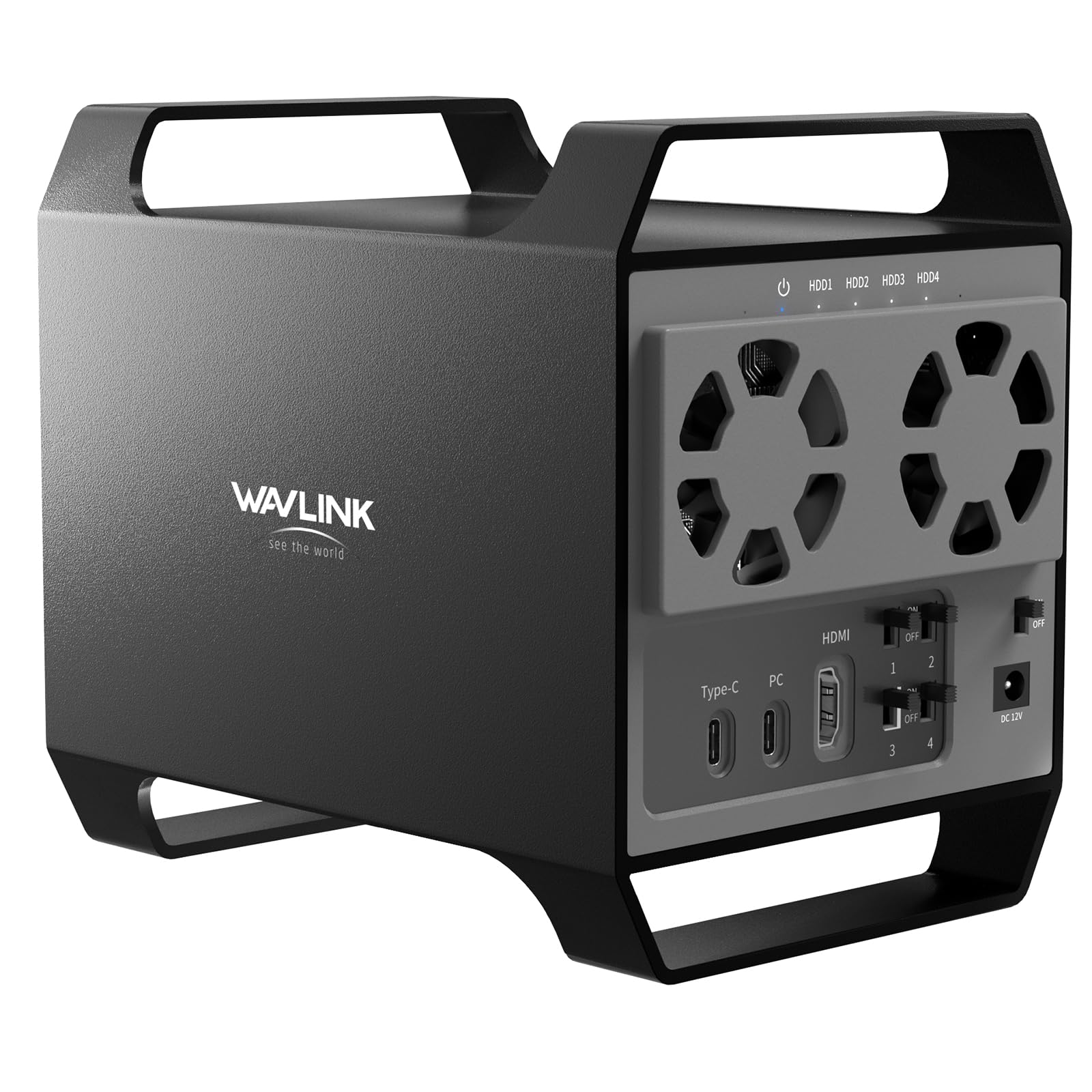
There is a 4K HDMI port on the back of this enclosure, and that is the honest reason to consider it over the TerraMaster. One cable to a laptop gets you four drive bays, an extra USB-C port for peripherals and a display output, which is a dock and a DAS in the same aluminum shell.

The storage side stands on its own: four bays, 128TB in total, USB 3.2 at 10Gbps, dual fans, and an individual power switch per bay so the box can idle with two drives dark. Hot-swap works as it should, and the drives sit snug in the bays.

Where it earns its place is a laptop-only desk, where one cable for four drives and a monitor is genuinely tidy and the per-bay switches save power on days you only need the archive. Behind a desktop that already has a display output and a hub, those ports sit unused and add another device to debug when a drive misbehaves.

Two practical notes. At 2.4 pounds with an external power brick it is furniture rather than something you move around. And with four drives behind one bridge board, keep an independent copy of anything irreplaceable — the more a single board serves, the more a failure costs.

Pros

  • Four bays with individual power switches
  • 10Gbps USB-C plus a 4K HDMI output
  • Aluminum shell with dual fans
  • 128TB total capacity

Cons

  • Dock ports you may never plug in
  • Heavy at 2.4 pounds, with a power brick
Our verdict

Worth it only if a laptop desk wants one cable for drives and a monitor; otherwise a plain four-bay box does the storage job with less to troubleshoot.

Check Latest Price
8

Loose-Drive Recovery

ClavoOp Lay-Flat Enclosure

86 /100
Keeper Score Excellent

Key details

Power
12V/2A adapter included
Interface
USB 3.0, 5 Gbps, UASP
Max Capacity
20TB
Drive Support
2.5 and 3.5-inch SATA
Check Price on Amazon

Most enclosures here hold a drive in a tray or a sleeve. This one lays it flat in a vented ABS shell with a circle of holes over the top and four rubber pads underneath — the shape you want for a bare drive that gets plugged in, read from and put away again.

It takes both sizes in the same slot: a 3.5-inch desktop drive or a 2.5-inch SSD, up to 20TB, running off the included 12V/2A adapter with UASP over USB 3.0. The listing quotes read speeds up to 336 MB/s, and sponge pads inside press the drive down so it does not rattle against the shell.

One behavior to know before you buy: the box parks an idle drive automatically. That suits a recovery session where you plug in, copy and unplug; it suits less well if something on the other end expects the volume to stay awake all evening. A single LED shows power and activity, and there is nothing to install.

What we like most is that it treats a loose drive like a drive rather than a component: drop it in, close it, read it, pull it. The plastic is the trade — this is a case for a shelf, not for a bag with a laptop, and a 3.5-inch disk with no fan of its own will run warm through a long copy. For a one-off rescue or a shuttle disk between two offices, those are the right compromises.

Pros

  • Takes 2.5 and 3.5-inch drives in one slot
  • Vented shell with anti-shock pads
  • 12V/2A adapter and UASP included
  • 20TB capacity ceiling

Cons

  • Plastic shell is not built for travel
  • Passively cooled, so a 3.5-inch drive runs warm
Our verdict

The pick for reading loose drives rather than storing one: it swallows 2.5 and 3.5-inch disks in one vented, padded, lay-flat case and stays on the shelf.

Check Latest Price

How We Tested 12 Hard Drive Enclosures

We started with every enclosure that met three basics: a proper SATA connection, UASP support, and a price that beats buying a new external drive. That left 12 units across four shapes — single-bay 2.5-inch boxes, powered 3.5-inch docks, and three- and four-bay towers — which we ran for eight months.

Every one got the same first test: a bare drive and no tools. We timed opening the case, seating the drive, and closing it again, and noted which latches felt like they'd snap by the fifth swap. Then the drive stayed in for weeks, which is where build quality shows — trays that rattle, feet that slide, connectors that loosen after a dozen cable pulls.

For speed, we pushed the same 40GB folder of video through each enclosure, then repeated it with an SSD to see which ones were capped by the bridge board rather than the disk. We pulled cables mid-transfer, left backups running overnight to catch drives that drop off the bus when a laptop sleeps, and ran the powered units beside my desk and then beside the bed to hear how loud the fans really get and feel which shells ran warm after an hour. Along the way we loaded decade-old drives, swapped bays with the power on, and mounted each unit on both macOS and Windows without reformatting.

How to Choose a Hard Drive Enclosure

Start with the drive, not the enclosure

A 2.5-inch SATA drive fits a small, bus-powered case; a 3.5-inch desktop drive needs a bigger box and its own 12V supply. Nothing here takes an M.2 stick, NVMe or SAS, so look at the connector before you shop: two separate L-shaped SATA connectors mean you are in the right aisle, a bare circuit-board stick means you are not.

Also read the label for thickness and capacity. Laptop drives come in 7mm and 9.5mm, and most trays accept both, but ceilings vary widely across this set, from 6TB on the Benfei to 22TB on the Sabrent EC-KSL3.

Power and ports decide where it can live

A 2.5-inch enclosure draws everything from the USB port, so it travels. A 3.5-inch or multi-bay box needs a wall outlet, which is the difference between a bag accessory and a piece of furniture. Check the host side too: several enclosures here ship a USB-A cable only, and a laptop with nothing but USB-C ports needs an adapter or the Benfei, which includes both.

USB 3.0 at 5Gbps is the floor and is ample for any spinning disk. The 10Gbps boxes only pull ahead with SATA SSDs, and only when the computer's port supports the same speed.

Bays, RAID and what a DAS really does

Multi-bay enclosures here are direct-attached storage: each drive appears as its own volume and the computer, not the box, decides what lives where. There is no RAID controller and no network port, which makes them cheaper and simpler than a NAS but also means one shared USB link carries every bay at once.

Buy one more bay than you need today. Adding a bare drive later is easy; replacing a full enclosure is not.

Cooling, noise and the room it sits in

Drive heat shortens life, so aluminum bodies and real fans matter in multi-bay boxes. The trade is sound: Cenmate tells you its fan runs at 40 to 50 decibels, and that is audible in a quiet study but invisible under a desk in a busy room. A single-drive case has no fan at all, which is why it belongs in a bedroom and a four-bay box usually does not.

Put any of them on a hard surface with the vents clear, and never stack two enclosures.

Install method, warranty and the part that fails

Tool-free trays and snap lids are the difference between swapping a drive in ten seconds and hunting for a screwdriver; screws are more secure but slower, as the GODO reminds you. The failure that matters is never the shell — it is the bridge board inside, which is why warranty length (three months to two years across this group) is worth checking and registering.

Whatever you buy, treat the enclosure as one copy of your data rather than the copy.

Frequently Asked Questions

Final Verdict

For most people the answer is the Sabrent EC-UASP. If you are holding a 2.5-inch drive and have no strong opinion about enclosures, this is the least fuss for the least money, and it disappears into a laptop bag.

Step up to the Sabrent EC-KSL3 when the drive is a 3.5-inch desktop model or the case will be carried around. And when several drives need to be online at once, the TerraMaster D4-320 is the one we point to: 10Gbps USB-C, four tool-free trays and a fan that only wakes up when the drives warm.