Best Cameras for Streaming of 2026

I swapped my laptop's built-in camera for a real webcam a couple of years ago and never went back — the difference on the other end of the call was obvious within one meeting. Built-in cameras sit too low and pick up the whole room instead of you; a good external one goes where you put it, handles a dim home office far better, and treats your voice as something worth capturing.

My team and I have spent the past six months living with 12 of them, clamped to monitors and threaded onto tripods through real workdays, client calls, and evening streams. Picture quality came first — skin tones, motion, how fast autofocus recovered — then setup time, how the mic handled an echoing room, and whether the mount survived a bumped desk.

The spec sheet won't tell you this, but a 4K label means very little if the sensor behind it is small, since that's what decides whether you look crisp at 8 p.m. under a single lamp. Auto-framing and gesture controls are the other upgrades genuinely worth paying for, and the picks below are the ones that got both right.

Keeper Score summarizes customer ratings and review volume. Read it alongside the product details and trade-offs. How the score works.

1

Best Overall

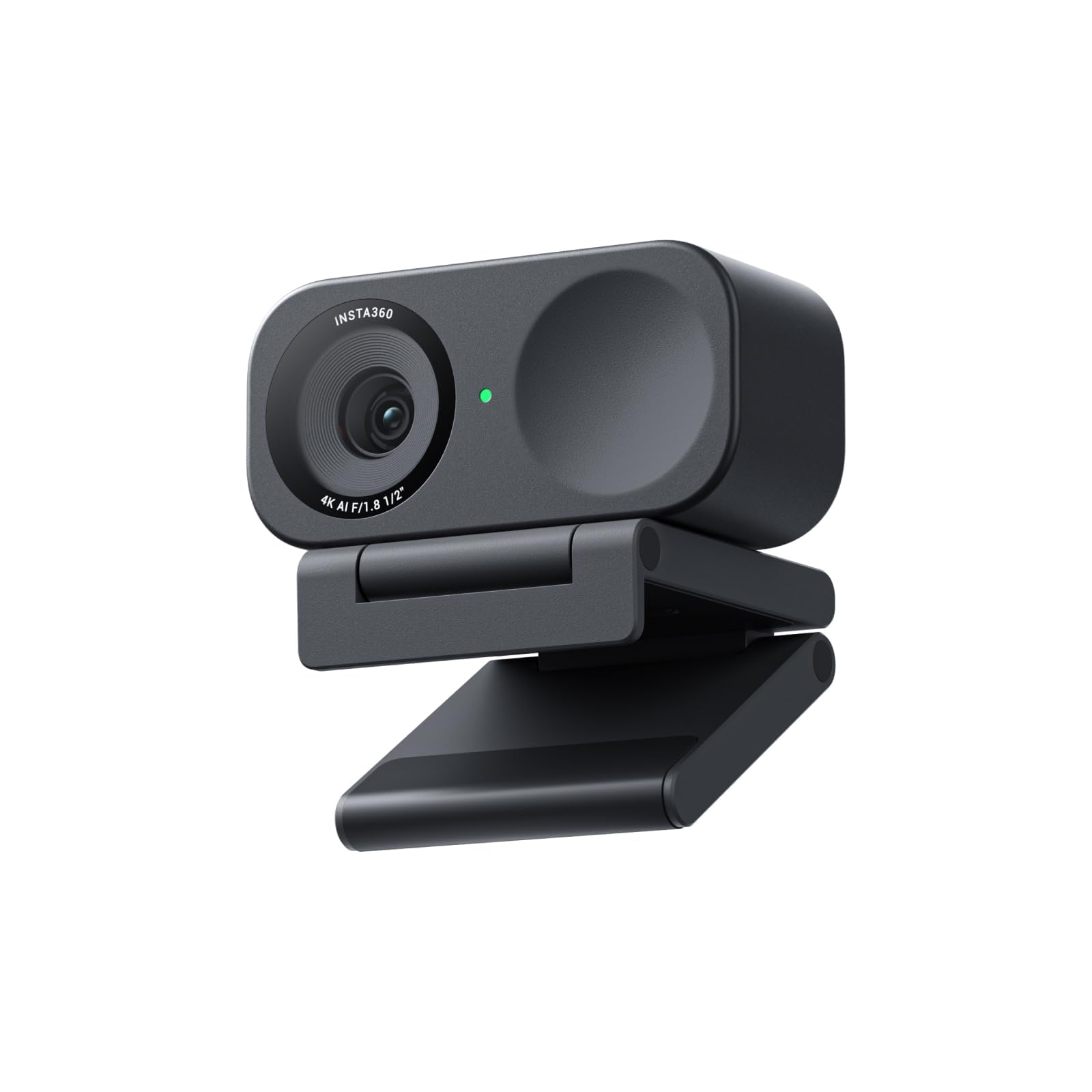
Insta360 Link 2

91 /100
Keeper Score Outstanding

Key details

Sensor
1/2-inch
Tracking
AI pan and tilt
Connection
USB-C
Max Resolution
4K UHD
Check Price on Amazon

A streaming camera has one job it cannot fail: keeping your face where the viewer expects it. The Link 2 does that with a motor — the head pans and tilts to follow you across the room — and we prefer a moving lens to the software cropping that most cameras call tracking, because a crop throws away the edges of your frame and the light that was in them. Sit still for an hour and you won't notice. Stand up to demonstrate something, and it is the entire reason to own this camera.

The rest of the package is why it's our top pick rather than just the cleverest thing here. A 1/2-inch sensor with HDR carries a room that has a bright window behind you, and phase-detection autofocus locks onto a box you hold up instead of hunting through the background. DeskView, the bokeh effect, and manual framing all come out of the Link Controller app, so set aside a few minutes before your first stream to find them.

Two things to know. The camera parks with its lens tilted down, and it can stay aimed at your desk until you reopen the app. The price also puts it level with the MX Brio and above everything else on this list, which only makes sense if your stream actually has movement in it.

That's the honest split. For a seated desk stream, the Link 2C does the same sensor and the same 4K for less. For anyone who stands, gestures, or walks a demo across the room, this is the camera the rest of the group gets measured against.

Pros

  • Motorized head keeps you framed while you move
  • 1/2-inch sensor with HDR for backlit rooms
  • Phase-detection autofocus holds on held-up objects
  • Magnetic mount and USB-C with an A adapter

Cons

  • Privacy tilt can leave the lens aimed at your desk
  • Early failures make an easy return window worth having
Our verdict

We recommend the Link 2 to anyone whose stream involves movement: the motor keeps you framed, and the 1/2-inch sensor holds up in a dim room.
Check Latest Price
2

Best If You Sit Still

Insta360 Link 2C

89 /100
Keeper Score Excellent

Key details

Sensor
1/2-inch
Framing
Auto framing
Connection
USB-C
Max Resolution
4K UHD
Check Price on Amazon

Take our top pick, remove the motor, and you have the Link 2C: the same 1/2-inch sensor, the same 4K and HDR, the same AI noise-canceling mic and magnetic mount, for noticeably less money.

For a stream that happens in one chair, that is the better trade, and we rate it the smarter buy for a solo desk setup. Auto framing zooms and reframes to keep you, or a couple of people, in shot, which is all a seated streamer needs. What it can't do is follow you out of frame, because nothing physically moves. If you stand up on stream, pay for the gimbal. If you don't, you're buying a motor you'll never use.

The sensor is the part worth paying for. At 1/2 inch it matches the Link 2, and with HDR it holds color in a room lit by a lamp and a monitor instead of going muddy. Setup is plug-and-play on PC and Mac, the magnetic mount sits on a monitor or a laptop lid, and there is a cover for the lens when the call is over.

One habit worth forming: open the Link Controller app before you start, because portrait mode, DeskView, and whiteboard are switched there rather than in Zoom or OBS. Leave auto framing on for a solo stream and turn it off for a two-person one, or the camera will keep re-cropping while you talk.

Pros

  • Same sensor, 4K, and HDR as our top pick
  • Auto framing covers a seated solo stream
  • Magnetic mount sits on a monitor or laptop
  • Cheaper than the camera it is based on

Cons

  • No physical tracking; the frame is set by software
  • Priced above the budget 4K cameras here
Our verdict

This is the one we hand to streamers who never leave the chair — our top pick's sensor and 4K, minus the motor.

Check Latest Price
3

Best for Image Control

Logitech MX Brio

88 /100
Keeper Score Excellent

Key details

Mount
Clip with removable adapter
Microphones
Dual beamforming, noise-reducing
Image Controls
ISO, shutter speed, tint, vibrance
Max Resolution
4K at 30fps or 1080p at 60fps
Check Price on Amazon

The MX Brio is the only camera here that hands over the controls a photographer expects: ISO, shutter speed, tint, and vibrance, adjusted in Logi Options+ instead of hidden behind an auto switch. For a stream that happens in the same room at the same hour every night, that is worth more than another megapixel — you set the look once and stop fighting auto exposure every time you lean toward the lamp.

It shoots 4K at 30fps or 1080p at 60fps, and for streaming the second number is the one to remember: 60 frames per second keeps hand gestures and game footage smooth in a way 4K at 30 cannot. Show Mode tilts the camera down to present a desk or a sketchbook, and the dual beamforming mics suppress room noise well enough to skip a headset on a casual stream.

The weight is the catch that rarely makes it into the specs column. At 13.12 ounces it is the heaviest camera in this group, and clipped to a thin laptop lid it droops forward; the mount clip has a removable adapter, and on a monitor or a desk stand it holds its angle. Plan on a stand if your screen is slim.

The choice between this and the Link 2 comes down to temperament. If you want the camera to make the decisions, buy the Insta360. If you want to make them yourself, and you're willing to spend one evening learning what shutter speed does to your face, the MX Brio gives you a look nothing automatic in this group can match.

Pros

  • Manual ISO, shutter, tint, and vibrance control
  • 1080p at 60fps for smoother motion
  • Show Mode tilts down to present a desk
  • Dual beamforming noise-reducing mics

Cons

  • No Windows Hello sign-in
  • Priced level with our top pick, without tracking
Our verdict

Buy the MX Brio if you want to set exposure and color once and stop thinking about it; the weight is the part to plan around.

Check Latest Price
4

Best Budget 4K

EMEET NOVA 4K

90 /100
Keeper Score Outstanding

Key details

Mount
Stand and 1/4-inch thread
Autofocus
PDAF, 7.9 to 118 inches
Field Of View
73 degrees
Max Resolution
4K at 30fps
Check Price on Amazon

Real 4K for less than any other 4K camera here is the headline, and it's why the NOVA is the first camera we point budget shoppers toward. The 73-degree view covers a desk and a chair without squeezing you into the middle of the frame, and the privacy cover is built into the body rather than clipped on and lost by the second week.

The detail that decides whether it suits you is focus. Autofocus is phase-detection and works between roughly eight inches and ten feet, with no manual focus to fall back on, and that shapes how you use it: a face at a desk is easy, while a small object held to the lens needs to be moved back to about a foot before it sharpens. For talking-head streaming the range is generous. For show-and-tell it sets the rules.

The mount beats the price. A universal joint gives 360 degrees of horizontal rotation and a little vertical tilt, the folding stand sits on a monitor, and a standard quarter-inch thread underneath takes a tripod when you want the camera off the screen entirely. For a cheap camera it is the part that feels considered.

Two years of warranty is as long as anything here offers, which counts for something on a budget buy, and setup is one USB-A cable with no driver to install. It's the pick for a first stream, a second angle, or a desk where the camera is going to get knocked around.

Pros

  • True 4K for the least money in this group
  • Wide 73-degree view covers a desk
  • Tripod thread and 360-degree swivel
  • Two-year warranty and driver-free setup

Cons

  • No manual focus to fall back on
  • Built-in mics are call-grade only
Our verdict

The 4K camera we point budget-minded streamers to first, provided you hold anything you want sharp about a foot from the lens.

Check Latest Price
5

Wide Framing

Logitech Brio 4K

93 /100
Keeper Score Outstanding

Key details

Connection
USB 3.0
Frame Rate
Up to 90fps
Field Of View
90, 78, or 65 degrees
Max Resolution
4K UHD
Check Price on Amazon

Three field-of-view presets — 90, 78, and 65 degrees, switched in Logi Tune — is a trick nothing else in this group offers. A wide 90 for two people on a couch, a tighter 65 when you want the frame on your face: it's the closest thing here to carrying three lenses in one body.

The rest is a 2017 flagship that refused to retire. 4K at 30fps, up to 90fps at lower resolutions when you want smoother motion, dual noise-canceling mics, and a USB 3.0 connection. For a meeting or a straightforward stream it still does the job without complaint.

What it no longer does is lead. The sensor is older than the Insta360 pair's, the design dates to 2017 — the listing says so itself — and the price hasn't fallen as far as the technology has. What keeps it on this list is the framing flexibility: if you share a desk, or want a wide shot without buying a gimbal, nothing else here switches views the way this does.

Buy it as a second camera for a second desk, or as the wide option for a couch stream. As the only camera on a brand-new setup, the newer picks above are the better spend.

Pros

  • Three switchable fields of view
  • Up to 90fps for smoother motion
  • Dual noise-canceling microphones
  • USB 3.0 connection

Cons

  • Long-run reliability is the weak spot
  • Windows Hello sign-in is unreliable
Our verdict

Worth buying for its three switchable views, as long as you accept an older sensor and an uncertain long-run reliability record.

Check Latest Price
6

Tight Budgets

EMEET C960

88 /100
Keeper Score Excellent

Key details

Focus
Fixed
Connection
USB-A with USB-C adapter
Field Of View
90 degrees
Max Resolution
1080p
Check Price on Amazon

Ninety degrees is the widest view in this group, and it changes what a cheap camera can do: two people at one desk fit, a whiteboard fits, and the room behind you fits. The C960 is the least expensive camera we recommend, and the wide lens is the whole reason it's here.

The trade for that width is that you are small in your own frame. At desk distance the camera sees your chair, your wall, and a fair amount of ceiling; crop into the middle in OBS or sit closer and it looks like a normal webcam shot. Focus is fixed, which means everything from about arm's length out is sharp — fine for a face, useless for reading a label to camera.

For the money, this is the least fussy camera here. It plugs into USB-A, comes with an adapter for USB-C laptops, and appears in Zoom, Teams, and OBS without a driver. Auto light adjustment keeps a dim corner from turning you into a silhouette, and the privacy cover means you can leave it mounted between streams.

The compatibility list is narrower than the price implies: Windows 10 and 11, recent macOS, and Android TV, with Windows Hello explicitly out and some Apple laptops proving fussy in practice. Check that against your machine first. On a plain Windows or Mac desktop it has been plug-and-play.

Pros

  • 90-degree view fits two people or a room
  • Driver-free plug-and-play with a USB-C adapter
  • Automatic light adjustment for dim rooms
  • Privacy cover included

Cons

  • Fixed focus rules out close-up detail
  • Built-in mic is call-grade only
Our verdict

The cheapest camera here, and the one we suggest for a first stream or a second angle, provided you don't need close-ups.

Check Latest Price

How We Tested a Dozen Cameras for Streaming

I started with the cameras that turn up again and again in streaming and remote-work setups, then filtered by what the listings actually claim: sensor size, top resolution and frame rate, autofocus type, field of view, mic array, and what mounting hardware comes in the box. I also checked each maker's software against the platforms people really use, and deliberately spread the final dozen across price bands instead of clustering at the top.

Twelve cameras spent six months on my desk. Each one got at least a week as my daily camera — morning standups, afternoon client calls, evening streams — and I mounted every one three ways: clamped to a monitor, on a shelf above eye level, and on a small tripod. I timed the first setup on a fresh laptop, noted whether it worked before I installed anything, and recorded a test clip with each mic beside a running fan and a dishwasher to hear how much of the room bled in.

Picture quality got the closest look. I sat under a single lamp, then beside a window at 4 p.m., comparing skin tones and how much grain showed in the shadows, and I walked out of frame to see whether tracking followed me or held still. I leaned in with a document to watch autofocus hunt and recover, waved a hand to find out what the gesture controls actually triggered, and bumped the desk to see if the mount slipped. Each camera stayed connected for weeks so I could catch dropouts mid-call, settings that reset after a reboot, and whether the extras were worth the step up in price.

How to Choose a Streaming Camera

Spend on light handling before resolution

Most streaming happens after dark, in a room lit by a lamp and a monitor, and that is where the money belongs. A larger sensor with HDR, like the 1/2-inch chips in both Insta360 cameras, keeps detail in a bright window behind you instead of blowing it out. Resolution buys cropping room, not brightness: 4K gives you somewhere to crop, while the light in the room decides whether the picture is any good.

If your room is dim, a lamp aimed at your face will do more for the picture than a step up in resolution. Budget for the light first and treat the extra pixels as a bonus.

Work out how much framing control you need

A fixed lens, a digital zoom, a motorized head, and a handheld remote each solve a different problem. A 73- or 90-degree fixed lens is right if you sit still and want your desk in shot. Digital zoom crops into the sensor, so you lose the edges of the frame and some of the light with them. A gimbal physically turns the camera, which is what you need if you stand, gesture, or walk through a demo.

Match the mechanism to how much you move, and don't pay for tracking you won't use. This is the single biggest price difference between the cameras here.

Plan where the camera will sit

The monitor clip is the default mount and often the weakest part of the package. Heavy cameras droop on a thin laptop lid, and one that swivels only up and down gets aimed by moving the screen. Check the weight before you hang anything off a laptop, and look for a quarter-inch thread if you want a tripod or a desk stand.

The mount is the part you live with every day, long after you stop thinking about the sensor.

Check software and platform support first

Nearly every camera here keeps its best features in a desktop app — Link Controller, Logi Options+, Logi Tune, EMEET STUDIO — and the apps are not equally steady. Windows Hello face sign-in, console support, and older operating systems are the usual casualties, so check the supported list against your machine before you order.

Then install the app and run a five-minute recording in OBS or your streaming software. If the feature you paid for doesn't appear there, you have found out in time.

Frequently Asked Questions

Final Verdict

For most people, the Insta360 Link 2 is the camera to buy: the gimbal keeps you framed when you stand up or step back, and the 1/2-inch sensor handles a room with a window in it. The EMEET NOVA 4K is the budget answer — real 4K and a tripod thread for the least money here, as long as you keep subjects a foot from the lens.