Best 360 Conference Cameras of 2026

The appeal of a 360 conference camera is easy to explain: one device in the middle of the table, a lens facing every direction and a ring of microphones, so the people on the other end see and hear whoever is talking instead of staring at somebody's forehead. What separates a good one from a frustrating one has almost nothing to do with resolution, which is the number most shoppers compare and the one that matters least. It's how fast the camera finds a new speaker, and whether the microphone picks up the person at the far end of the table or just the air handler overhead.

Over the past nine months I've sat through meetings with eight of these cameras — huddle rooms, a long boardroom table, a training session where people kept getting up to write on a whiteboard. The laggards were obvious within ten minutes: the far end watches an empty chair while someone finishes a sentence. Audio separated them even faster than video did, which is not how most buyers shop. The eight that made the cut are below, sorted by the kind of room they actually suit.

Keeper Score summarizes customer ratings and review volume. Read it alongside the product details and trade-offs. How the score works.

1

Best Overall

Meeting Owl 3

86 /100
Keeper Score Excellent

Key details

Tracking
Automatic speaker focus
Mic Pickup
Up to 18 ft (5.5 m)
Connectivity
USB; Wi-Fi
Video Resolution
1080p
Check Price on Amazon

Ask anyone who has sat through a hybrid meeting in the last few years and the Owl is probably the device they picture: a dark column in the middle of the table with a light ring that swings toward whoever is talking. Using the Meeting Owl 3 makes that reputation legible. Power and USB-C go in, Teams or Zoom opens, and the room is on the call without a driver, a remote, or anyone standing over a laptop.

The specification that earns its keep is the audio reach, 18 feet or about 5.5 meters, which covers the far end of a long boardroom table rather than just the three people nearest the device. The Owl Intelligence System reads voices and faces together, cuts to the active speaker, and leaves a strip of the whole room at the top of the frame so remote attendees can see who is leaning in.

Picture quality is where we part ways with the premium. This is a 1080p camera, and beside the 4K units here the faces at the back of a big room go soft. In a room where most of the agenda is a screen share you will not notice; on a client pitch pushed to a large display you will.

What sold us is the growth path. Add a second Owl, an Owl Bar, or an Expansion Mic and the same device covers more space without a new platform to learn, and the whole fleet is manageable from one dashboard. It is certified for Microsoft Teams and behaves with Zoom and Google Meet.

The premium is real, and it buys reliability and room to grow rather than sharpness. For a space that six different teams book every week, that trade is the right one.

Pros

  • 18-foot pickup reaches the far end of a table
  • Plug-and-play setup measured in minutes
  • Expands with a second Owl, Owl Bar, or Expansion Mic
  • Certified for Microsoft Teams

Cons

  • 1080p sensor trails the 4K picks here
  • Needs its own AC adapter at the table
Our verdict

We put the Meeting Owl 3 first because it turns a room into a working hybrid meeting in minutes and grows with the space; the 1080p picture is the one compromise.

Check Latest Price
2

Best Value for 4K

Coolpo Pana 360

81 /100
Keeper Score Excellent

Key details

Tracking
AI voice tracking
Microphones
8 omnidirectional
Connectivity
USB
Video Resolution
4K
Check Price on Amazon

Four thousand ninety-six pixels across is the number that gets this camera noticed, and in decent light it is not marketing. Faces separate better than on the 1080p units here, the eight-mic array picks up a normal speaking voice from across a mid-size table, and the tracking follows whoever is talking rather than parking on the widest possible view. The digital zoom lets you push toward a whiteboard when someone stands up to draw, though it softens as it goes.

We like how little it asks of the room. It is USB plug-and-play on Windows and Mac with no software to install, and the AI runs on the device rather than in a cloud service, which settles a lot of IT questions before they are asked. Sound is the quiet strength: clear, loud enough for eight to ten people, and steady at the volume where conference audio usually starts to break up.

Two things to know. The 4K sensor is only as good as the light you give it, and a dim corner room flattens the image badly with no setting to rescue it. It can also be particular about which USB port it is plugged into, so try the connection on your own room PC before the mount goes up.

Pros

  • 4K capture with a clean eight-mic pickup
  • On-device AI keeps processing local
  • Plug-and-play on Windows and Mac
  • Loud, clear speaker for mid-size rooms

Cons

  • Image quality depends on good room lighting
  • Zoom is digital only
Our verdict

We point buyers at the Coolpo when they want 4K without Owl money: it reads faces across a mid-size table and sounds strong, provided the room is well lit.

Check Latest Price
3

Best Standalone Setup

KanDao Meeting Pro

80 /100
Keeper Score Excellent

Key details

Speaker
5W
Microphones
8 omnidirectional
Connectivity
USB, HDMI, Wi-Fi
Video Resolution
1080p
Check Price on Amazon

Most of the cameras here need a computer to be the computer. The KanDao Meeting Pro does not. There is a built-in Android system, so a call can run from the device itself with a monitor on HDMI and nothing else in the room, which is the difference between a huddle space that works for six different teams and one that needs a visit from IT every Monday.

Around the table it is equally self-contained: two 195-degree lenses stitch into a full 360 view, eight omnidirectional mics feed a 5W speaker, and five modes cover what actually happens in meetings. Presentation mode is the useful one, holding the frame where you put it instead of hunting for a face while somebody is pointing at a chart.

What we appreciate most is that the standalone mode is not a gimmick bolted onto a webcam. Local recording to microSD is there for teams that cannot put meeting video on someone else's cloud, and when you do plug it into a laptop over USB it behaves like any other 360 camera in Zoom or Meet.

The ceiling is resolution: 1080p is where this one stops, and the 4K picks will look sharper on a big display. At 1.8 kg it is also a fixture rather than something you carry between rooms. Neither matters if the room it lives in is the room that needed rescuing.

Pros

  • Runs standalone on built-in Android
  • Eight mics and a 5W speaker
  • Five modes with a presentation lock
  • Records locally to microSD

Cons

  • 1080p is the resolution ceiling
  • 1.8 kg unit stays in one room
Our verdict

We recommend the KanDao for rooms that should not depend on a laptop: it runs its own software, covers the table with eight mics, and gives up only resolution.

Check Latest Price
4

Best for Large Rooms

Meeting Owl 4+

84 /100
Keeper Score Excellent

Key details

Mic Pickup
Up to 18 ft (5.5 m)
Connectivity
USB, Wi-Fi, PoE
Room Expansion
Pairs with a second Owl
Video Resolution
4K
Check Price on Amazon

The Owl 4+ costs about twice what the Owl 3 does, and for plenty of rooms that settles the argument. Where the extra money goes is the sensor and the install kit: this is a 4K Owl, the faces at the back of a long table hold up when the far end puts the call on a big screen, and the details around it, power over Ethernet and a built-in Kensington lock and enterprise Wi-Fi, are the ones that decide whether a device survives a shared floor.

It is also a different shape. The 4+ is a compact cube rather than the tall column of the Owl 3, which makes it easier to sit under a display or on a shelf, and at 800 g it is light enough to mount without a contractor.

The intelligence is the same system: 18 feet of pickup, automatic speaker focus, noise equalizing that keeps a rattling vent out of the call, and the option to pair a second Owl or an Owl Bar when one unit cannot cover the room. We noticed the upgrade almost entirely in the video, which is the right place for it.

The trade is straightforward and expensive. You are paying a premium for sharper faces, and if your remote attendees mostly look at slides the Owl 3 does the same job for a lot less. If they are looking at people across a twelve-seat table, this is the one that holds up.

Pros

  • 4K picture holds up across a long table
  • Power over Ethernet and Kensington lock
  • Same 18-foot pickup and speaker focus
  • Pairs with a second Owl or Owl Bar

Cons

  • The most expensive unit here
  • More camera than a huddle room needs
Our verdict

Our pick for boardrooms: the Owl 4+ keeps the plug-and-play Owl experience and adds the 4K detail a large room needs, at a price only heavy use justifies.

Check Latest Price
5

Best Budget All-In-One

TOUCAN SC360

81 /100
Keeper Score Excellent

Key details

Speaker
Built-in Bluetooth speaker
Microphones
4 noise-reduction mics
Connectivity
USB; Bluetooth
Video Resolution
1080p
Check Price on Amazon

Setting the TOUCAN on the table is the whole installation. The column comes up, the room appears in the preview, all of it, with the current speaker centered, and nobody has to think about where to point anything. Four microphones cover a normal meeting table, and because the speaker is built into the housing you do not need a separate conference phone to hear the far end.

The cabling is as simple as it gets: USB-C into the camera, USB-A into the computer, and Zoom, Teams, or Google Meet picks it up as a camera, mic, and speaker. For a small team without an IT department, that is most of the value right there.

The compromises land where the price shows. Video is 1080p and looks it once the room stretches out, and the audio controls sit on the camera body rather than the laptop, so during a call you reach for the unit. For the money, the built-in speaker earns its place before a sharper sensor does, and that is the trade this one makes.

It is a chunky thing at 1.28 kg, with a footprint that wants the middle of the table. Fine for a room it never leaves; not the one to carry to a client site.

Pros

  • 360 camera, four mics, and a speaker in one
  • USB-C to USB-A plug-and-play
  • Speaker tracking keeps the talker centered
  • One of the cheaper all-in-ones here

Cons

  • 1080p video gets soft in larger rooms
  • 1.28 kg unit stays put
Our verdict

For a small room on a tight budget, this is the one we hand people: 360 video, mics, and a speaker in a single box, with a 1080p picture that suits huddles.

Check Latest Price
6

Best for Big Tables

NexiGo Meeting 360

80 /100
Keeper Score Excellent

Key details

Speaker
Dual 10W speakerphones
Mic Pickup
Up to 18 ft
Microphones
8 omnidirectional
Video Resolution
8K capture, 1080p output
Check Price on Amazon

Eight microphones and a pair of 10-watt speakers is more audio hardware than anything else in this set, and it is the reason to consider this one at all. In a long room, voices from the far end of the table still arrive clearly, and the far end's audio fills the space without anyone adding a soundbar.

The camera side is a pair of 195-degree lenses that capture a full 360 view and output a split 1080p image, with AI framing and speaker tracking doing the cutting. Capturing at 8K and handing the meeting app 1080p sounds like a mismatch, and in practice it is: you get a clean, stable picture rather than a detailed one.

Build is the other thing you notice. This is a 2.24 kg cylinder with a stable footprint, and once it is on the table it stays exactly there, which is an asset in a permanent room and a liability if the camera has to move. One habit worth forming: speak toward the unit, because a person turned away from it at a whiteboard comes through thinner than someone facing it.

What tips it against the Coolpo and the Owl 3 is the audio margin. If your room is wide and quiet voices get lost, the extra microphones and watts are worth more than extra pixels, and nothing else here gives you as much of either.

Pros

  • Eight mics rated to 18 feet
  • Dual 10W speakers fill a large room
  • AI framing and speaker tracking built in
  • Heavy base stays exactly where set

Cons

  • 1080p output despite 8K capture
  • 2.24 kg unit stays in one room
Our verdict

For a fixed, long conference table we reach for the Meeting 360: the eight-mic array and dual speakers carry a room that cameras alone cannot.

Check Latest Price
7

Best for Travel

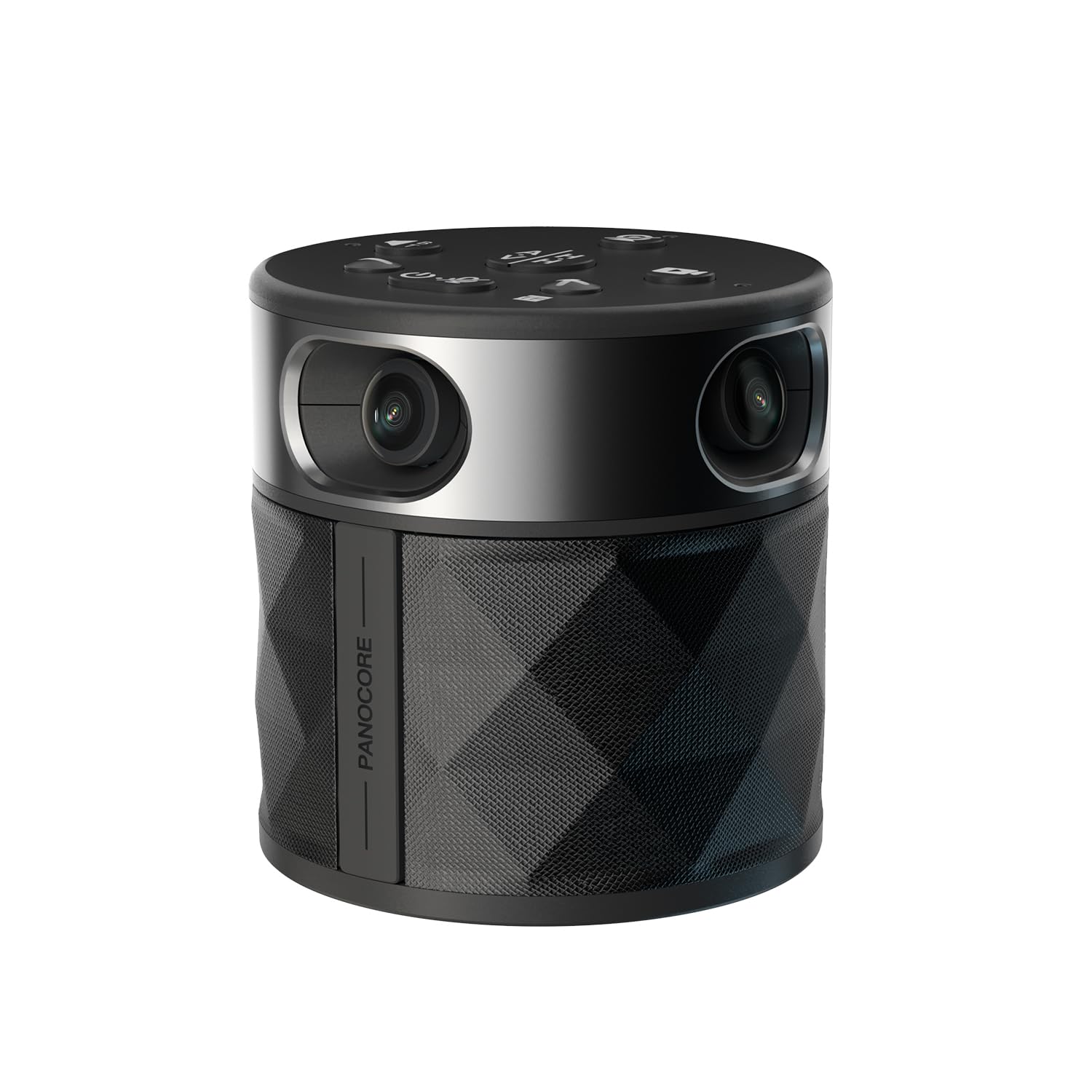
PANOCORE360

78 /100
Keeper Score Very Good

Key details

Weight
10 oz
Mic Pickup
Up to 10 ft
Microphones
3-mic array
Video Resolution
1080p
Check Price on Amazon

Ten ounces, three inches across, and a USB-C cable: of everything here, this is the one that leaves the building. That is the whole case for the PANOCORE360, and it is a good one, because a client office, a borrowed conference room, or a desk that becomes a meeting room at four o'clock all get 360 coverage without a site visit or an install ticket.

Setup is the other half of it. Four cameras and a three-mic array arrive ready to go, the dual-vision modes let you choose between a 360 panorama and two 180-degree halves, and it runs from a standard 5V USB port or the adapter in the box. For the twelve-person room it is built for, the framing is genuinely useful rather than decorative.

The limits are honest at this size. Audio pickup is rated to ten feet, roughly half the Owls, so it is a huddle camera and not a boardroom one, and the output is 1080p. In the rooms this is meant for, neither costs you anything.

The tripod in the box matters more than it should: nobody is taping the camera to the top of a monitor, and the unit can sit at seated eye level wherever you land.

Pros

  • Ten-ounce body travels between rooms
  • 360 and dual-180 view modes
  • Camera, tripod, and cables in the box
  • Powered from a laptop USB port

Cons

  • Ten-foot mic pickup limits it to small rooms
  • 1080p output only
Our verdict

The PANOCORE is our pick for teams who move between rooms: light, USB-powered, and built for up to twelve people, with audio reach that suits huddles.

Check Latest Price
8

Remote-Controlled Framing

j5create JVU368

80 /100
Keeper Score Excellent

Key details

Weight
2 lb
Controls
Included remote
Microphones
Omnidirectional
Video Resolution
1080p
Check Price on Amazon

A remote control and a detachable travel case are not the features that sell a conference camera, but they change how one gets used: frame, switch views, and mute from your seat instead of walking back to the laptop, and the case means the lens arrives uncrated. The JVU368 ships with both.

What tips it for us is the combination rather than any single number. A 1080p 360 camera with AI auto-framing and participant detection, a speakerphone with noise cancellation, and a hand-held remote add up to a complete small-room system that packs into a bag, and it is plug-and-play over USB with Zoom, Teams, and Meet.

The 2.1 MP sensor behind that 1080p picture is the limiting factor: fine for faces at meeting distance, not the camera for archiving an event. At 2 lb it is light enough to move and heavy enough to stay where it is put.

Pros

  • Remote control for framing and mute
  • Built-in speakerphone with noise cancellation
  • AI auto-framing and participant detection
  • Ships with a detachable travel case

Cons

  • 1080p picture from a 2.1 MP sensor
Our verdict

We like the JVU368 for rooms where someone controls the shot by hand: a remote, a speakerphone, and 360 framing in a package that travels.

Check Latest Price
9

Tight Budgets

j5create JVCU360

85 /100
Keeper Score Excellent

Key details

Dimensions
1.46 x 3.68 x 7.6 in
Microphone
Built-in omnidirectional
View Modes
Six
Video Resolution
1080p
Check Price on Amazon

There is no speaker in this one and no speaker tracking either, so if you want a single box that handles the whole room, the other picks here are the ones to read. What the JVCU360 does is put a full 360 view of the table on the call for the smallest outlay in this set, with a fixed-focus lens and a weighted base that stays exactly where you put it.

Six view modes are what we ended up using. A full-room panorama, a split host view, a single view, and a wide-angle mode give you an answer to the whiteboard question without moving the camera, and the touch bar on the body switches between them.

Picture quality is the compromise, and it is worth being clear-eyed about. This is a 2 MP sensor outputting 1080p, and in a dim room the image goes soft; in a bright huddle room it is perfectly serviceable for meetings, which is the job.

The arithmetic we keep coming back to: this gives you the thing a laptop webcam cannot, everyone at the table in frame at once, and asks you to supply the audio yourself. In a room that already has a conference phone, that is a sensible trade rather than a compromise.

Pros

  • Lowest outlay here for a full 360 view
  • Six switchable view modes
  • Weighted base holds its position
  • Plug-and-play USB-C

Cons

  • No speaker and no speaker tracking
  • 2 MP sensor softens in low light
Our verdict

If the budget is tight and the room already has decent audio, the JVCU360 gets a full 360 view onto the call; it just cannot be the whole system.

Check Latest Price

How We Tested 360 Conference Cameras

We started by pulling every 360 conference camera we could find that packed a microphone and speaker into the same housing, then narrowed the field by how each one connects — USB, HDMI, or Wi-Fi — whether it required software installed before the first call, and which platforms it was certified for. That left eight units across the price range, from pucks you can carry between rooms to standalone systems with their own speaker and video out.

Each one went into the same three rooms: a four-person huddle space, a twelve-seat boardroom, and a training room where people stand up and move around. We ran live calls on Zoom, Teams, and Google Meet with remote colleagues who didn't know which camera was on the table, and we timed how long the frame took to settle on a new speaker after they started talking. We also watched for the person at the far end of the table getting cropped out of frame, and checked how much of the room the picture actually captured.

For audio, a colleague sat at the far end of the boardroom and read aloud while we recorded from the other side, then played it back to hear whether voices sounded natural or compressed and how much room echo came through. We ran a whiteboard session with someone walking mid-sentence, and switched on the HVAC to see what noise cancellation and voice isolation genuinely removed. For adjustability and connectivity, we timed setup from unboxing to first call, crowded the table with laptops the way a real room gets crowded, and swapped inputs mid-meeting to see whether the camera recovered on its own.

We kept each camera in rotation for the full nine months so we met on it weekly rather than once. Value came down to whether the thing earned its footprint on a shared table, and whether anyone on the far end ever had to ask who was speaking.

How to Choose a 360 Conference Camera

Resolution Is Not the Same as Sharpness

Most units here hand the meeting app a 1080p stream, including several that capture at 4K or higher. That is not a con. The app compresses what it receives, and framing, exposure, and room light do more for how you look on the far end than the sensor badge does.

Where extra capture earns its keep is when the camera crops in on a speaker: a 4K sensor downsampled to 1080p holds detail that a native 1080p unit loses. Buy on framing and low-light behavior first, and treat 4K as a bonus for rooms whose picture ends up on a large display.

Match Microphone Reach to the Table

A 360-degree lens sees the whole room; the microphones may not hear it. That is the most common mismatch in this category, a camera that frames twelve people and picks up the six nearest the unit. Check the pickup figure rather than the viewing angle: 18 feet, about 5.5 meters, covers a long boardroom, while a 10-foot rating is a huddle-room number.

If your farthest seat sits more than a dozen feet from where the camera will live, put the 18-foot units at the top of your list regardless of what the picture looks like.

Decide Whether the Room Needs a Computer

Nearly every camera here is a USB peripheral, which means a host machine running the meeting app. That is fine in a room with a permanent PC and less fine in a space booked by whoever walks in with a laptop half-charged.

A standalone unit with its own operating system and an HDMI output, like the KanDao Meeting Pro, runs the call itself and removes the most common failure in shared rooms. Pay for that only if the room genuinely lacks a reliable computer; otherwise a USB unit is simpler and cheaper.

Choose How the Camera Frames the Room

There are two philosophies. One cuts to whoever is speaking, keeping the talker large with the rest of the room in a strip; the other splits the 360 view into two 180-degree halves so everyone stays visible at once.

Single-speaker framing flatters a boardroom and can feel jumpy when people talk over each other. Split views suit classrooms, panels, and any meeting where several people speak in sequence. Watch a recording of a real meeting in both before you commit, because the difference in feel is bigger than the difference in specification.

Plan for Power, Cabling, and Growth

Every unit here needs power at the table, and several want their own adapter rather than a USB cable, so check the box contents and the outlet before the furniture moves. Weight matters more than it sounds: a two-kilogram cylinder is a permanent fixture, a ten-ounce unit travels.

If the room might grow, buy into a system that expands. The Owl line pairs a second unit or an expansion mic, which is cheaper than replacing the camera when the table gets longer.

Frequently Asked Questions

Final Verdict

The Meeting Owl 3 is the camera we recommend for most rooms: 18 feet of pickup, automatic speaker focus, and a setup measured in minutes rather than a site visit. Its 1080p sensor is the compromise, and two situations override it.

If remote attendees will see the room on a large display, step up to the Meeting Owl 4+ for 4K. If the room has no computer worth relying on, start with the KanDao Meeting Pro, which runs the call itself.