Best 4K Webcams of 2026

4K on a webcam box is a resolution, not a promise. Two cameras can both claim it and look nothing alike at 7 p.m. with a lamp behind you — what separates them is sensor size, how they handle a bright window, and whether focus holds when you lean back in your chair.

I've spent the past six months on video calls with eight 4K webcams, clamped to laptop lids, monitor tops, and one desk arm that never stayed put. Setup turned out to be the easy part; compatibility wasn't, since one camera that behaved on my Mac needed an adapter and a detour through settings on a Windows tower. Value and reliability sort the rest out fast.

One thing I wish someone had told me sooner: a wider field of view is not automatically better. Lovely for a whiteboard, less lovely in a small room. The picks below earned their spot on the boring stuff — a steady picture, honest color, a mount that stays where you aim it.

Keeper Score summarizes customer ratings and review volume. Read it alongside the product details and trade-offs. How the score works.

1

Best Overall

Insta360 Link 2

91 /100
Keeper Score Outstanding

Key details

Sensor
1/2-inch
Autofocus
PDAF
Connection
USB-C
Video Resolution
4K
Check Price on Amazon

The Link 2 is the only webcam in this group that physically turns to follow you. Its motorized pan and tilt keep a speaker framed instead of drifting toward the edge of the shot, and the 1/2-inch sensor plus HDR support give the image more headroom in a dim office than the budget cams can manage. PDAF autofocus locks on quickly when you lean in or hold something up, which is exactly the behavior that separates a polished call from a blurry one.

We also appreciate how much control sits behind that head. The Link Controller software can crop to portrait, frame a desktop, or apply a natural bokeh effect, and gesture control means you can start tracking without reaching for the keyboard. Those extras can stay out of the way when you just want a meeting camera, but they are there when a demo or a stream needs a different shot.

The premium price is the obvious hurdle, and the motion system can be disconcerting: the camera parks itself facing down when idle, then swings back when it wakes. More important, the reliability record is mixed, with the camera sometimes blacking out when effects are enabled. Test those features early and buy where returns are easy.

For a fixed desk and ordinary video calls, that machinery is more than you need. For teaching, live demos, or any call where you move around, nothing else here keeps you composed as effortlessly.

Pros

  • AI tracking keeps a moving speaker framed
  • 1/2-inch sensor and HDR handle mixed light
  • PDAF autofocus locks quickly
  • Portrait, DeskView, and gesture controls

Cons

  • Premium price for tracking you may not use
  • Can black out when effects are enabled
Our verdict

For moving presenters, the Link 2 is the one we reach for: AI tracking and a large sensor produce the most polished 4K image here.

Check Latest Price
2

Best Value

EMEET NOVA 4K

90 /100
Keeper Score Outstanding

Key details

Autofocus
PDAF
Connection
USB-A
Field Of View
73 degrees
Video Resolution
4K at 30fps
Check Price on Amazon

The Nova is the value anchor of this group. You get 4K at 30fps, PDAF autofocus, dual microphones, a 73-degree view, and a privacy cover in a compact body that clips onto a monitor without much fuss. That is the right feature set for a desk, and the 73-degree lens frames one person cleanly instead of pulling in the whole room.

We were pleasantly surprised by how much of the 4K experience survives at this end of the market. In a normally lit room the image is crisp, and the autofocus snaps into place quickly for face-to-camera work. The dual mics are fine for a one-person call but thin for a podcast or a room with a loud vent; if audio is the main event, budget for a separate microphone.

Those are easy trade-offs for meetings and family calls, and the included privacy cover is the kind of small detail that makes daily use easier. Longevity is the one thing we cannot call from a first look: the camera can stop being recognized after months, so keep the receipt and test it thoroughly in the return window. For casual streaming and everyday calls, the Nova does the core job with very little fuss.

Pros

  • Genuine 4K at a budget price
  • PDAF autofocus and privacy cover
  • 73-degree view frames one person well
  • Simple plug-and-play setup

Cons

  • USB-A only; USB-C laptops need an adapter
  • Close-focus autofocus can hunt
Our verdict

The Nova is our value pick because it delivers genuine 4K, autofocus, and a privacy cover without premium pricing.

Check Latest Price
3

Best for Windows Hello

Logitech Brio 4K

93 /100
Keeper Score Outstanding

Key details

Connection
USB 3.0
Field Of View
90, 78, or 65 degrees
Windows Hello
Yes
Video Resolution
4K
Check Price on Amazon

The Brio's standout trick is not image quality; it is Windows Hello. If you work on a Windows laptop and want to sit down and be logged in without typing a password, the infrared camera does that, and it is the reason this older design stays in the roundup. The 4K sensor, RightLight 3, and three field-of-view presets cover everything from a solo desk to a small meeting table.

Image quality has held up better than its age suggests. The 4K feed is crisp in good light, the 5x digital zoom gives you some crop without moving the camera, and the 90fps mode is there if you record motion. Most meeting apps compress the feed anyway, so the frame rate is a bonus rather than the reason to buy. The dual mics suppress background noise well enough for a call, though a dedicated mic still wins for recording.

We found the Brio's age in the details. The image is good rather than class-leading in low light, and newer sensors here have more headroom before the picture goes soft. The clip mount is adequate on a laptop lid, but thick monitor panels can make it feel less planted. None of that makes it a bad buy; it makes it a specific one.

If face login and broad meeting-app support are the priorities, the Brio is still the low-friction choice. If you just want the sharpest image for the money, the EMEET Nova and AOC are easier to justify.

Pros

  • Windows Hello face login
  • Three field-of-view presets
  • 4K image with up to 90fps
  • Dual noise-canceling mics

Cons

  • Face login works only on Windows
  • Older sensor trails newer picks in low light
Our verdict

We keep the Brio 4K on the shortlist for Windows users who want face login and a dependable meeting camera.

Check Latest Price
4

Best Premium Image Controls

Logitech MX Brio

88 /100
Keeper Score Excellent

Key details

Connection
USB-C
Microphones
Dual beamforming
HD Frame Rate
1080p at 60fps
Video Resolution
4K at 30fps
Check Price on Amazon

The MX Brio is what happens when Logitech treats a webcam like a small camera. It shoots 4K at 30fps or 1080p at 60fps, has larger pixels for difficult light, and exposes fine controls for ISO, shutter speed, tint, and vibrance. The settings can be dialed in through Logi Options+ and saved to the camera, so moving between a laptop and a desktop does not erase your look.

For a creator who appears on camera daily, that control is the point. The image has more depth and color flexibility than a basic 1080p cam, and the auto mode is competent when you do not want to think about it. The larger pixels help in a dim room, but they do not make a dark room look lit; a window or a key light still does more than any setting.

The frustrations are physical. The USB-C cable is short for a tower under the desk, and the mounting hardware is the part that needs the most care on a thick monitor. Compatibility is otherwise broad, with Teams, Zoom, WebEx, FaceTime, and Chrome OS all in play.

So the MX Brio earns its place as a creator's camera, not a default meeting cam. We kept reaching for it when we wanted to fix white balance or pull a cleaner image out of a mixed-light room, and that is the test it passes. If you will not touch those controls, the standard Brio 4K or the EMEET Nova is the more sensible buy.

Pros

  • Manual ISO, shutter, tint, and vibrance
  • 4K video plus 1080p60
  • Settings save to the camera

Cons

  • Mounting clip can lose grip on a monitor
  • No Windows Hello login
  • Premium price for controls you may not use
Our verdict

We see the MX Brio as a creator's camera: manual controls and low-light processing are worth it if you'll use them.

Check Latest Price
5

Best for Livestreaming

EMEET C60E Dual

88 /100
Keeper Score Excellent

Key details

Zoom
Up to 11x hybrid
Autofocus
PDAF
Connection
USB 2.0
Video Resolution
4K at 30fps
Check Price on Amazon

Two lenses in one webcam is unusual, and the C60E uses them well. A wide-angle camera captures the whole scene, a telephoto camera handles tight shots, and both share a 4K sensor. The included remote is what makes the design work: you can switch views or adjust zoom while you are on camera instead of alt-tabbing into software. We think that is a smarter streaming tool than another software-only zoom.

The 11X hybrid zoom is more practical than the spec suggests. At 3X and 5X, the image still holds detail, and PDAF autofocus keeps a face sharp as you move between wide and tight. For a teacher demonstrating a small object or a streamer changing framing, that is a real production tool rather than a gimmick. The remote covers the basics, including zoom, color temperature, and framing, without forcing you into the app mid-stream.

The trade-offs are built in. It is a USB 2.0 camera, so the 4K signal is not the cleanest possible, and the 4K30 ceiling means fast motion can smear. The dual-lens body is larger than a basic clip cam and takes up more monitor space. And the deepest controls still live in EMEET Studio, so the remote is a shortcut rather than a full replacement. For meetings, this is overkill; for live commerce, music lessons, or a stream where you need to change shots, it solves a problem the other picks do not.

Pros

  • Wide and telephoto lenses in one body
  • Up to 11x hybrid zoom
  • Remote control for framing
  • PDAF autofocus

Cons

  • Remote ships without batteries
  • USB 2.0 connection limits 4K headroom
Our verdict

We chose the C60E for streamers who want to reframe shots mid-broadcast without touching software.

Check Latest Price
6

Simple Calls

AOC AC310 4K

87 /100
Keeper Score Excellent

Key details

Focus
Autofocus
Connection
USB-C or USB-A
Privacy Cover
Sliding lens cover
Video Resolution
4K
Check Price on Amazon

The AOC AC310 is the no-fuss option: plug in USB, open your meeting app, and you are done. It has a physical sliding privacy cover, a built-in noise-reducing mic, and a wide-angle lens with 180 degrees of tilt and 360 degrees of swivel. The mount is simple, but it holds a monitor edge without drama.

Picture quality is the reason it is here. The 4K video is clear and sharp in a normally lit room, and the auto light correction keeps a backlit face from turning into a silhouette. We found the wide view best for two people at a desk or a room shot; for a tight head-and-shoulders frame, you will be cropping in software and losing some of the resolution you paid for. That is the main compromise, but it is a sensible one for everyday calls.

The AOC is happiest when you leave it alone. The automatic controls mean less to fiddle with, which is exactly what a lot of buyers want, and the privacy cover is easy to slide without looking. The microphone is fine for a call and not much more; if you stream, use a dedicated mic. For meetings and family calls, it is an easy recommendation.

Pros

  • True 4K picture for everyday calls
  • Sliding privacy cover
  • Plug-and-play USB setup
  • Wide view and swivel mount

Cons

  • No zoom control
  • Wide view needs cropping for close framing
Our verdict

The AOC is the one we hand to shoppers who want simple, sharp 4K calls and no creator complexity.

Check Latest Price
7

Budget 4K

Acer A640

87 /100
Keeper Score Excellent

Key details

Sensor
Sony 1/2.8-inch
Autofocus
PDAF
Field Of View
77.4 degrees
Video Resolution
4K
Check Price on Amazon

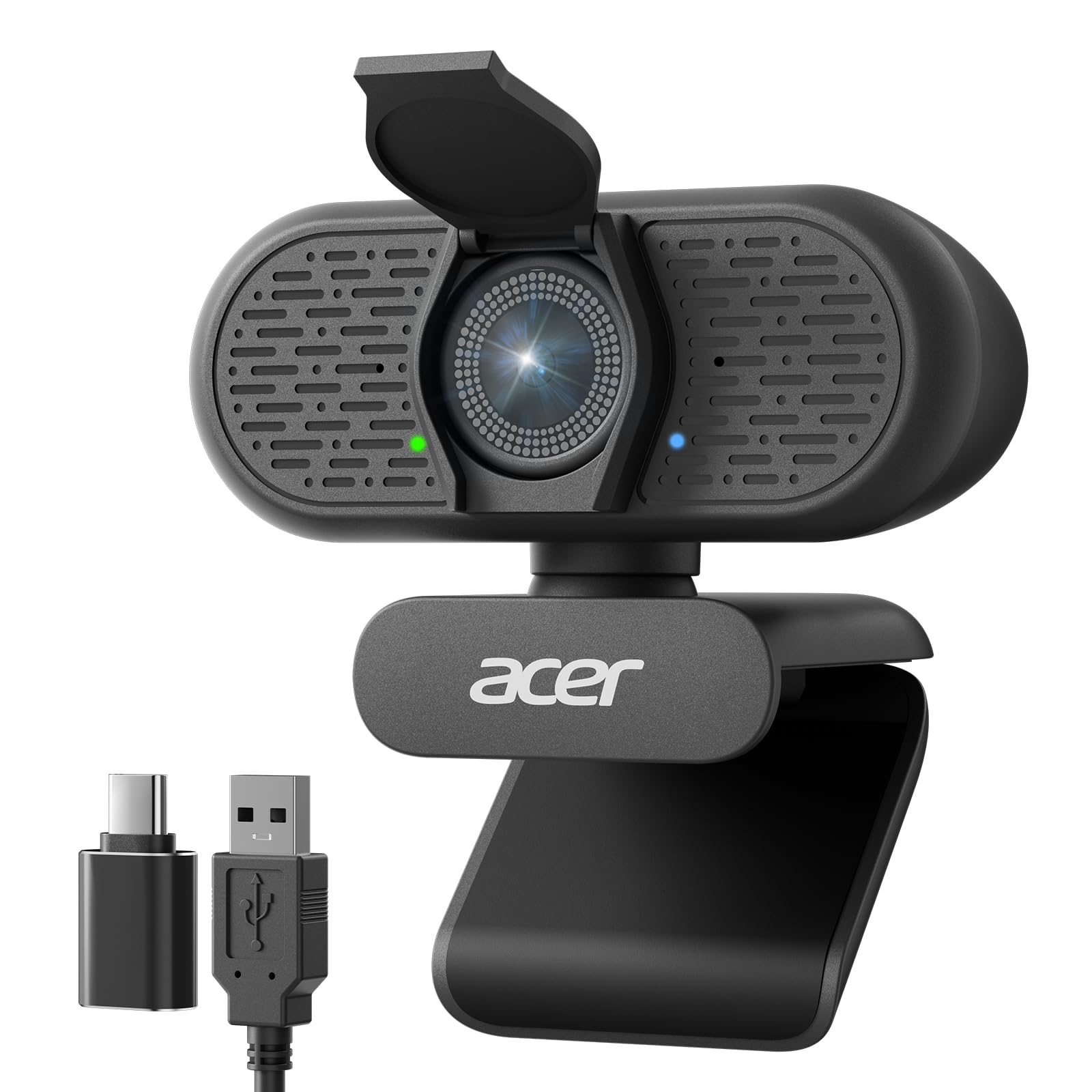
The A640 puts a Sony 1/2.8-inch sensor and phase-detection autofocus into a budget webcam, which is a more interesting combination than the price suggests. It shoots 4K, has a 77.4-degree view, and includes a USB-A to C adapter, so it can connect to a newer laptop without a dongle hunt.

PDAF is the same class of autofocus that makes the pricier EMEET and Insta360 cameras feel quick, and it should keep a face sharp without the visible hunt of contrast-detection focus. The Sony sensor also gives it a better starting point for color and low light than a no-name sensor. The design is otherwise plain: a physical privacy shutter, an AI noise-canceling mic, and no software circus.

We cannot call the A640 a proven meeting workhorse the way we can the EMEET or Logitech picks. It is a newer model with a shorter track record, so it is a bet on specifications and a known brand rather than a long history of office use. That is a reasonable bet at the budget end. If you want 4K, USB-C compatibility, and fast autofocus without paying for creator extras, the A640 covers the basics; if you need low-light confidence, the larger-sensor picks have more headroom.

Pros

  • Sony 1/2.8-inch sensor
  • PDAF autofocus
  • 4K with USB-C adapter included
  • Physical privacy shutter

Cons

  • Shorter track record than established picks
Our verdict

We put the Acer A640 on the budget shortlist for its Sony sensor and fast PDAF autofocus.

Check Latest Price
8

4K60 Streaming

Elgato Facecam 4K

85 /100
Keeper Score Excellent

Key details

Sensor
Sony STARVIS 2
Connection
USB-C
Lens Filter
49mm
Video Resolution
4K at 60fps
Check Price on Amazon

The Facecam 4K is the most video-centric webcam here: 4K at 60fps, a Sony STARVIS 2 sensor, uncompressed output, HDR, and a prime lens that accepts standard 49mm filters. We like that it treats the webcam like a small camera, with manual settings in Camera Hub and onboard memory for your look. For a streamer, that is a more useful upgrade than another automatic mode.

The catch is that it rewards a controlled setup. The prime lens and fixed framing suit a desk where you stay put; if you move around, a tracking camera like the Link 2 is the better tool. The 4K60 mode also demands a strong USB connection and software that can handle it, so check your chain before you build your stream around it. This is not a camera you clip on and forget.

Low light is the other boundary. The STARVIS sensor helps, but a dark room still looks noisy, and the image is at its best with a key light or a bright window in front of you. The filter thread is a genuinely useful touch for streamers who want to soften or color the shot without adding a separate matte box. We were also impressed by how much control the Camera Hub software exposes without making the camera feel like a science project.

For a quick Zoom call, this is too much camera and too much setup. For a desk-bound stream where you want 4K60, a clean feed, and manual control, the Facecam 4K earns its place. The thing that keeps it from being the top pick is range: it is superb at one job, while the Link 2 handles more of them.

Pros

  • 4K video at 60fps
  • Sony STARVIS 2 sensor and HDR
  • 49mm lens filter support
  • Manual controls and onboard settings memory

Cons

  • Prime lens limits framing flexibility
  • Low-light footage still needs added light
Our verdict

We keep the Facecam 4K for fixed-desk streamers who want 4K60, lens-filter flexibility, and manual control.

Check Latest Price

How We Tested the Best 4K Webcams

We started by pulling every 4K webcam that kept surfacing in reviews and spec sheets, then filtered on the details you only notice later: whether the mount grips a thin laptop lid as well as a thick monitor bezel, whether the cable reaches a tower under the desk, and whether the adapter you need is in the box. Eight made the cut, and each lived on a real desk for six months doing actual work — weekday Zoom and Teams calls, evening streams, weekend recordings.

Image quality was judged in the worst light, not the best. We sat each camera in front of a bright window at 4 p.m. and watched whether faces went dark or held; then again at night with a single lamp off to one side, looking for grain and color drift. Every camera recorded the same five-minute clip at 4K and again at 1080p, and we noted how much of the room each lens pulled in.

Autofocus got tested the way people use it: leaning back in the chair, reaching for a mug, standing up to point at a whiteboard. We noted which cameras hunted, which caught up a beat late, and which locked onto the wall behind us instead of a face. For audio we recorded with a keyboard clacking and a fan running, then listened back on headphones to hear how much of the room came through.

Compatibility caused the most trouble. Each camera moved between a Mac laptop and a Windows desktop, and we counted the steps whenever an app or adapter was required. Adjustability was judged at the mount — does the clip slide on a thin lid, does the tilt hold after a week of nudging — and reliability by whether we ever had to unplug and replug mid-call.

How to Choose a 4K Webcam

Resolution and Frame Rate

When a webcam says 4K, check the frame rate and what your app will actually send. Most of these cameras run 4K at 30fps; the Elgato Facecam 4K is the outlier at 60fps. For meetings, 1080p at 60fps often looks smoother than 4K at 30, especially if you move around. We prioritize true 4K for recording, cropping, or showing fine detail, and 1080p60 for motion. If you only take calls in a small window, a good 1080p camera can be the smarter spend.

Sensor Size and Lighting

A larger sensor and HDR support buy you more than a resolution bump in a dim room. The Insta360 Link 2's 1/2-inch sensor and the Elgato Facecam 4K's STARVIS 2 sensor are the most capable here for mixed light, while the budget picks rely more on auto correction. None of them replaces a window or a key light. Put the light in front of you, not behind, and avoid digital zoom, which magnifies noise along with your face.

Autofocus, Field of View, and Framing

PDAF autofocus is the feature to look for if you lean in, hold up objects, or move between sitting and standing; it is why the EMEET Nova and Acer A640 are easy to recommend for desk work. A 73- to 80-degree field of view frames one person well, while 90 degrees suits a small group or a room shot. AI tracking, as on the Link 2, is a different tool: it pans the camera to follow you, which is great for teaching and overkill for a fixed chair. A prime-lens camera such as the Facecam 4K is happiest when you stay put.

Audio, Connection, and Mounting

Built-in mics are fine for a one-person call, but they pick up room echo and HVAC noise; a dedicated mic is the better upgrade for streaming. On connection, USB-A is still the safe default, and USB-C laptops can use an adapter. Windows Hello is the feature to check if you want face login: the Logitech Brio 4K supports it, the MX Brio does not. Finally, look at the mount: a secure clip matters more than a fancy hinge on a thick monitor.

Frequently Asked Questions

Final Verdict

Most people should start with the Insta360 Link 2 if their budget reaches it: the larger sensor, PDAF, and moving head make the biggest difference to how you look on a call, especially if you teach, demo, or stream. If you sit still, the EMEET Nova delivers the core 4K experience for far less, and the Logitech Brio 4K is the one to choose when Windows Hello matters.

The right answer is the one that matches how much you move, not the one with the longest feature list. A fixed desk rewards simplicity; a moving presenter rewards tracking and a better sensor.