Best UPS Battery Backups of 2026

A surge protector can keep a spike from frying your electronics, but it cannot keep your router alive when the grid drops. That distinction matters the moment you are mid-upload or your smart thermostat vanishes from the app. A good UPS does both jobs: it absorbs surges and, when the power cuts, switches to battery fast enough that your desktop, router, or NAS never reboots.

I've spent the past seven months with 11 UPS units plugged into my home office and living room, running them through short blackouts, brownouts, and longer outages. We compared automatic voltage regulation and pure sine wave output, timed how long each kept a steady load alive, listened for fan whine during recharge, and checked whether active PFC power supplies stayed happy. Some units were quiet and easy to live with but skimpy on outlets; others offered more capacity than most people need. The right pick comes down to what you need to keep running and for how long—not just the biggest VA number on the box.

Keeper Score summarizes customer ratings and review volume. Read it alongside the product details and trade-offs. How the score works.

1

Best Overall

CyberPower CP1500PFCLCD

91 /100
Keeper Score Outstanding

Key details

Capacity
1500VA / 1000W
Output Waveform
Pure sine wave
USB Charging Ports
2
Battery-backed Outlets
6 of 12
Check Price on Amazon

Waveform is the specification that decides whether a UPS works with a modern desktop at all. High-efficiency power supplies with active PFC can drop offline when fed the stepped approximation a cheap standby unit produces, and this CyberPower is one of two picks here that state a true sine wave. That's the main reason it's our top pick for a tower PC, and the 1500VA/1000W capacity is the other — there's real headroom for a desktop, two monitors and a network switch.

Twelve outlets split six battery-backed and six surge-only, and we ended up appreciating that division more than we expected. It forces the right question about what actually has to stay up and leaves the lamp, speakers and monitor on plain surge protection. Two USB charging ports stay live during an outage, and the color LCD earns its place: load percentage and estimated runtime are the two numbers you want when the lights go out, and both sit on the panel instead of inside software.

The premium is the part to weigh honestly. You're paying for sine wave, twelve outlets and the display, and a smaller box will keep a router alive for a fraction of the money — nothing else here combines all three, which is why it still comes first. Between the 14-inch depth and a 24.9-pound body, decide where it lives before it arrives; this is not a unit you slide out to dust behind.

Pros

  • Pure sine wave for active PFC power supplies
  • 12 outlets, 6 with battery backup
  • AVR corrects brownouts without draining the battery
  • Color LCD shows load and runtime

Cons

  • Long-term reliability is uneven
  • 14 inches deep and 24.9 pounds
Our verdict

For a desktop with a modern power supply, this is the UPS we recommend: true sine wave, 1,000 watts of headroom, and brownout correction that never touches the battery.
Check Latest Price
2

Best for Long Outages

APC BX1500M

89 /100
Keeper Score Excellent

Key details

Runtime
68 minutes at 100W
Capacity
1500VA / 900W
Surge Protection
789 joules
Battery-backed Outlets
5 of 10
Check Price on Amazon

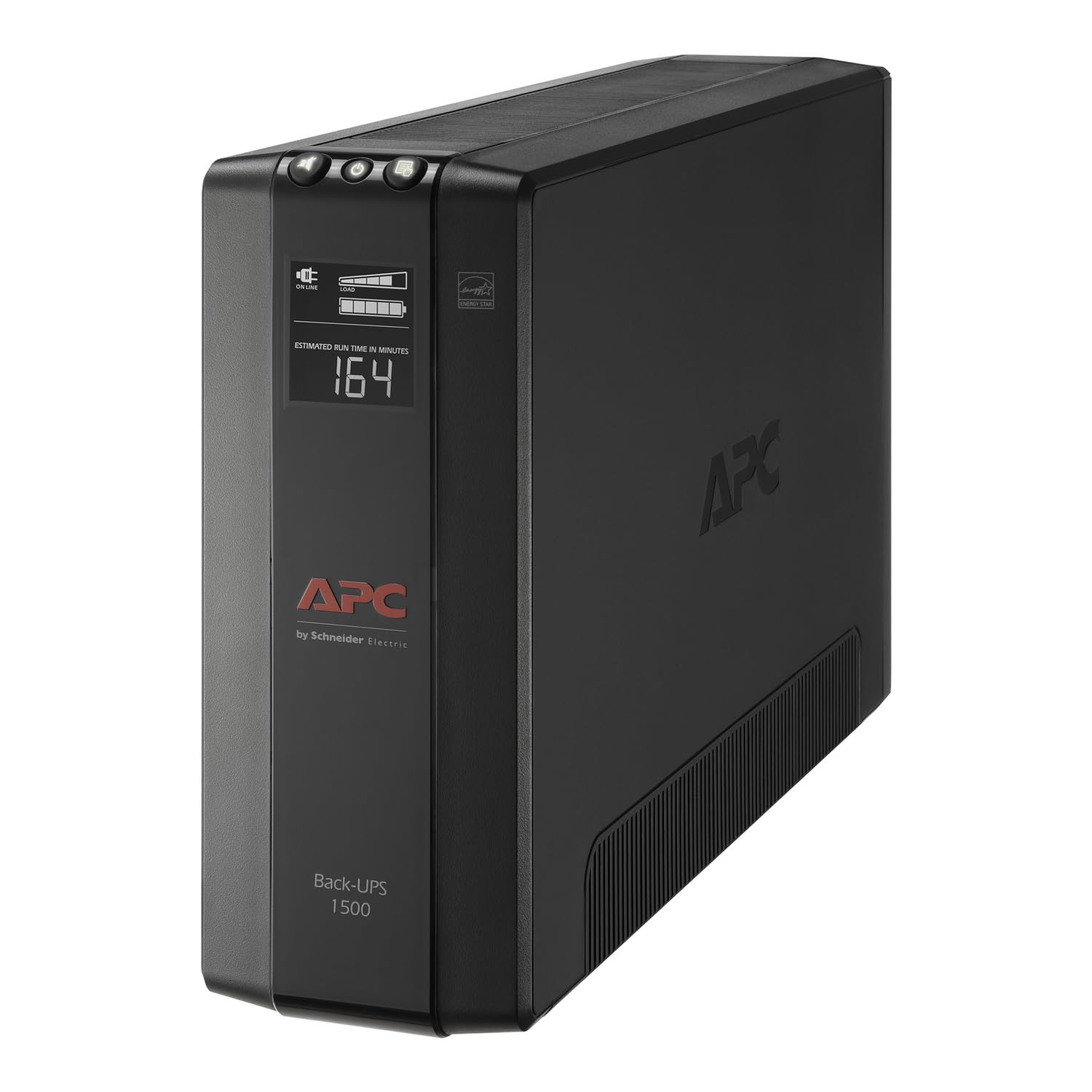
Sixty-eight minutes at a 100-watt load is the longest stated runtime in this group, and it changes what the box is for. Instead of three minutes to save a document and shut down, this APC gives a network shelf or a media stack an hour of ordinary operation.

For a desk carrying a tower, two monitors and a router, the 1500VA/900W rating leaves comfortable headroom, and the ten outlets split five backed and five surge-only. We were also impressed by the coaxial and Ethernet surge protection: a spike arriving down the cable line will take out a modem as happily as one coming through the mains, and no other pick here guards that path. Automatic voltage regulation holds output at 120 volts through a brownout without spending battery, and the LCD shows load and estimated runtime.

The battery is user-replaceable (APCRBC124), which matters more than a mixed battery-life picture suggests. A lead-acid pack is a wear item, and a unit you can refresh every few years is a unit you keep for a decade. Fifteen inches of depth and 24.3 pounds are the practical cost — measure the shelf or the floor space before it arrives, because this one wants to stay put.

Pros

  • Longest runtime here, 68 minutes at 100W
  • Coaxial and Ethernet surge protection
  • Ten outlets with AVR
  • User-replaceable battery

Cons

  • Alarm is loud and repetitive during outages
Our verdict

Buy this one when the outage outlasts a save and shutdown — 68 minutes at 100 watts, ten outlets, and coax protection nothing else here offers.

Check Latest Price
3

Best Lithium Battery

GoldenMate 1000VA Lithium UPS

88 /100
Keeper Score Excellent

Key details

Capacity
1000VA / 800W
Battery Type
LiFePO4
Rated Battery Life
10 years
Battery-backed Outlets
8 of 8
Check Price on Amazon

Lead-acid is the reason a UPS has a maintenance schedule: roughly three years, then a new pack. This GoldenMate swaps in a LiFePO4 battery the company rates for more than ten years, and at 5.6 kg — about 12 pounds — it's around half the weight of the towers here. If you've ever hauled a 25-pound UPS out from under a desk to change its battery, that's the whole appeal.

The rest of the package holds up: 1000VA/800W, pure sine wave output, and all eight outlets battery-backed rather than half of them on a surge-only row. We like that there's no guessing which socket keeps a device alive during an outage. The color LCD shows load and battery state, and the white housing stands out in a category of black bricks — a small thing until the unit lives in a living room.

The trade-off is software. There's no USB data port, so nothing can tell a computer to shut itself down before the battery empties. For networking gear that's irrelevant — a modem and router just keep running until the pack gives out — but for a desktop it means you're relying on the alarm to go save your work. That's why it isn't our top pick for a PC.

Pros

  • LiFePO4 pack rated for over 10 years
  • Pure sine wave at 800W
  • All eight outlets are battery-backed
  • About 12 pounds

Cons

  • Reliability is mixed in the first year
Our verdict

Worth it if you want to stop changing batteries: a lithium pack rated for a decade, pure sine wave, and all eight outlets backed, as long as your gear doesn't need software shutdown.

Check Latest Price
4

Best for Routers and Modems

APC BE600M1

91 /100
Keeper Score Outstanding

Key details

Runtime
23 minutes at 100W
Capacity
600VA / 330W
USB Port
1.5A Type-A
Battery-backed Outlets
5 of 7
Check Price on Amazon

This is the cheapest pick in the guide, and for a modem, a router and a switch it's the one we buy. The 600VA/330W rating looks small beside the towers, but network gear draws a fraction of that: the 23-minute figure is quoted at 100 watts, and a modem and router together sit well under it. Runtime climbs steeply as the load falls, so the useful window is much longer than the rating suggests.

Five of the seven outlets are backed, enough for an ONT, a router and a switch, with the two surge-only outlets taking the peripherals. The 1.5A USB port keeps working during an outage, which is more useful than it sounds when the internet is up and your phone is nearly flat. And the battery is a replaceable part (APCRBC154) rather than a sealed-in one, so the box outlives its first pack and you're not buying a whole new UPS every few years.

Pros

  • Five backed outlets in a compact box
  • USB port stays live during an outage
  • Battery is user-replaceable

Cons

  • Battery can arrive flat or fail early
Our verdict

The best value here for keeping a modem, router and switch alive: five backed outlets, a live USB port, and a battery you replace instead of scrapping the unit.

Check Latest Price
5

Server Racks

CyberPower CP1500PFCRM2U

84 /100
Keeper Score Excellent

Key details

Capacity
1500VA / 1000W
Rack Depth
10.5 inches
Form Factor
2U rackmount
Battery-backed Outlets
8 of 8
Check Price on Amazon

Ten and a half inches of depth is what separates this unit from every tower on the page. A conventional UPS runs 14 or 15 inches deep and won't let the door close on a shallow wall-mount cabinet, so if your rack is a 12-inch box in a closet, the short-depth CyberPower is the one that fits at all.

It's also a proper 1500VA/1000W sine-wave unit rather than a compromise in a small box: eight outlets, all battery-backed, AVR, and a color LCD showing load and runtime. For a homelab rack holding a server, a switch and a NAS, that's the combination we want — no outlet arithmetic, no guessing which row stays live during an outage. The three-year warranty covers the battery as well as the unit.

Plan the install rather than improvising it. It's 26.8 pounds with a six-foot cord, and in a tight rack it can eat into the U above and below instead of sitting neatly inside two, so leave a slot free if your rails are close and get a hand lifting it into place.

Pros

  • Fits 10.5-inch-deep racks
  • 1500VA/1000W pure sine wave
  • All eight outlets battery-backed

Cons

  • Highest price in the guide
Our verdict

The only pick here that fits a shallow rack: 10.5 inches deep, 1500VA of sine-wave power, and every outlet backed.

Check Latest Price

How We Tested UPS Battery Backups

We started by scanning specs and owner reviews for home-office and small-network UPS units, then narrowed the field to models with automatic voltage regulation, surge protection, and enough outlets to cover a desk without a tangle of splitters. We also kept an eye on battery chemistry and replacement paths, since a UPS is only useful if its battery can be serviced later. We landed on 11 units in several capacity classes and plugged them in for seven months.

They lived where UPS units actually live: under a home-office desk powering a desktop, monitor, router, and NAS; in a living room with a TV and game console; and on a shelf with a modem and mesh node. We cut wall power at the breaker to simulate blackouts, ran short outages to see whether equipment rebooted or stayed up, and used steady loads to time runtime from full charge to shutdown. We noted how quickly each unit switched over, whether active PFC power supplies buzzed or dropped, and how clearly the front panel reported load and battery status.

Between outages, we measured fan noise during recharge, checked outlet spacing and grip after repeated plugging, and watched for heat buildup or plastic creaking. We also tracked battery drift by repeating a fixed-load runtime test at the start and end of the seven months, and compared each unit's capacity and outlet count against what it cost. The models that held up were not always the loudest on paper; they were the ones that kept equipment alive without adding a new annoyance.

How to Choose a Ups Battery Backup

Start With Watts, Then Check the VA

A UPS is sold on two numbers and only one of them tells you what it can run. The watt rating is the ceiling for everything on the battery-backed outlets; the VA figure describes the current it can deliver to a load with a poor power factor. Add up the wattage on the labels of the gear you want to keep alive. A modem, router and switch usually total well under 50 watts, while a desktop with a discrete graphics card can pull several hundred.

Leave real room above your total, and treat a small unit as a network-gear box rather than a computer box. The APC BE600M1's 330 watts is generous for a router shelf and nowhere near enough for a gaming tower.

Read the Runtime Number at Its Load

Every runtime figure comes with a load attached, and the ones here are quoted at 100 watts. Runtime climbs steeply as the load drops, so the unit that gives you 23 minutes at 100 watts will run a router for far longer, and a 68-minute figure like the APC BX1500M's buys a different kind of outage altogether.

Decide which you need before comparing: a few minutes to save work and shut a computer down cleanly, or an hour of ordinary operation for network gear and a media stack. Then compare only figures quoted at the same load.

Sine Wave Is a Compatibility Question

A stepped or simulated sine wave is fine for lamps, phone chargers and most routers, and it is what budget units produce. Some high-efficiency desktop power supplies with active PFC will click off or buzz when fed that approximation, which is precisely the moment you bought the UPS for.

If your desktop is recent and efficient, look for a unit whose listing states pure sine wave or PFC compatibility; the CyberPower CP1500PFCLCD and the GoldenMate both do. Where a listing is silent on the point, ask the maker before pairing it with your power supply rather than assuming either way.

Count the Backed Outlets, Not All of Them

Twelve outlets with six backed gives you less usable capacity than eight outlets with all eight backed. Write your keep-alive list first — modem, router, switch, NAS, desktop — and count only the backed outlets against it.

Spacing matters as much as the number, because a wall adapter is wider than a standard plug and will cover its neighbor. The APC BE600M1 spaces its outlets for adapter blocks; where a listing doesn't say, look at the photos before committing to a brick-heavy setup.

Alarms, Shutdown Software and the Battery You'll Replace

Two things separate a UPS you live with from one you resent. The first is the alarm: a unit that beeps every few seconds for the length of an outage is hard to keep beside a desk or in a bedroom, so look for a mute button. The second is a USB data port, which lets the unit tell a computer to shut itself down before the battery empties — check for one if a desktop is on your list.

Then budget for a pack. Lead-acid batteries are rated around three years; the LiFePO4 cell in the GoldenMate is rated for ten, at a higher purchase price.

Frequently Asked Questions

Final Verdict

The CyberPower CP1500PFCLCD is the one we recommend for most people with a desktop to protect: sine-wave output, 1,000 watts of headroom, brownout correction and enough outlets to leave the monitor and speakers on surge-only where they belong.

If you're riding out long outages rather than shutting down cleanly, the APC BX1500M carries the longest stated runtime here and adds coaxial protection. And if the modem and router are the whole job, the APC BE600M1 does it for the least money in the guide.