Best Streaming Lights of 2026

The first time I saw myself on a video call lit only by the fixture behind me, I looked like a witness in a documentary: halo of light, face in shadow. A streaming light fixes that in a minute, a small ring or panel you aim at yourself so the camera has something to work with. What separates a good one from an irritating one isn't raw output. It's whether your skin still looks like skin.

We've spent the past six months living with 14 of them — clamped to monitors, stood on tripods, packed into bags — and the ones that stayed were the ones I could adjust without breaking eye contact with the camera. Value had less to do with lumens than with whether the stand held still and the controls made sense in a dark room. Box lumens are measured at the panel; what reaches your face drops off fast with distance, so a diffused mid-power light usually beats a harsh bright one at arm's length. The picks below all solve for that distance problem.

Keeper Score summarizes customer ratings and review volume. Read it alongside the product details and trade-offs. How the score works.

1

Best Overall

Logitech Litra Glow

91 /100
Keeper Score Outstanding

Key details

Mount
3-way monitor mount
Power
USB
Control
Buttons and desktop app
Diffusion
Frameless diffuser
Check Price on Amazon

A good streaming light should disappear into your desk and still make your face look awake. The Litra Glow is the one we reach for first: its frameless diffuser spreads a soft, full-spectrum light that flatters skin without the harsh hotspot we associate with bare LED panels. It is a small light, but it is the easiest to live with.

The three-way monitor mount is the detail that makes it practical. It adjusts height, tilt, and rotation, so we can put the light just above the camera and angle it down instead of staring into a flat panel. The onboard buttons are big enough to find without looking, and the desktop app gives finer control when we want it. It also fades up rather than snapping on, which is easier on the eyes at the start of a morning call.

The mount is not universal. It works best on a typical desktop monitor or a sturdy laptop lid, and a very thick or curved screen can make the clamp feel less secure. Check the thickness before you commit. It works best if you want one light that stays on the monitor and handles calls, gaming, and casual streaming without a tripod.

What we keep coming back to is the light itself: it makes a webcam look better without asking you to rebuild your desk. That is a small thing to get right, and it is the reason this one stays mounted between shoots.

Pros

  • Soft, flattering light from a frameless diffuser
  • Three-way monitor mount adjusts height, tilt, and rotation
  • Onboard buttons plus desktop app control
  • USB powered with no battery to manage

Cons

  • Pricier than most single lights here
Our verdict

For a desk-based stream or video call, we recommend the Litra Glow first because it makes skin look soft and natural without a studio setup.

Check Latest Price
2

Best Budget Ring Light

UBeesize 12-Inch Ring Light

89 /100
Keeper Score Excellent

Key details

Power
USB
Height
Up to 62 inches
LED Count
240
Ring Size
12 inches
Check Price on Amazon

A ring light, a 62-inch stand, a phone holder, a remote, and a USB cable in one box—that is the UBeesize pitch, and it covers the phone-first basics without asking you to buy a stand separately.

We recommend it for the creator who wants to point a phone at themselves and start. The 12-inch ring has 240 LEDs and five color modes with ten brightness steps, and the touch panel is responsive. The light is soft enough for makeup and talking-head videos, and the rotatable head switches between portrait, landscape, and overhead shots without moving the stand.

The stand extends to 62 inches and converts into a handheld selfie stick, which is more useful than it sounds when you want to shoot away from a desk. At full height the tripod can feel top-heavy, especially on a soft rug, so keep the base centered and do not extend it all the way if you are moving around.

The included remote is the difference between framing a shot once and resetting it every time. For a phone-first stream, that small convenience matters more than another brightness mode.

Pros

  • Complete phone-first kit in one box
  • Five color modes and ten brightness levels
  • Stand converts into a handheld selfie stick
  • Responsive touch controls

Cons

  • USB cable limits placement
Our verdict

We recommend the UBeesize kit for phone-first creators who want a full ring-light setup in one box without spending much.

Check Latest Price
3

Best Two-Light Kit

NiceVeedi 2-Pack LED Kit

89 /100
Keeper Score Excellent

Key details

Pack
2 panels
Panel Size
10 x 7.8 inches
Stand Height
Up to 73 inches
Color Temperature
2800-6500K
Check Price on Amazon

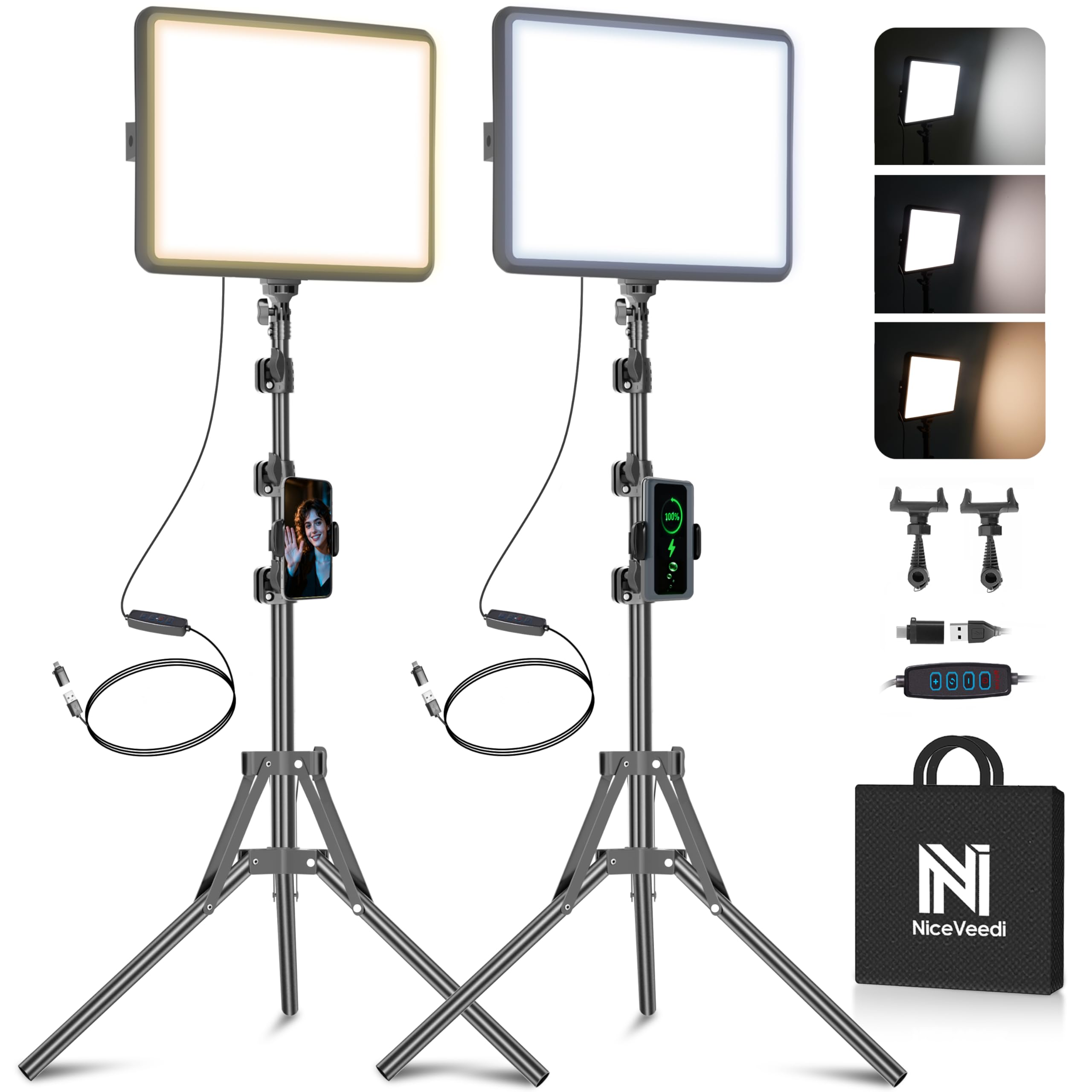
One light is enough for a webcam close-up; two are what make a small room look finished, and the NiceVeedi kit is the most sensible way to get there without a studio budget. It pairs two 10-by-7.8-inch LED panels with tripod stands, phone holders, USB-C adapters, and a storage bag, so you can put a key light on one side and a softer fill on the other.

The panels are about the size of a small tablet, which keeps them easy to move, and the 2800-6500K range plus ten brightness levels are enough to match warm room light or cool daylight. The stands adjust high enough to get the panels above eye level, and the tilt makes it easy to feather the light away from a shiny forehead.

Setup is straightforward: screw the panels onto the stands, plug in the USB-C adapters, and clip a phone to the holder if you need one. The storage bag makes the kit easier to keep together between shoots.

The stands are light-duty, so we keep them lower when the floor is uneven and avoid hanging anything heavy from them. That is the trade-off for a kit this portable; it is not a studio rig, but it does not need to be for a desk or a spare-room stream.

Pros

  • Two panels fill both sides of a scene
  • 2800-6500K range with ten brightness levels
  • Storage bag holds the kit together
  • USB-C adapters included

Cons

  • No USB power adapters in the box
Our verdict

We recommend the NiceVeedi kit when one light leaves half your face in shadow and you want two soft panels without a studio budget.

Check Latest Price
4

Best Compact Accent Light

ULANZI VL49 RGB

93 /100
Keeper Score Outstanding

Key details

CRI
95+
Mount
3 cold shoe and 1/4 screw
Battery
2000mAh
Color Temperature
2500-9000K
Check Price on Amazon

The VL49 is small enough to disappear into a camera bag, and that is the point. It is a 2.6-by-3.1-inch panel that weighs about 100 grams, so it can ride along as a fill light without becoming the heaviest thing you carry.

The light runs from 2500K to 9000K, offers RGB hue adjustment, and lists a CRI of 95+, which is enough to make skin and product colors look believable. The 60 LEDs and 120-degree spread give a soft wash rather than a tight spot, and the magnetic back turns a metal shelf or monitor arm into a mount.

We recommend it as a second light, not the only one. The cold shoes plus 1/4-inch screw let it sit on a camera or a small tripod when the magnet has nothing to grab. For a desk stream, it is best used as a colored rim or a fill from the side.

The magnetic back is the detail we use most: it turns a metal shelf or monitor arm into a light stand when a tripod is in the way.

Pros

  • Pocketable 100-gram panel
  • 2500-9000K range with RGB hue
  • CRI 95+ for natural color
  • Magnetic back and cold shoes

Cons

  • Battery runs short at high brightness
Our verdict

We recommend the VL49 as a pocketable accent or fill light, not as the only light in a room.

Check Latest Price
5

Best for Video Calls

ACMEZING Clip-On Ring Light

89 /100
Keeper Score Excellent

Key details

Mount
Clip and flexible tripod
Power
USB
Brightness Levels
5
Color Temperatures
5
Check Price on Amazon

The ACMEZING is a small ring light with a metal clip and foam cushions, built to sit on a laptop lid or monitor. It takes less space than a tripod light, which is why it stays in the bag with the laptop.

We recommend it for work calls, where speed matters more than output. Five color temperatures and five brightness levels cover the basics, and the ring design softens shadows without the harsh square reflection of a bare panel. The clip has a strong spring and foam pads, so it grips a monitor or laptop lid without scratching.

The light is USB-powered, so there is no battery to charge, and the inline controls stay within reach. The ring is small, so it is best for a head-and-shoulders call, not for lighting a whole desk.

The flexible tripod is the bonus that makes it more than a laptop light: it can stand on a desk or wrap around a shelf when the clip is in the way.

Pros

  • Five color temperatures and five brightness levels
  • Metal clip with foam cushions
  • Flexible tripod included
  • Ring design softens shadows

Cons

  • Cable ties it to a USB port
Our verdict

We recommend the ACMEZING for work calls on a laptop, where a small clip-on ring light is faster than a tripod.

Check Latest Price
6

Best Pocket Fill Light

ALTSON Selfie Light

91 /100
Keeper Score Outstanding

Key details

CRI
97+
Weight
3.35 oz
Battery
2200mAh
Color Temperature
2500-6500K
Check Price on Amazon

The ALTSON is the light that lives in a bag, not on a stand. It weighs 95 grams, fits in a pocket, and clips onto a phone or laptop, which makes it easy to carry for a quick call or a selfie check.

The light has a CRI of 97+, three color modes from 2500K to 6500K, and ten brightness steps. The 160-degree rotating panel lets us aim the light without moving the clip, and the 2200mAh battery is enough for short sessions.

We recommend it for quick calls and travel, not as the only light for a long stream. The clip is the part we use most, and it holds a phone or laptop lid without much fuss. The tripod adapter is the detail that makes it more than a phone accessory: it can become a desk fill light when you need one.

Pros

  • CRI 97+ for natural skin and products
  • Three modes and ten brightness levels
  • 2200mAh rechargeable battery
  • Clip and tripod adapter

Cons

  • Battery life drops at higher brightness
Our verdict

We recommend the ALTSON for quick calls and travel because it clips on, runs on battery, and fits in a pocket.

Check Latest Price
7

Best for Larger Scenes

Torjim 12-Inch 2-Pack Kit

91 /100
Keeper Score Outstanding

Key details

Pack
2 lights
Power
30W
Panel Size
12 inches
Color Temperature
3000-6500K
Check Price on Amazon

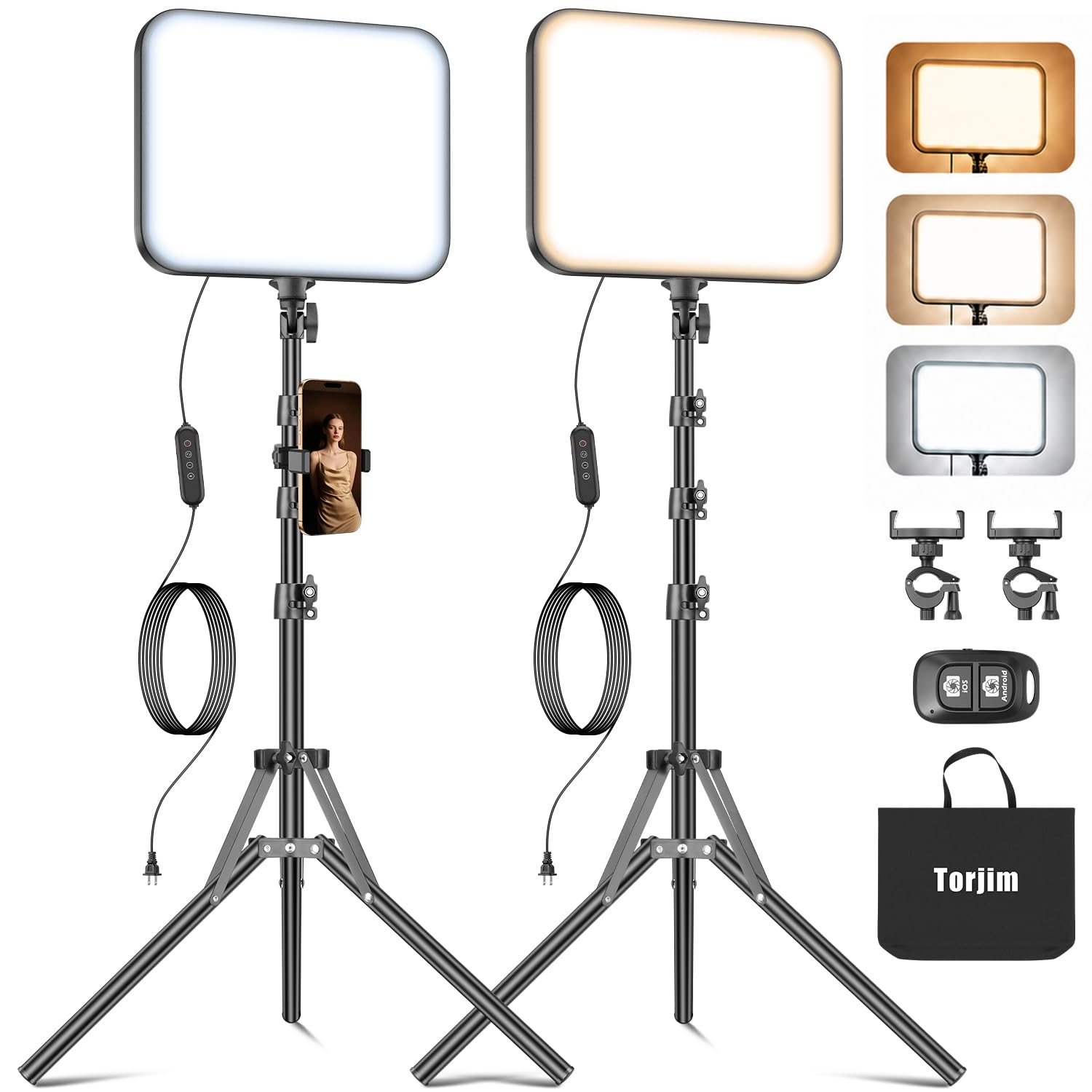
A 30W rating is the headline, and it is the reason this two-panel kit belongs in a larger room. The Torjim set includes two lights, two tripod stands, two phone holders, a remote, and a storage bag, so it covers both sides of a scene without buying a second kit.

The 3000-6500K range and nine brightness levels are easy to match to room light, and the 12-inch panels throw a broader wash than the small ring lights here. The stands extend high enough to get the panels above eye level, and the phone holders keep a phone steady for a demo or a talking-head shot.

The controls are simple, and the stands and phone holders are easy to position. The kit is not a pro-grade build; the stands are light-duty, so we keep them lower when the floor is uneven and avoid hanging anything heavy from them.

We recommend the Torjim kit for larger rooms where its 30W two-panel output can wrap a scene in light without a pro budget. The storage bag is the detail that makes it practical: the kit stays together between shoots instead of turning into a pile of stands and panels.

Pros

  • 30W kit output across two panels
  • Two 12-inch panels with stands
  • 3000-6500K range and nine levels
  • Storage bag and remote included

Cons

  • Some units stop working
Our verdict

We recommend the Torjim kit for larger rooms where its 30W two-panel output can wrap a scene in light without a pro budget.

Check Latest Price
8

High-Output Studios

Elgato Key Light

91 /100
Keeper Score Outstanding

Key details

Mount
Desk clamp
Output
2800 lumens
Control
Wi-Fi app
Color Temperature
2900-7000K
Check Price on Amazon

The Key Light is the most powerful light here, and the opal glass face is what keeps all that output from looking harsh. The 2800 lumens and 2900-7000K range cover a large desk and a wide swing from warm sunset to cool daylight, and the 160 OSRAM LEDs run cooler than a softbox.

The build is serious: a metal pole and a desk clamp that gets the light above a monitor without a tripod footprint. The Wi-Fi app control is convenient when it works, and it lets you tune brightness and temperature from the desktop.

That is the catch. The app is the only way in, and the light is useless if it cannot join or stay on your network. A dropped connection leaves you with no fallback controls.

The output is there for a large frame, and the color range is genuinely useful; the question is whether your network is as reliable as the fixture. For a dedicated studio desk, that trade-off can be worth it.

Pros

  • 2800 lumens for large scenes
  • 2900-7000K color temperature range
  • Opal glass diffusion
  • Desk clamp and Wi-Fi app control

Cons

  • Premium price for a single light
Our verdict

We recommend the Key Light for a large, bright studio desk with stable Wi-Fi, not as a first streaming light.

Check Latest Price

How We Tested 14 Streaming Lights in Real Rooms

I built the shortlist from lights that kept surfacing in creator forums and in the reviews of models I already owned, then filtered for what changes performance: monitor clamp, tripod, or laptop clip; corded or battery; color temperature adjustable on the unit or only in an app. That left 14 lights, which I spent six months with across two desks, a dim spare room, and a carry-on.

Testing happened where these lights live: a north-facing home office during morning video calls, a basement desk during evening streams with the ceiling light off, and a hotel room where the laptop was the only other source. I recorded the same 30-second clip under each light at its dimmest, middle, and brightest settings and watched them back to back on one screen — washed-out highlights and uneven coverage are obvious in a recording and invisible in a live preview. I also dimmed every light to its lowest setting while filming to check for flicker.

Adjustability and controls got a separate pass. I changed color temperature mid-sentence and watched whether skin went gray or sallow, and I changed brightness by feel in a dark room, one-handed, the way you would mid-call. On the app- and Wi-Fi-controlled units, I closed the app, left the room, and timed the reconnect. Stability was simple physics: I typed hard beneath every clamped light and caught each tripod with an elbow to see how far the head drifted.

Battery life I measured the boring way, running each rechargeable light at full until the output visibly dropped, and durability by packing and unpacking the portable ones for every trip. Value came down to what shipped in the box: a stand that didn't wobble, a clamp that fit a real monitor, a mount that didn't need a second pair of hands.

How to Choose a Streaming Light

Start with where the light will live

Placement decides more than output. A monitor-mounted light like the Litra Glow keeps the light close to your face and out of the way, but the clamp has to fit your screen; measure the thickness of your monitor or laptop lid before you buy. A tripod or desk stand takes up floor or desk space, yet it lets you raise the light above eye level and angle it down, which is usually more flattering than light coming straight at you from the screen.

Check the camera position, too. For a webcam, put the light slightly to one side and a little above the lens; for a phone on a tripod, the ring light's center hole can hold the phone and keep the light even. Compact in a listing often means it fits in a bag, not that it will fit an overhead bin or a crowded desk.

Choose the light shape for your shot

Ring lights are convenient for phone-first creators because the phone sits in the middle and the light wraps around the lens; the trade-off is a flat, even look and a circular catchlight in the eyes. Panels and diffused key lights give a softer, more directional look that flatters faces and separates you from the background. For a single desk light, we prefer a diffused panel or a monitor light with a frameless diffuser; for makeup, close-up demos, or top-down phone shots, a ring light earns its place.

Color temperature and rendering matter as much as shape. A range that covers warm to cool lets you match room light, and a high CRI helps skin and products look natural. You do not need RGB for most streams; colored light is an accent, not a key.

Decide between corded and battery power

USB-powered lights are the simplest for a desk: no charging routine, no runtime anxiety, and one less thing to remember before a stream. The cost is a cable that limits where you can place the light. Battery lights are better for moving between rooms, but runtime drops as brightness rises; a light rated for several hours at low output may not last a long meeting at full power.

If you stream for hours, corded is the safer default. If you need a fill light for quick calls and travel, a rechargeable pocket light makes more sense.

Plan the control and the stand

Controls are part of the purchase. Onboard buttons are the fastest when a call starts suddenly; a remote is handy when the light is above your desk; an app gives fine control but depends on a stable connection. We treat Wi-Fi-only control as a specialist feature, not a default, because a dropped connection can leave you with no fallback.

Stands and clamps deserve the same scrutiny: a light that tips at full height is worse than a dimmer one that stays put. Keep the base centered, avoid extending a light stand all the way on soft flooring, and check the clamp's padding before it goes on a thin laptop lid.

Frequently Asked Questions

Final Verdict

For most people, the Logitech Litra Glow is the streaming light we recommend because it solves the everyday problem: soft, flattering light on your face without a studio setup. It mounts on a monitor, runs from USB, and adjusts quickly, so it is easy to leave in place between calls.

If you need to light a larger scene or want two lights for shape and background, the NiceVeedi 2-Pack is the better buy. If maximum output is the priority and you have stable Wi-Fi, the Elgato Key Light is the specialist choice; just go in knowing its controls live entirely in the app.