Best Vertical Laptop Stands of 2026

The day my second monitor arrived, my laptop became the problem. Flat on the desk it owned a third of the surface, and a riser just moved the clutter around. Standing it on edge gave most of that space back — and immediately exposed how different these stands are. One wobbled every time I bumped the desk; another let a slim ultrabook lean over like a bookend that had given up.

Over the past three months my team and I have kept 14 of them on our desks — single-slot, dual, and three-slot racks — docking and undocking twice a day. The ones that earned a permanent spot got three things right: the slot cinched down to the laptop in front of you, the base was heavy enough to stay put, and the padding never marked the finish.

A stand's own weight matters more than most shoppers expect, since a five-pound gaming laptop will tip a hollow plastic rack. And adjustable slot width is the spec worth checking — it's the difference between fitting this laptop and fitting the next one.

Keeper Score summarizes customer ratings and review volume. Read it alongside the product details and trade-offs. How the score works.

1

Best Overall

OMOTON Vertical Laptop Stand

96 /100
Keeper Score Outstanding

Key details

Material
Anodized aluminum
Item Weight
1.12 lb
Number Of Slots
1
Fits Laptop Thickness
0.55 to 2.71 in
Check Price on Amazon

The 0.55-to-2.71-inch slot is the reason this OMOTON is our top pick. That is the widest thickness range in this group, and it means one stand can hold a slim ultrabook and a chunky gaming notebook without changing hardware. We turned the screw to set the width, slid each laptop in, and got a snug, upright hold with no wobble. The clamp is simple, but simple is what you want here: fewer parts to loosen, nothing to misalign.

At 510 grams, the OMOTON has more heft than the 176-gram UGREEN single, and that weight is doing real work. The wide base and silicone feet kept it planted when we pulled a laptop out with one hand. The slot lining is soft enough that we did not worry about scuffing a lid, and the black finish disappears against a dark desk.

This is built for a one-laptop desk, and that focus is why the clamp feels so settled. If you keep a second machine docked, the OMOTON Dual gives each laptop its own slot; if your laptop is thinner than 0.55 inch, the UGREEN single starts narrower. The included Allen key is small enough to keep in a drawer, and once the width is set you may not touch it again.

Pros

  • Widest thickness range in this set
  • Heavy 510 g base stays planted
  • Soft silicone slot lining

Cons

  • No secondary phone or tablet slot
Our verdict

The OMOTON single is the stand we recommend first for most desks: its wide grip and weighted base handle both slim and thick laptops.

Check Latest Price
2

Best for Two Laptops

OMOTON Dual Vertical Laptop Stand

96 /100
Keeper Score Outstanding

Key details

Material
Anodized aluminum
Footprint
5.91 x 4.72 x 1.85 in
Number Of Slots
2
Fits Laptop Thickness
0.55 to 1.65 in
Check Price on Amazon

A second laptop usually means a second stand, or a machine balanced on top of a closed dock. The OMOTON Dual solves that with two independently adjustable slots in one aluminum base, so a thick work laptop and a thin personal machine can stand side by side.

We liked that each slot has its own width screw. A thick gaming laptop and a slim MacBook can share the stand without one being clamped too tightly or the other rattling loose. The weight is spread across a wide base rather than concentrated in one narrow foot, and the silicone feet kept it from sliding when we pulled either laptop out.

The 0.55-to-1.65-inch range covers most 13- to 16-inch machines, but not the very thickest gaming laptops, and the 5.91-by-4.72-inch footprint needs a little depth behind the monitor. If only one laptop lives on the desk, the single OMOTON has a wider thickness range and a smaller footprint. The sandblasted silver finish is a close match for a MacBook and hides fingerprints better than a polished stand. Keep the included Allen key nearby for the first week; after that, the stand is set-and-forget.

Pros

  • Two independently adjustable slots
  • Wide aluminum base stays stable
  • Protective silicone mats in both slots

Cons

  • No slot for a phone or tablet
Our verdict

For a two-laptop desk, we choose the OMOTON Dual; independent slot widths keep a thick work machine and a slim personal laptop secure.

Check Latest Price
3

Best for Three Laptops

UGREEN 3-Slot Vertical Laptop Stand

95 /100
Keeper Score Outstanding

Key details

Material
Aluminum and silicone
Compatible Size
Up to 17.3 in
Number Of Slots
3
Fits Laptop Thickness
0.47 to 1 in
Check Price on Amazon

Three laptops can eat a desk in three separate cradles. This UGREEN replaces them with one 3-slot aluminum block, leaving a single base on the desk instead of a row of them. The stand holds three laptops at once, and each slot has its own width adjustment.

We think it is the right pick for a shared home office or a test bench with several machines, because each slot loosens independently and can be set to a different width. The 0.47-to-1-inch range is built around slim laptops and tablets. The footprint is compact for three devices, but it is still a block, not a folding rack, so it needs a permanent home.

The aluminum body has silicone pads in the slots and on the base, and the space-gray finish blends into a dark monitor shelf. It arrives ready to use, which we appreciated after wrestling with screw-together stands. The three-slot format is niche, but if your desk has three clamshell machines, nothing else here clears as much surface area in one move. A single-laptop owner should look at the UGREEN single instead; the 3-slot makes sense only when three devices are regularly parked.

Pros

  • Holds three laptops in one footprint
  • Independent width adjustment per slot
  • Aluminum body with silicone protection

Cons

  • One-inch thickness cap
  • Premium cost for a niche setup
Our verdict

The UGREEN 3-Slot earns our recommendation for three-laptop desks where space is tighter than the machines are thick, as long as every laptop measures an inch or less.

Check Latest Price
4

Best Tool-Free Adjustment

Psitek Vertical Laptop Stand

96 /100
Keeper Score Outstanding

Key details

Material
Sandblasted aluminum
Warranty
5 years
Adjustment
Tool-free quick-release screws
Fits Laptop Thickness
12-42mm/0.5-1.65 inch
Check Price on Amazon

The quick-release screws are what make the Psitek stand easy to live with. Instead of hunting for an Allen key, you turn the steel screws by hand and the slot opens or closes. The slot spans 12 to 42 millimeters, and the screws have enough grip to stay where you set them.

We found the stand covers most ultrabooks and many 15-inch laptops. The aluminum body has a sandblasted finish, silicone pads in the slot, and a five-year warranty, which is longer than most here. It looks and feels like a more expensive stand than it is. The footprint is compact at 5.91 by 3.74 inches, so it fits on a narrow desk without crowding a monitor.

The one thing we wished for is more mass. With a heavy laptop, the light body can shift when you pull the machine out; hold the base or slide the laptop straight up and it stays put. That is a small habit, not a dealbreaker. The steel screws are the part that makes the tool-free design feel less like a shortcut.

Pros

  • Tool-free width adjustment
  • Fits 0.5 to 1.65 inches
  • Five-year manufacturer warranty

Cons

  • Thickness range stops at 1.65 inches
Our verdict

We pick the Psitek when swapping laptops is routine: its tool-free screws make width changes quick, and the aluminum body stays compact.

Check Latest Price
5

Best Budget Organizer

Vaydeer 3-in-1 Laptop Stand

92 /100
Keeper Score Outstanding

Key details

Material
ABS plastic
Footprint
5.98 x 4.8 x 2.17 in
Device Capacity
Laptop plus phone or tablet
Fits Laptop Thickness
0.55 to 1.69 in
Check Price on Amazon

If your desk is crowded with a laptop, phone, and tablet, the Vaydeer 3-in-1 gives each one a slot for less than most single stands here. We like that it doesn't pretend to be a premium aluminum dock: it is ABS plastic, light, and happy to hold a phone upright next to a closed laptop. The open grooves make it easy to grab a device without unclamping anything.

The laptop slot adjusts from 0.55 to 1.69 inches with the included Allen wrench, and the silicone mats inside the grooves protect the finish. The wide base kept it from sliding on a smooth desk. It is light enough to move with one hand when you need to clear the desk. The small assembly screws are the one place it asks for care: use the included wrench and stop when snug, because the threads can strip if you overtighten.

This is not the stand for a thick gaming laptop or a heavy 17-inch workstation; the 1.69-inch maximum is better suited to a 13- or 15-inch machine. The phone and tablet cradle is still the reason to buy it, and it is the part we used most. The black plastic is easy to wipe down, which matters on a desk where coffee mugs live.

Pros

  • Three-in-one laptop, phone, tablet cradle
  • Adjustable 0.55-to-1.69-inch slot
  • Low-cost plastic build

Cons

  • Plastic body flexes more than aluminum
  • Only one laptop slot
Our verdict

A tight budget and a desk that needs to park a phone or tablet alongside one laptop make the Vaydeer the obvious choice for us.

Check Latest Price
6

Best for Slim Laptops

UGREEN Vertical Laptop Stand

95 /100
Keeper Score Outstanding

Key details

Material
Aluminum alloy
Item Weight
6.21 oz
Number Of Slots
1
Fits Laptop Thickness
0.47 to 1 in
Check Price on Amazon

At 5.9 by 3.2 by 2 inches and 176 grams, this UGREEN barely registers on a desk. We found it easy to tuck behind a monitor or slip into a laptop bag, and the aluminum body looks more substantial than the weight suggests. The footprint is small enough to sit beside a monitor rather than behind it, which helps on a shallow desk.

The slot adjusts from 0.47 to 1 inch, so it is aimed at slim ultrabooks and tablets rather than thick gaming laptops. The silicone pads inside and on the base protect the finish and keep the stand from skating. The open slot leaves the laptop's sides exposed, which is the point of vertical storage. The adjustment screw is simple to turn, and the stand arrives assembled.

The light body is a better match for a 13-inch laptop than a heavy gaming rig; that is a fair trade for a stand you can move with one finger. The space-gray finish is close to a MacBook's tone, so it disappears into a matching setup. The narrow base leaves room for a phone or a notebook beside it, a small advantage on a shallow desk.

Pros

  • Very small 176 g footprint
  • Narrow 0.47-inch minimum slot
  • Aluminum body with silicone protection

Cons

  • One-inch maximum thickness
Our verdict

Slim laptops and small desks are where we think the UGREEN single makes sense; its tiny footprint and 0.47-inch minimum slot beat a heavier stand for that job.

Check Latest Price
7

One-Handed Docking

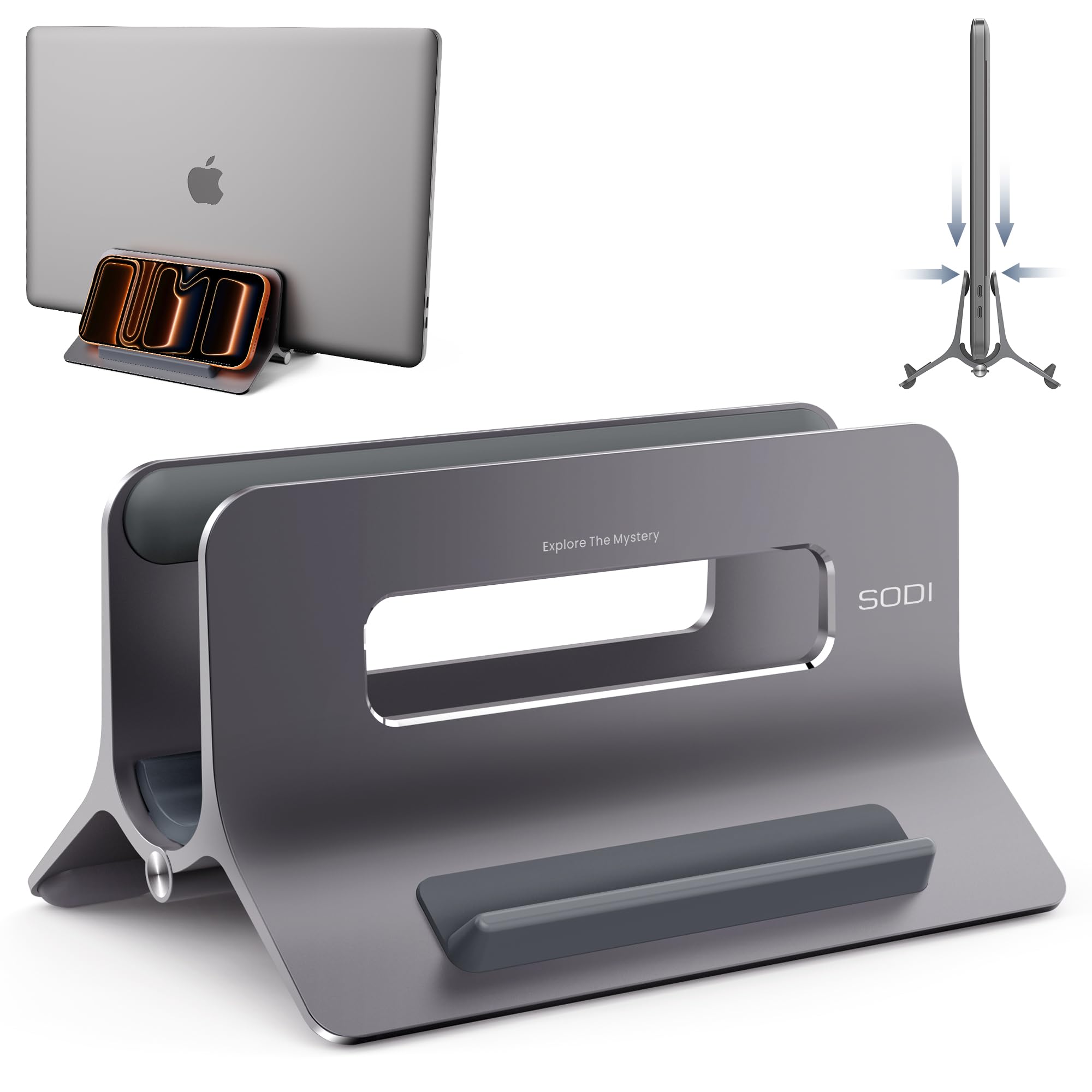
SODI Auto-Lock Laptop Stand

92 /100
Keeper Score Outstanding

Key details

Material
Aluminum
Adjustment
Gravity auto-lock
Item Weight
14.5 oz
Fits Laptop Thickness
Up to 1.05 in
Check Price on Amazon

The SODI's party trick is a gravity clamp: set the laptop in, and its weight closes the grip around it. No screws to turn, no key to lose.

We liked how little thought the stand asks for. You drop the laptop in with one hand, and the clamp takes up the slack; lift it out and the grip opens. The aluminum body has a sandblasted finish and silicone pads, and the stand can also hold a phone or tablet in its second cradle. That makes it more than a laptop dock on a crowded desk.

At 0.41 kg, it has enough mass to stay put on a desk, and the broad base does not feel tippy. The open design also leaves the laptop's vents exposed, which is the reason to store it upright rather than flat. It is a more deliberate-looking stand than the plain screw clamps here, with the Eiffel-style frame giving it some presence.

What we keep coming back to is the one-hand removal. On a desk where the laptop comes and goes several times a day, that small convenience is worth more than another millimeter of adjustment. The open front makes it obvious where the laptop goes, even in a hurry.

Pros

  • One-hand gravity docking
  • Holds laptop plus phone or tablet
  • Aluminum body with 0.41 kg heft

Cons

  • Won't take laptops thicker than 1.05 inches
Our verdict

If a laptop comes and goes several times a day, we point you to the SODI, whose gravity clamp makes one-handed placement genuinely easy.

Check Latest Price
8

Thick Laptops

JARLINK Vertical Laptop Stand

96 /100
Keeper Score Outstanding

Key details

Material
Anodized aluminum
Footprint
6 x 6.07 x 1.75 in
Number Of Slots
1
Fits Laptop Thickness
0.55 to 2.55 in
Check Price on Amazon

The JARLINK does most of what our top pick does for less, and its 0.55-to-2.55-inch slot is the reason it stays in the conversation. That range covers everything from a thin ultrabook to a thick 15-inch workstation, and the anodized aluminum body has a solid, planted feel.

We found the wide base and silicone pads kept it from sliding when we pulled a laptop out, and the open slot leaves the lid edges protected rather than pinched. The base has enough mass to stay put when you pull a laptop out, and the silicone pads do not leave marks on the desk. The finish is brushed and understated, with no logo shouting across the desk. The 6-by-6.07-inch footprint is broad enough that it needs a little room behind the desk.

An Allen key sets the width; after that, the stand stays where you put it. It is a single-slot design, so two laptops need the OMOTON Dual. The JARLINK also has less color choice than the top pick, which matters if you are matching a silver laptop.

Where the JARLINK earns its place is the thickness range at the price. It is the stand we point to when the top pick is unavailable or when you want a wider grip without moving up to a premium single-slot model. The silver finish is the one we preferred on a light wood desk, where it disappears instead of blending into the laptop.

Pros

  • Wide 0.55-to-2.55-inch slot
  • Anodized aluminum with silicone pads
  • Solid value versus premium single stands

Cons

  • Single slot only
  • Silver is the only finish
Our verdict

The JARLINK is our value alternative to the top pick, with a 2.55-inch-wide grip that still handles thick laptops.

Check Latest Price

How We Tested Vertical Laptop Stands

We started by pulling every vertical stand we could find and cutting anything that couldn't hold a large gaming laptop, had a fixed unpadded slot, or cost more than it was plausibly worth. That left 14 stands in aluminum and plastic, from single docks to three-slot racks, and we ran them for three months.

Each one went onto a real desk: mine, running a laptop in clamshell mode into an external monitor; a colleague's setup with a thick gaming machine; and a shared desk where three people swap laptops through the day. We raised and lowered a standing desk with each stand in place, slid laptops in and out several times a day, and carried a few home in a backpack to see how they survived the trip.

Slot fit came first. We measured the narrowest and widest setting, then checked whether a thin ultrabook stood straight or leaned, and whether a thick gaming chassis forced the sides apart. Stability was a nudge test — a bumped desk, a yanked charging cable — plus a weigh-in comparing each stand to the heaviest laptop it was rated for. We looked for scuffs where the padding met the lid, checked whether rear ports stayed reachable while docked, and measured how much desk each footprint actually returned.

Adjustable models got re-adjusted a dozen times to see whether the mechanism drifted; plastic racks were checked for flex at the base. Value came down to whether the hardware matched the price — machined edges and dense padding versus visible seams and thin foam. After three months, the stands still on our desks are the ones we stopped noticing.

How to Choose a Vertical Laptop Stand

Start With Thickness, Not Screen Size

The first number to check is the laptop's thickness at its thickest point, including any shell or skin. Slot ranges in this group run from 0.47 to 2.71 inches, and that spread is wider than it looks: a stand with a 0.47-inch minimum and a 1-inch maximum, like the UGREEN single, is a slim-laptop tool, while the OMOTON single opens to 2.71 inches and will take a gaming notebook. Close the lid, measure across the thickest part, and leave a little breathing room so the lining can grip without pinching.

Decide How Many Laptops Share the Desk

A single stand is simpler and usually covers a wider thickness range. The OMOTON single is the easy default for one machine; the OMOTON Dual makes sense when two laptops are both in daily use; the UGREEN 3-Slot is for three slim machines that would otherwise occupy three cradles. Count the devices you actually park on the desk, not the ones you own. A second slot you use twice a month is just a wider footprint the rest of the time.

Match the Adjustment to Your Routine

Screw clamps are set-and-forget: turn the included key once, and the stand stays put. Tool-free screws, like the Psitek's, are better if you switch between a work laptop and a tablet during the week, while a gravity clamp such as the SODI's lets you drop a laptop in with one hand. The mechanism matters less than the habit it supports, so choose the one that matches how often the slot changes.

Stability Is About Mass and Footprint

Aluminum is not automatically stable. The OMOTON single weighs 510 grams and the UGREEN single weighs 176 grams, and that difference shows when you pull a laptop out with one hand: the heavier base stays put, while the lighter one may need a hand on the base. Silicone feet help, but a deep base also needs desk depth. For a thick laptop, favor mass; for a laptop that travels, favor the smaller footprint.

Frequently Asked Questions

Final Verdict

For most desks, the OMOTON single is the one we recommend. Its 0.55-to-2.71-inch slot covers more laptops than any other stand here, and the 510-gram aluminum body gives it the stability to stay put when you pull a machine out. If two laptops are part of your daily setup, the OMOTON Dual is the better buy; if you regularly park three slim machines, go to the UGREEN 3-Slot.