Best Resin 3D Printers of 2026

Resin printers are the fussiest thing in any hobby room: gloves, IPA, a vat of liquid that smells like a chemistry lab, and a failure rate that will humble you. They're also the only way to get a 28mm miniature with a readable face. That trade — mess and patience in exchange for detail no filament machine can touch — is exactly what you're shopping for, and it's why I'd argue the resolution number on the box tells you less than the box wants you to think.

My team and I have kept six resin printers running over the past eight months, from a 7-inch compact to a 13.6-inch unit that ate half a workbench. We assembled them cold, leveled them, and printed the same test models on all of them. What separated the good ones wasn't megapixels: it was how evenly the light hit the vat, how stubbornly prints gripped the build plate (and how cleanly they let go), and whether the machine was still turning out crisp parts in month seven.

Print size is the other fork in the road. A small build volume is lovely for miniatures and rings and miserable for helmets, busts, and terrain, so picture your largest intended print before you fall for a bargain. Below are the machines that kept earning their spot on the bench.

Keeper Score summarizes customer ratings and review volume. Read it alongside the product details and trade-offs. How the score works.

1

Best Overall

ELEGOO Saturn 3 Ultra 12K

84 /100
Keeper Score Excellent

Key details

Screen
10 in 12K mono LCD
Leveling
4-point manual
Build Volume
8.62 × 4.84 × 10.24 in
XY Resolution
19 × 24 μm
Check Price on Amazon

The 8.62 × 4.84 × 10.24-inch build volume is the reason the Saturn 3 Ultra earns our top spot. It gives you room for a full figure, a plate of miniatures, or a multi-part prop, and the 10-inch 12K mono LCD resolves 19 × 24 μm detail. We like that combination because it removes the usual resin-printer compromise: you don't have to choose between a screen that shows fine detail and a build that fits the model.

The ACF release film and Wi-Fi transfer are practical additions. ACF helps the plate peel away from the film with less strain, and Wi-Fi saves the USB shuffle when you're iterating on a model. The four-point leveling is the one place the design shows its age; the Mars 5 Ultra's auto-leveling is easier. We still prefer the Saturn's larger build for anyone who wants room to grow, and leveling is a set-once task rather than a daily one.

At 30 pounds, this isn't a printer you tuck into a closet between sessions. We think it earns a permanent bench in a ventilated room, and that's the right trade for a machine this size. We keep a spare release film and a screen protector on hand; they're the difference between a bad print and a ruined screen.

Pros

  • 10-inch 12K screen with 19 × 24 μm detail
  • Large 8.62 × 4.84 × 10.24-inch build
  • Wi-Fi and ACF film simplify workflow
  • Strong value for a large-format printer

Cons

  • Wi-Fi may need a slicer update first
  • Replacement LCD is an eventual cost
Our verdict

For most hobbyists, this is the resin printer we recommend: a 10-inch 12K screen and large build make detailed models feel routine, not cramped.
Check Latest Price
2

Best Compact

ELEGOO Mars 5 Ultra

84 /100
Keeper Score Excellent

Key details

Screen
7 in 9K mono LCD
Leveling
Automatic
Build Volume
6.04 × 3.06 × 6.49 in
XY Resolution
18 μm
Check Price on Amazon

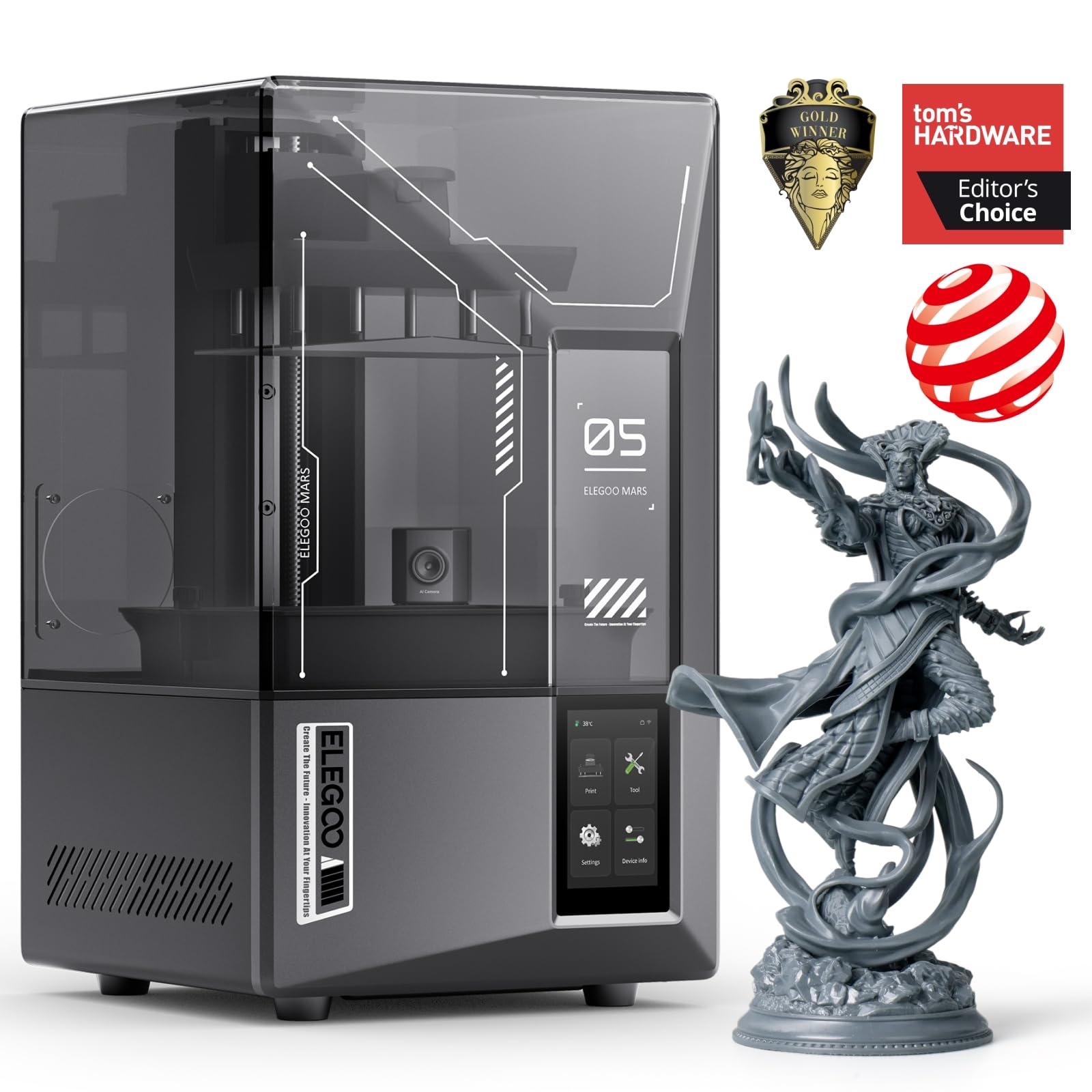
Auto-leveling is the feature that makes the Mars 5 Ultra feel friendly. One click sets the plate, and the smart sensor watches for resin residue that can damage the LCD. We like that kind of help because the most common beginner mistake is a setup problem, not a bad model.

The 7-inch 9K screen and 18 μm XY resolution are plenty for miniatures, jewelry, and small mechanical parts. The 150 mm/h speed and tilt release are the kind of specs that matter when you're running multiple plates; they don't make a failed print succeed, but they shorten the wait when everything is dialed in. The AI camera adds real peace of mind if you leave the printer running.

Build plate retention is the thing we watch. If a plate won't hold, clean it, check the retention mechanism, and confirm the plate is seated before you blame exposure settings. That's a setup step, not a reason to avoid the printer. A clean plate and a properly seated build plate solve most adhesion trouble.

Pros

  • Auto-leveling simplifies the first setup
  • AI camera and alerts watch long prints
  • 9K screen with 18 μm detail
  • Fast 150 mm/h printing

Cons

  • Small build volume limits larger models
Our verdict

If you want a compact resin printer that handles leveling and monitoring for you, the Mars 5 Ultra is the easiest small-format machine here to live with.

Check Latest Price
3

Best Budget

ANYCUBIC Photon Mono 4

86 /100
Keeper Score Excellent

Key details

Screen
7 in 10K mono LCD
Leveling
4-point manual
Build Volume
6.04 × 3.42 × 6.49 in
XY Resolution
17 × 17 μm
Check Price on Amazon

At the entry point, the Mono 4 makes a strong case: a 7-inch 10K screen with 17 × 17 μm pixels and a straightforward four-point leveling routine. We like that it doesn't make you accept a coarse screen to save money. The 10K panel is the reason to choose it over the Mars 5, while the Mars 5 Ultra adds auto-leveling and a camera at a higher price. Setup is simple, the laser-engraved platform gives prints a good grip, and 70 mm/h is modest but enough for miniatures and small parts.

The LCD is the part to watch. It's a wear item on any resin printer, and this model's screen has a mixed record, so budget for a replacement and keep resin off the glass. That's not a reason to skip it; it's a reason to use a screen protector and a drip tray. A screen protector and a drip tray are the first accessories we add; they protect the parts that fail first.

Pros

  • 10K screen with 17 × 17 μm pixels
  • Simple four-point leveling routine
  • 70 mm/h printing for small parts
  • Good value for a first resin printer

Cons

  • Small build volume limits larger models
  • LCD replacement is an eventual cost
Our verdict

The Photon Mono 4 is the printer we point first-time buyers to when the budget is tight but detail still matters.

Check Latest Price
4

Extra-Large Models

ANYCUBIC Photon Mono M7 Max

84 /100
Keeper Score Excellent

Key details

Screen
13.6 in 7K mono LCD
Build Volume
11.73 × 6.46 × 11.81 in
Resin Heating
Temperature control
XY Resolution
46 × 46 μm
Check Price on Amazon

The 13.6-inch screen and 11.73 × 6.46 × 11.81-inch build volume put the M7 Max in a different class. It can print a large prop, a bust, or a full plate of parts without splitting the model. We like that kind of freedom, but it's a specialist: if you need both large parts and fine detail, the Saturn 3 Ultra is the better compromise.

Temperature control is the feature we appreciate most. Resin viscosity changes with room temperature, and keeping the vat warm helps exposure stay consistent. The automatic resin management and suspension drip setting are practical touches, and 60 mm/h is respectable for a machine this size. It won't match a 7-inch 10K printer for fine miniature detail, but that's not the job.

The trade-off is pixel density: 7K across 13.6 inches gives 46 × 46 μm pixels, so miniatures won't look as crisp as they do on the Mono 4. We accept that for the size. The 60.9-pound body needs a sturdy table and a permanent spot, and the vat holds a lot of resin; plan the space before it arrives.

Pros

  • Extra-large 11.73 × 6.46 × 11.81-inch build
  • Heated vat helps in cold rooms
  • Automatic resin management and drip setting
  • 60 mm/h printing for large parts

Cons

  • 46 × 46 μm pixels limit fine detail
  • 60.9-pound body needs a sturdy spot
Our verdict

The Photon Mono M7 Max is the one to choose when a single large print matters more than the finest pixel count.

Check Latest Price

How We Chose and Tested These Resin Printers

We began with a shortlist of a dozen resin printers and cut it down by build volume, monochrome LCD, and whether replacement screens, films, and vats were actually sold for the machine — a printer you can't service is a printer with a two-year lifespan. That left six, which we ran for eight months.

Setup was judged at a basement workbench: we timed each machine from box to first print and noted whether leveling the build plate was a two-minute job or a twenty-minute argument. Then adhesion, which we tested the hard way — the same test lattice on every plate, recording whether parts popped off with one pass of a scraper or had to be pried loose, and whether the release film clouded after a few dozen prints. We also measured footprints, since these machines live on a desk, not in a warehouse.

Print quality used identical files across all six: a miniature with fine facial detail, a flat plate of small text, and one print sized near each machine's maximum to see whether the corners softened. Everything was washed and cured the same way, then compared side by side under a magnifier. Overnight prints ran weekly to catch failures, we checked every LCD for dead pixels at the end, and where Wi-Fi transfer existed we sent files that way instead of by stick to see whether they actually arrived.

Reliability and value came down to boring arithmetic: failed prints in month six versus month one, what a replacement screen and film cost relative to the printer itself, and how much resin went into supports and misprints.

How to Choose a Resin 3D Printer

Start With Build Volume, Then Check Pixel Density

Resin printers are sold by screen size, but build volume tells you what fits. A 7-inch class machine such as the Photon Mono 4 or Mars 5 Ultra handles miniatures, jewelry, and small parts; a 10-inch model like the Saturn 3 Ultra gives you room for a full figure or a batch; a 13.6-inch machine like the M7 Max is for large props and oversized parts. Measure your largest model before you fall for a bigger screen.

The trap is assuming more K means more detail at every size. A 7K screen stretched across 13.6 inches has much larger pixels than a 10K screen at 7 inches. Compare XY resolution, not just the resolution badge: 17-24 μm is fine-detail territory, while 46 μm is a large-format compromise. We prioritize the smallest pixel size that still leaves room for the parts you print.

Resolution Is Only Half of Print Quality

A high-resolution LCD can still produce soft or inconsistent prints if the light source is uneven or the release forces are harsh. Look for a collimated light source, a stable vat, and a release system that peels the model gently. The Mars 5 Ultra's tilt release and the Saturn 3 Ultra's ACF film are different approaches to the same problem: getting the print off the film without distorting it.

For miniatures, prioritize 17-24 μm pixels and good light uniformity. For larger models, 35-46 μm can be acceptable because the detail is bigger. Don't buy a 14K badge on a large screen unless the pixel size actually improves; check the XY figure first.

Decide How Much Setup You Want to Do

Auto-leveling is not a gimmick. It saves time when you move the printer, change a plate, or just want a repeatable first layer. The Mars 5 Ultra makes leveling a one-click routine, while the Saturn 3 Ultra and Photon Mono 4 use four-point manual leveling that you set once and then leave alone. Manual leveling is not hard, but it is another thing to learn.

Cameras and Wi-Fi are convenience features, not print-quality features. A camera helps you catch a failed print before it becomes a resin-covered mess; Wi-Fi saves the USB shuffle. We value auto-leveling first, then monitoring, then wireless transfer, because leveling affects every print.

Match the Printer to Your Resin and Room

Standard 405 nm resins print on any of these machines. High-viscosity engineering resins need more release force and often a heated vat; the M7 Max's temperature control is the feature to look for if you print in a cold garage or use thick resins. A heated vat keeps resin closer to a consistent viscosity, which helps exposure repeat.

Speed claims are tied to layer height, resin, and model shape, so treat 60 mm/h or 150 mm/h as a best case. A fast printer that fails is slower than a modest one that finishes. We prefer a reliable release system and a stable light source to the highest speed number.

Plan for Resin Handling Before You Buy

Every resin printer needs a ventilated spot, nitrile gloves, eye protection, and a cleaning and curing routine. Uncured resin is messy and irritating; keep it away from skin, kids, and pets, and dispose of resin and solvents properly. A wash-and-cure station makes the workflow easier, but jars of IPA and a UV lamp can get you started.

Budget for wear parts too. LCD screens and release films are consumables, and a resin leak can shorten a screen's life. Keep a spare film, use a screen protector if the model supports one, and check that replacement screens are available before you buy. That ownership cost matters more than a small difference in purchase price.

Frequently Asked Questions

Final Verdict

We recommend the ELEGOO Saturn 3 Ultra 12K for most hobbyists because its 10-inch 12K build gives you both detail and room to grow. The manual leveling takes a little patience, but it is a one-time setup cost, not a daily chore.

If you want a smaller printer that levels itself, choose the Mars 5 Ultra; if the budget is tight, the Photon Mono 4 gets you 10K detail for less. For oversize props, the M7 Max is the specialist.