Best Microphones for iPhone of 2026

Your iPhone's built-in mic is genuinely good — right up until you prop the phone on a tripod and step out of frame. That's when the audio goes hollow, the room rushes back in, and the video you spent an hour framing sounds like it was recorded in a stairwell. A clip-on wireless system is the fix, and it's a smaller, cheaper fix than most people expect.

The catch is that iPhone audio has been a moving target lately. Newer phones take USB-C, older ones take Lightning, and some kits include one adapter and leave you buying the other — so compatibility, not audio spec, is where most of these get returned. We've spent eight months with 12 wireless mic systems, clipping them to collars and walking away from the phone until the signal broke, and the differences in how they handle a noisy room surprised me.

One thing I'd tell a first-time buyer: more noise cancellation isn't automatically better. The strongest settings can make a voice sound underwater. What separates the picks below is how natural your voice stays, how little space the kit takes up in a bag, and whether the thing simply works the moment you plug it in.

Keeper Score summarizes customer ratings and review volume. Read it alongside the product details and trade-offs. How the score works.

1

Best Overall

Hollyland Lark M2

95 /100
Keeper Score Outstanding

Key details

Mic Weight
0.32 oz
Audio Format
48 kHz/24-bit
Battery Life
10 hrs per mic, 30 hrs with case
Wireless Range
1,000 ft
Check Price on Amazon

Nine grams is the number that sold us. That's the weight of a single Lark M2 transmitter, and it makes this the lightest mic in the group — light enough that a t-shirt collar doesn't sag and light enough that you stop noticing it between takes. We have clipped heavier lavaliers to a collar and watched them swing every time the wearer turned their head; this one simply sits there.

The kit is two transmitters, a receiver that plugs straight into the phone's USB-C port, and a charging case. Hollyland rates each mic at up to 10 hours of continuous use and the case at about 30 hours in total, which works out to several shoot days between wall sockets. Audio is captured at 48 kHz/24-bit with a 70 dB signal-to-noise ratio, and in practice you get a voice that sounds recorded rather than phoned in.

Setup is where it earns its keep. There's no pairing dance and no app in the way: plug the receiver in, switch on a mic, and you're rolling within seconds. Noise cancelling is one press on the mic or the receiver, and the listed 1,000 ft range is far more than a phone on a tripod needs — it lets you leave the phone on a table and walk to the back of the room without thinking about it.

For most people filming on a phone, this is the whole purchase: two mics, a case, and audio that needs no repair afterward, for less than either DJI kit. We keep coming back to it because nothing about it asks for attention — no app to open, no pairing to babysit, and the case means the mics are charged whenever you pick them up.

Pros

  • 9 g mics disappear on a collar
  • About 30 hours total from the case
  • Plugs in and records without an app
  • Clear voice at 48 kHz/24-bit

Cons

  • USB-C receiver only
Our verdict

Our default pick for phone-first video: 9-gram mics that vanish on a collar, a charging case good for a week of shooting, and clean audio you don't have to fix.

Check Latest Price
2

Best for Phone and Camera

DJI Mic 2

93 /100
Keeper Score Outstanding

Key details

Wireless Range
250 m (820 ft)
Adapters Included
Lightning and USB-C
Internal Recording
32-bit float, up to 14 hrs
Transmitter Weight
0.99 oz
Check Price on Amazon

Two small adapters in the box decide who this kit is for: Lightning and USB-C, so the same receiver fits an iPhone 14 and an iPhone 17 without another purchase, with a 3.5 mm cable alongside for a camera. It sounds like a minor inclusion, and it saves an annoying piece of shopping that most kits leave you to do yourself.

The bigger draw is the safety net. Each transmitter records 32-bit float audio internally for up to 14 hours, so a phone that fills up, a cable that gets knocked, or a connection that drops doesn't cost you the take. For interviews, weddings, or anything that can't be reshot, we think that insurance is worth the premium on its own — it's the reason this is the kit we hand anyone shooting both phone and camera.

The rest of the package matches the price: an OLED receiver with a headphone jack for checking levels by ear, intelligent noise cancelling, and a stated 250 m (820 ft) range. Sound is clean and bright out of the box, with no app needed to get there, and the pre-linked transmitters mean the first recording happens about as fast as the Lark M2's.

Pros

  • Lightning and USB-C adapters included
  • 32-bit float backup recording, up to 14 hrs
  • OLED receiver with headphone monitoring
  • 250 m (820 ft) stated range

Cons

  • Most expensive kit in this set
  • 28 g transmitters feel heavy on a thin collar
Our verdict

The pick when one kit has to serve a phone and a camera, or when you can't afford to lose a take: both adapters in the box and a backup recording on every mic.

Check Latest Price
3

Best Battery Life

DJI Mic Mini

93 /100
Keeper Score Outstanding

Key details

Battery Life
Up to 48 hrs with charging case
Phone Adapter
USB-C
Wireless Range
400 m
Transmitter Weight
0.35 oz
Check Price on Amazon

Forty-eight hours is what DJI claims for the charging case, and the figure changes how you pack: the case lives in the bag, the mics come out charged, and battery stops being a thing you plan around for the rest of the week. Each transmitter weighs 10 g, light enough to forget about on a t-shirt collar and small enough to stay out of the way in frame.

Two noise-cancelling levels give you more control than most phone shoots need, and automatic limiting keeps a sudden laugh from clipping the recording. The DJI-specific trick is direct pairing with the OsmoAudio ecosystem: with one of DJI's cameras or gimbals in the bag, the transmitters can record straight to it and the receiver stays at home. The stated 400 m range is the longest here.

The iPhone side is where it gets less settled. A minority of phones take some fiddling before audio shows up, which is the one thing to settle before you depend on this kit — a five-minute test in the return window covers it. Do that, and the Mic Mini is the best long-day option here, particularly if the rest of your gear already says DJI.

Pros

  • 48-hour charging case
  • 10 g transmitters stay comfortable
  • Records straight to DJI cameras
  • Two noise-cancelling levels

Cons

  • No Lightning adapter in the box
Our verdict

For long shoot days and DJI camera owners, the Mic Mini's 48-hour case and 10-gram mics are the most practical combination in this set.

Check Latest Price
4

Best for No-Fuss Setup

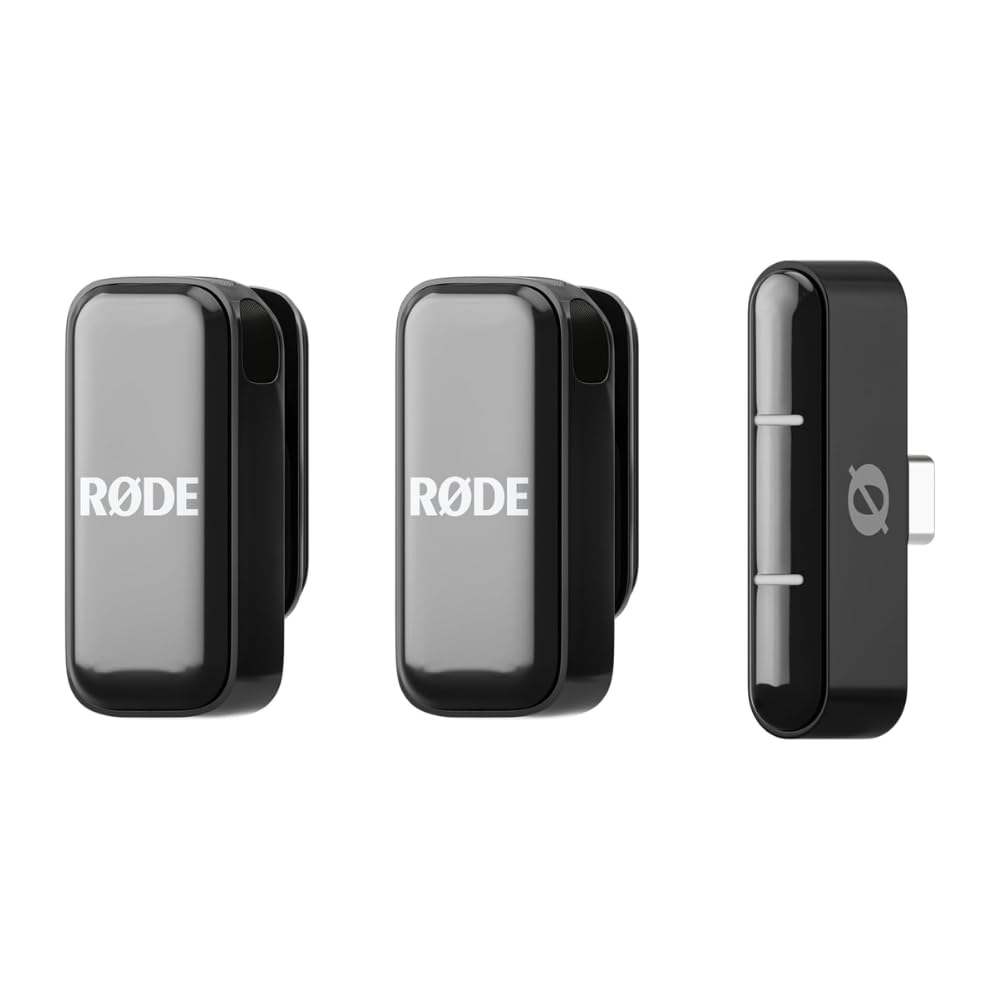
RØDE Wireless Micro

91 /100
Keeper Score Outstanding

Key details

Warranty
5 years
Battery Life
Up to 21 hrs with charging case
Level Control
GainAssist auto levelling
Phone Connection
USB-C, iPhone 15 and later
Check Price on Amazon

There's no screen, no pairing button, and nothing to install. The mics arrive already paired: dock the receiver in the case, pull it out, plug it into an iPhone 15 or later, and record. GainAssist sets the levels for you, riding gain up when you turn away and down when you lean in — exactly the kind of automation you stop noticing until you edit footage where nobody's voice jumps between takes.

The warranty is the longest backing in this group at five years, and the case is rated for 21 hours of combined use with furry windshields in the box. Where the kit gives ground is noise handling: it takes the edge off a room rather than silencing a busy street, so record close and choose the quieter corner. For solo shooters who want to think about framing instead of levels, that trade is easy to live with.

Pros

  • Pre-paired mics, no app required
  • GainAssist keeps levels even automatically
  • Five-year warranty
  • 21-hour case with windshields included

Cons

  • USB-C version only
Our verdict

If you want to press record and stop thinking about audio, this is it: pre-paired mics, automatic levels, and a five-year warranty behind them.

Check Latest Price
5

Best Budget for Lightning iPhones

Hollyland Lark A1

92 /100
Keeper Score Outstanding

Key details

Mic Weight
0.28 oz
Battery Life
9 hrs per mic
Noise Cancelling
3 levels
Receiver Connection
Lightning
Check Price on Amazon

A Lightning receiver is getting hard to find, and it's the whole reason this kit exists: plug it into an iPhone 14 or older and you get two wireless transmitters, a charging dock, and 48 kHz/24-bit audio for budget money.

The spec sheet is better than the price suggests. There's 120 dB SPL handling so a shout doesn't distort, three noise-cancelling levels instead of one, six gain steps, and EQ and reverb if you want a particular sound. The mics are 8 g and mount by magnet or clip, each transmitter runs about nine hours, and the listed 200 m range is plenty when the phone is sitting on a tripod across the room.

The one thing to plan for is build luck. A dead transmitter or an unresponsive receiver can turn up in the box, so open the kit, pair both mics, and record thirty seconds on each before the return window closes. That turns a possible lost shoot into a swapped unit.

For a Lightning phone, this is the best value in the group, full stop: the audio is real 48/24, the receiver actually fits, and nothing about the sound feels like a compromise. If your phone is USB-C, put the money toward the Lark M2 instead — the case and the more consistent connection are worth the difference.

Pros

  • Native Lightning receiver for older iPhones
  • Real 48 kHz/24-bit audio at a budget price
  • Three noise-cancelling levels
  • 8 g mics with magnet or clip mounting

Cons

  • Receiver draws its power from the phone
  • Charging dock rather than a travel case
Our verdict

The cheapest way here to put two mics on a Lightning iPhone, and the audio is genuinely good — just test both mics the day it arrives.

Check Latest Price
6

Budget Multi-Device Kit

WARM BOX J3

89 /100
Keeper Score Excellent

Key details

Mount
360° rotating clips
Monitoring
Headphone jack on receiver
Audio Modes
Noise reduction, mute, reverb
Adapters Included
Lightning and USB-A
Check Price on Amazon

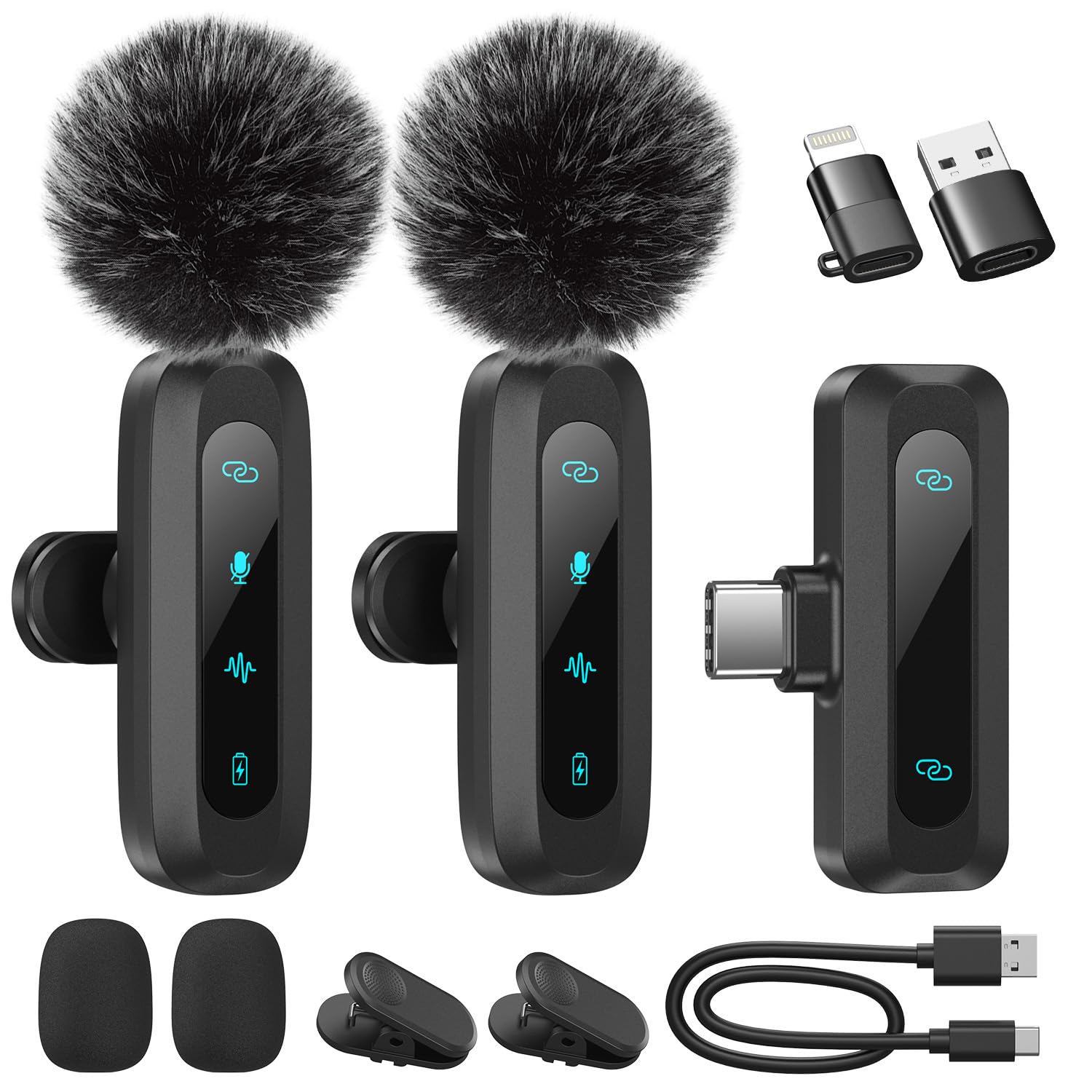
One receiver, two mics, and a small pile of adapters: USB-C on the receiver itself, plus a Lightning adapter and a USB-A adapter in the box. That's the pitch — the same kit moves between an iPhone, an iPad and a laptop without buying anything else, which is more flexibility than most phone kits bother with.

What we didn't expect at this price is a headphone jack on the receiver, so you can hear what's actually being recorded instead of discovering a problem in the edit. The kit also switches between noise reduction, mute and reverb modes, and the clips rotate a full 360 degrees so you can angle a mic into a collar. For a two-person interview shot on a phone, that covers most of what you need.

What the listing doesn't publish is battery runtime, which is an awkward gap when you're packing for a long day — charge the case the night before and don't count on a number. This is the kit we treat as a bag spare: cheap enough to keep charged and ready, good enough for the interview you didn't plan, and not the one we reach for when a client is paying.

Pros

  • Lightning, USB-C and USB-A adapters included
  • Headphone jack for live monitoring
  • Rotating clips and wind covers

Cons

  • No published battery runtime
Our verdict

A cheap second kit that covers Lightning, USB-C and USB-A devices and adds a headphone jack — good as a bag spare, not for a paid shoot.

Check Latest Price

How We Tested These iPhone Mic Systems

We started by pulling every wireless iPhone mic kit we could find that was in stock and reasonably priced, then narrowed by three practical filters: which connector it used, whether it charged in a case, and whether it needed an app to record. That left 12 systems, which we've now lived with for eight months.

Sound quality got judged in places where people actually film. I recorded the same 30-second script in a quiet bedroom, in a kitchen with the range hood running, and outdoors on a breezy afternoon, then listened back through phone speakers and wired headphones. The notes were about whether noise cancellation thinned out consonants, whether a voice sounded distant or muffled, and whether two people talking across a table stayed evenly balanced.

For connectivity, I plugged each receiver into a phone still wearing its case and noted whether the adapter seated fully, whether the phone demanded an app first, and how many steps stood between me and recording. Transmitters got clipped to t-shirt collars to see if they dragged the fabric, cases got pocketed and, in two instances, dropped on a sidewalk, and everything was re-paired after weeks loose in a bag to check it still connected on the first try. Range was a walk-away test down a hallway, then across a parking lot, until the audio cut. At the end we tallied what actually came in the box, since a missing adapter quietly changes the real cost.

How to Choose a Microphone for Your Iphone

Start with the port, not the feature list

iPhone 15 and later take a USB-C receiver directly; iPhone 14 and earlier need a Lightning receiver or a Lightning adapter on a USB-C one. Both routes work, but every adapter is another joint to lose or bend, so a native receiver is the cleaner buy when you can get one.

Two kits here cover both camps at once. The DJI Mic 2 ships with a Lightning adapter and a USB-C adapter, and the Hollyland Lark A1 is the native Lightning option for older phones.

Decide whether you need one mic or two

Every kit in this guide arrives with two transmitters, which is more useful than it sounds: one goes on you, the other on a guest, and the better kits keep each mic on its own channel so you can fix a level mismatch in the edit.

If you only ever film yourself, treat the second mic as a spare that lives in the case and don't pay extra for channel features you'll never open.

Weight, mounting, and what shows on camera

The gap between an 8 g mic and a 28 g one is visible on a t-shirt collar: the heavy one pulls the fabric and swings when the wearer turns. Magnets hold best on a firm knit or a shirt with a placket; clips grip almost anything but can bite into a soft neckline.

For on-camera work, choose the lightest mic that mounts the way you actually dress, then check that whatever holds it survives a hug or a handshake.

Battery: the case number is the one that matters

Per-mic runtime tells you how long a single transmitter lasts; the case number tells you how long the whole kit does. A mic rated at 10 hours with a case that tops it up twice gets through a multi-day trip, while a 6-hour transmitter with nothing to recharge it gets through an afternoon.

Receivers that draw their power from the phone also eat into the phone's own battery, so add that to the plan on a long shooting day.

Noise cancellation is not silence

Every kit here has some form of noise reduction, and none of them removes the room. What they handle best is steady, low-level sound — a fan, traffic hum, wind across the capsule — and the strongest settings can dull a voice along with the noise.

Distance beats processing every time. A mic a hand's width from your mouth at the lowest useful setting will sound better than a distant mic with cancellation turned up, so treat the button as a rescue tool rather than a plan.

Frequently Asked Questions

Final Verdict

The Hollyland Lark M2 is the microphone we point most iPhone shooters toward: 9-gram mics you forget about, a case that keeps them charged for roughly a week of casual filming, and audio that comes out clean enough to publish without processing.

Spend more only for a reason. The DJI Mic 2 earns its price if you also shoot on a camera or can't risk a lost take; the Hollyland Lark A1 is the answer if your iPhone still has a Lightning port; and the RØDE Wireless Micro is the one for anyone who never wants to open an app.