Best Computer Speakers of 2026

For years the speakers on my desk were the ones that came free with something else — wedged behind the monitor, turned up until they rattled, mostly used to hear a meeting start. Then I spent an afternoon editing audio through them and realized I'd been guessing at half of it. A good pair makes voices land cleanly, then disappears from your attention.

We've spent the past six months with 12 pairs on real desks — a shared workroom, a home office, a kitchen counter that does double duty — and setup is where they separate. Bluetooth that pairs on the first try, a volume knob you can find without looking, a footprint that fits under a monitor arm: small things that decide whether a set stays plugged in.

One thing buyers rarely anticipate is how much power shapes the sound. Sets that draw everything from a single USB cable are tidier, but a pair with its own adapter usually has more headroom before things turn harsh. Below are the ones we kept returning to, sorted by what each does best.

Keeper Score summarizes customer ratings and review volume. Read it alongside the product details and trade-offs. How the score works.

1

Best Overall

Creative Pebble V3

89 /100
Keeper Score Excellent

Key details

Dimensions
4.8 x 4.69 x 4.61 in
Driver Size
2.25-inch full-range
Connectivity
USB-C, Bluetooth 5.0, 3.5mm
Power Output
8W RMS (16W peak)
Check Price on Amazon

There is exactly one cable to the computer. The Pebble V3 carries both power and audio over a single USB-C lead, so there is no second wire hunting for a headphone jack and no power brick under the desk. On a surface already carrying a monitor, a keyboard and a charger, that was the first thing we noticed and the thing we kept noticing.

We think it is the best default here because the neatness costs you no flexibility. Bluetooth 5.0 covers a phone or a second laptop, a 3.5mm input handles anything without USB audio, and a USB-A adapter comes in the box for an older tower. The 2.25-inch drivers sit at a 45-degree angle, firing up toward your ears rather than into your knees, which is a large part of why these fill a desk better than their size suggests.

Clear Dialog processing is aimed at speech, and it earns its keep on calls and video: dialogue stays out in front instead of sinking under the backing track. Bass is where the design stops. Eight watts RMS from a 2.25-inch driver gives a warm, tidy low end, not the punch of a subwoofer, and the pair tops out at a volume that suits a room rather than a party.

Bluetooth is the least steady part of the package. Pairing is quick, but the link is not the most robust and a busy hub nearby does not help. Run the cable at your desk, keep Bluetooth for the phone on the couch, and the weakness disappears. Each speaker is roughly four and three-quarter inches square, so they tuck under a monitor without crowding a mouse hand.

Pros

  • One USB-C cable for power and audio
  • Bluetooth 5.0 and 3.5mm inputs as well
  • Angled drivers aim sound at desk height
  • Compact enough to sit under a monitor

Cons

  • Bass stops short of a 2.1 system
  • Volume ceiling suits a desk, not a room
Our verdict

We recommend it as the default: one USB-C cable, Bluetooth and 3.5mm in a compact set that fits almost any desk.

Check Latest Price
2

Best for Bigger Rooms

OHAYO C6 60W

87 /100
Keeper Score Excellent

Key details

Inputs
Bluetooth 5.3, RCA, AUX, USB
Drivers
0.75-in tweeter, 3-in driver
Enclosure
MDF wood
Power Output
60W (30W x 2)
Check Price on Amazon

A three-inch carbon-fiber driver, a 0.75-inch silk dome tweeter and a cabinet made of MDF rather than molded plastic: that is a bookshelf-speaker recipe, not what we expect from a set costing a little more than the USB-powered ones. The wooden box is the part that earns its keep, damping the resonance a hollow shell adds to everything you play.

What the hardware buys is headroom. This is the loudest pair here and the only 2.0 set with a proper tweeter, so cymbals, strings and dialogue have somewhere to sit instead of being smeared through the midrange. On a desk pushed against a wall, where the speakers cannot get far from the surface behind them, that control matters more than a prettier finish.

Anyone with the space should start here. The caveat is the daily ritual: they do not switch off with the computer, so the rocker on the back of the active cabinet becomes a habit, and the Bluetooth pairing announcement is loud enough to make you jump the first time. Inputs are the most generous in this group, with Bluetooth 5.3, RCA, AUX and USB, which is what makes them easy to share with a turntable or a television.

Plan the space as well. At about four and three-quarter inches tall and four and a third wide, each cabinet needs real estate either side of the monitor, and the rear connections want an inch or two of clearance behind them. On a deep desk that is nothing; on a shallow one it decides where everything else goes.

Pros

  • 60W with a real tweeter per cabinet
  • MDF cabinet damps resonance
  • Bluetooth 5.3, RCA, AUX and USB inputs
  • Two-year manufacturer warranty

Cons

  • Some units stop powering on within months
  • Wider footprint than the USB-powered sets
Our verdict

Our pick when the desk has room and the room needs filling: the most powerful, most complete 2.0 pair in this group.

Check Latest Price
3

Best for Bass

Logitech Z313

89 /100
Keeper Score Excellent

Key details

Inputs
3.5mm aux
Controls
Wired control pod
Power Output
25W
Configuration
2.1 with subwoofer
Check Price on Amazon

The subwoofer is the whole argument, and it is why this set earns a place. Nothing else here puts a dedicated bass driver on the floor, and for games and films that changes the character of the sound rather than just the volume: explosions get weight underneath them instead of a thump from a small cone. The cabinet is compact enough to sit under a desk without stealing legroom.

This is the set we choose when the desk doubles as an entertainment center. The control pod is the second reason: a small wired puck holding the volume dial and a headphone jack, sitting where your hand already is, so you are not reaching behind a monitor or fishing for the system slider halfway through a call.

The tuning leans boomy, and there is no tone control anywhere on the system, so if the bass overwhelms a small room, shifting the sub away from the wall is the only adjustment you get. The satellites are light enough that a sleeve or a slack cable can knock one over, so give them a little margin from the desk edge. The failure to watch for over the years is a sub that develops a rattle or a satellite that goes quiet.

Pros

  • Real subwoofer for games and film
  • Wired control pod with headphone jack
  • Hooks up to anything with a 3.5mm output

Cons

  • No tone or bass control at all
  • Satellites are easy to knock over
Our verdict

The only 2.1 system here, and the one we choose when games and movies matter more than a tidy setup.

Check Latest Price
4

Best for Two Devices

Logitech Z207

88 /100
Keeper Score Excellent

Key details

Extras
On-speaker headphone jack
Connectivity
Bluetooth 4.2, 3.5mm
Power Output
10W peak
Cabinet Height
9.49 in per speaker
Check Price on Amazon

Two devices, one set of speakers, no cable swapping: that is the Z207's pitch, and it is the reason this pair made the list. Bluetooth 4.2 takes the phone or a second laptop while the 3.5mm lead stays in the desktop, and Easy-Switch hands over when you pause one source and start the other. We found it the least fiddly way here to go from a work call on the laptop to music on a phone.

The cabinets are the surprise. At 1.39 inches wide they slip into gaps a normal satellite will not, but they stand 9.49 inches tall, so check the clearance under a monitor shelf before you commit. Each cabinet pairs an active driver with a passive radiator, which stretches the bass noticeably beyond what that width suggests.

Where they give ground is weight of sound. Ten watts peak across the pair produces clear speech and a decent stereo image, plenty for a desk, but the low end is thin beside the 2.1 Logitech set and the midrange hardens as you push the volume. The headphone jack on the speaker is a genuinely useful touch for anyone who switches to a headset for calls.

Longevity is the open question, and it is why this sits behind the top pick rather than beside it. Units that died inside a year or so are the recurring note, and the two-year warranty is what makes that a manageable risk instead of a deal-breaker.

Pros

  • Bluetooth and 3.5mm with easy switching
  • Slim 1.39-inch cabinets
  • On-speaker headphone jack

Cons

  • Tall cabinets need vertical clearance
  • Thin bass beside the 2.1 option
Our verdict

We like it best for two devices: Bluetooth and 3.5mm on one set, with a headphone jack within reach.

Check Latest Price
5

Best for Tiny Desks

XKX116A Monitor Speaker

86 /100
Keeper Score Excellent

Key details

Mounting
Monitor spring clamp
Driver Size
40mm
Connectivity
USB, USB-C adapter
Power Output
8W
Check Price on Amazon

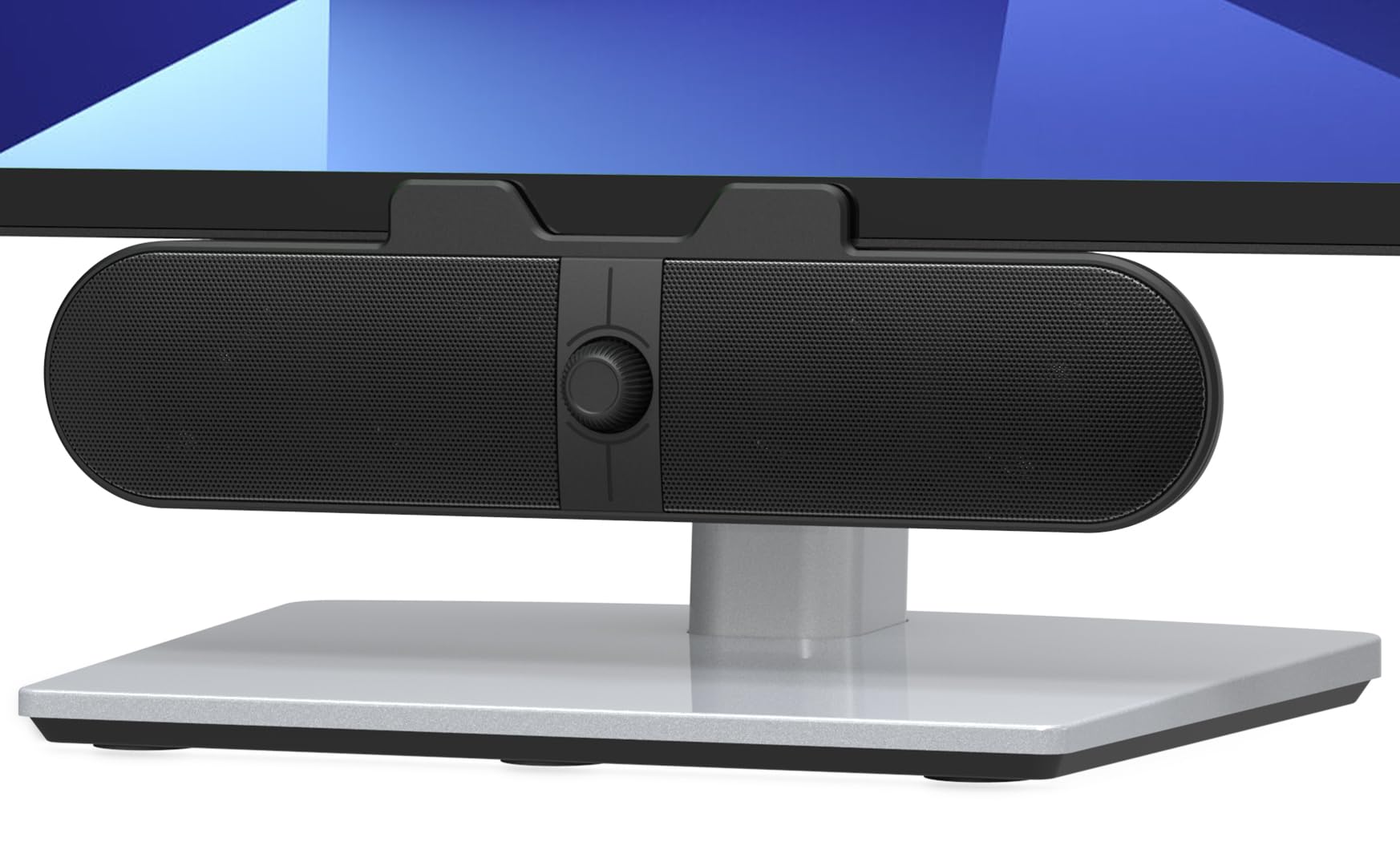
If your desk has no room left, this is the speaker that does not ask for any. It is a single 9.17-inch bar that clamps to the top, bottom or side of a monitor on a padded spring clamp, and it runs from one USB cable with a USB-C adapter in the box. We have worked at desks where the only free surface was the monitor's bottom bezel, and this is the shape that solves it.

The volume knob is what makes it more than a compromise. It is a rotary dial on the front that syncs with the system volume, so you reach up and turn instead of hunting through the system tray, and a G-sensor flips the left and right channels automatically depending on whether the bar sits above or below the screen. That sounds like a gimmick until you move the bar and do not have to re-plug anything.

Eight watts from 40mm drivers will not fill a room and should not be asked to. What it does is put clear speech and serviceable music at ear level, a real step up from laptop speakers, without touching the desk. The clamp is the part to check: thick or curved panels and some gaming monitors are where it struggles, and the fallback is to rest the bar just under the screen rather than gripping it.

The cable runs 5 feet, which reaches a tower beside the desk but not one across the room, and the bar itself is covered for 24 months.

Pros

  • Clamps on, so it uses no desk space
  • Rotary knob synced to system volume
  • Auto channel switching when repositioned
  • USB-C adapter included

Cons

  • Clamp will not grip thick or curved monitors
  • 8W will not fill a room
Our verdict

Our recommendation when desk space is the constraint: clamp it to the monitor and forget it is there.

Check Latest Price
6

Changing Setups

OFFSIR GS005

87 /100
Keeper Score Excellent

Key details

Lighting
Touch RGB, four modes
Connectivity
USB, 3.5mm
Power Output
10W (5W x 2)
Configuration
2-in-1 pair or soundbar
Check Price on Amazon

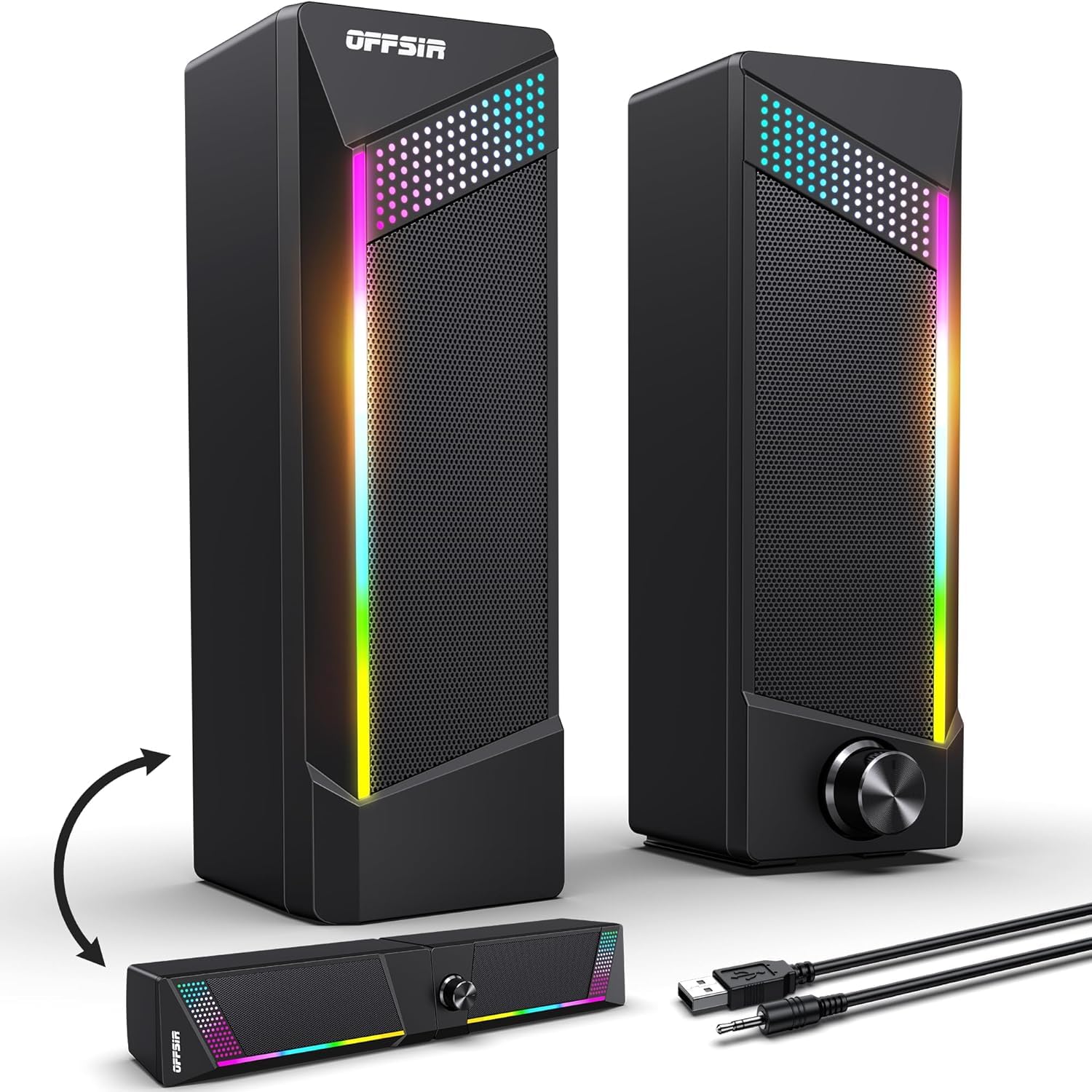
Two speakers or one soundbar, decided by whether you slide them together. The GS005 is a pair of 5-watt units that join into a single 15.75-inch bar, an unusual bit of design at this end of the market, and it answers a real question: run them apart for stereo separation at a desk, clip them together when the surface gets cleared or the setup moves to a television.

Sound is decent rather than remarkable. Dual 5-watt drivers give clear speech and a little bass, and the set is honest about its limits: a big step up from laptop speakers and a step behind the USB-C Creative pair. What you are paying for is the shape and the lighting, and the lighting is better than it needs to be, with four modes on a touch pad on top and one of them switching it off.

Two things to settle before ordering. There is no Bluetooth, so both the USB and the 3.5mm cables have to reach the computer, and the RGB is either the reason you want these or the reason you do not, since it is all or nothing rather than dimmable.

Placement is easy either way. At 2.56 inches deep they sit on a narrow shelf or under a low monitor, and the touch controls are on top where your hand lands.

Pros

  • Splits into a pair or joins into a bar
  • Touch RGB with an off mode
  • Clear sound for the money

Cons

  • No Bluetooth, so two cables to the PC
  • Lighting cannot be dimmed
Our verdict

A flexible, good-looking budget set for a desk that changes shape, as long as you can live without Bluetooth.

Check Latest Price

How We Tested 12 Sets of Computer Speakers

We began with listings, filtering for sets you could live with for a full workday: a volume control you can reach without a keyboard shortcut, a wired input that doesn't need a dongle, and a footprint that sits beside a monitor rather than under it. That left 12 pairs — USB-powered pucks, wooden two-speaker sets, one 2.1 system with a subwoofer, and several with Bluetooth — which we ran for six months.

Each set spent at least two weeks on a real desk, through morning calls, afternoon playlists, and a few long gaming evenings. We also carried the Bluetooth models out to a kitchen counter, paired them with both a phone and a laptop, then walked to the far end of the room to find where the signal gave out.

At the desk we turned each set down to the quietest audible notch and checked whether the left and right speakers still matched, and sat in silence listening for idle hiss. We unplugged and re-plugged every pair daily, coiled the cables back up, pressed on the cabinets to hear which ones rattled, and ran a thumb over the finish to see what picked up fingerprints. A few we left running eight hours straight and felt the cabinets afterward for heat. Throughout, we kept notes on what each set cost against what it actually did.

How to Choose Computer Speakers

Start with the cables you can live with

A USB-only speaker takes one cable and one port and does everything over it, which is why the tidiest desks end up there. The trade is power: USB supplies 5 volts, so those sets top out lower than anything running from a wall adapter. A USB-plus-3.5mm pair occupies the audio jack as well; an AC-powered pair frees both ports but adds a brick and a socket.

Count what is left on your machine before you decide. On a laptop with two USB-C ports, a single-cable set earns its place faster than an extra watt or two.

Decide about bass before you shop

A 2.1 system adds a subwoofer, which is the only way to get real low end at a desk, but it needs floor space, a socket and a little distance from the wall so it does not boom. A 2.0 pair keeps the desk simple and can still sound warm; it just will not move air the way a sub does.

Be honest about the room. In a small office a boomy sub is worse than a clean pair of satellites, and none of these systems gives you a tone control to fix it afterwards.

Measure for shape, not just size

Height catches people out. A cabinet 9.5 inches tall will not slide under a monitor shelf that a 5-inch box clears, and a bar clamped to the bottom bezel can put the screen's own buttons out of reach. Compact in a listing usually describes depth, not height.

Measure three things: the gap between desk and monitor, the free width either side, and the clearance behind the cabinets for cables and rear ports.

Get a volume control you can reach

Every set here can be adjusted from Windows or macOS, but diving into the system mixer mid-call gets old. A knob or buttons on the speaker, or a wired pod on the desk, is worth more than another watt of rated power.

On Bluetooth sets, the speaker's own level and the system level are separate. Turn the speaker up first and then use the keyboard, or you will spend a week convinced the set is quiet.

Treat reliability as part of what you are buying

The failure in this category is usually the amplifier, not the drivers: a set that goes quiet or stops powering on is generally finished. Buy somewhere with a return window long enough to use, and spend the first week listening at the volume you actually work at.

Warranty length tells you something about the maker's confidence, and it matters more on a system with a subwoofer and more parts to fail than on a two-driver pair.

Frequently Asked Questions

Final Verdict

The Creative Pebble V3 is the set we recommend for most desks. One USB-C cable handles the installation, Bluetooth and a 3.5mm input cover the devices that cannot use it, and the angled drivers make a small pair sound bigger than it has any right to. It is the least fuss for the most setups.

If the desk has room and the room needs filling, the OHAYO C6 is the upgrade. If games and films matter more than a tidy surface, the Logitech Z313 and its subwoofer are the ones to hear before you decide.