Best Audio Mixers of 2026

A mixer's worst flaw isn't a missing feature — it's a hiss you can't unhear. Push the gain and the noise floor rises with it: a faint buzz under every vocal, a crackle when a fader moves, a Bluetooth button that finally connects on the third try. What you actually want is dull and reliable — every input you need, clean gain, and knobs you can find without a flashlight.

My team and I spent eight months running 11 mixers in the rooms they actually live in: a bedroom studio desk, a basement band rehearsal, a small bar stage. Channel count is the spec everyone shops on and the one most people overbuy — four stereo line inputs will carry a keyboard rig and a drum machine just fine. What separates these units is the edges: quiet phantom power, clean USB audio moving in both directions, app control that survives bad Wi-Fi.

Power is the other trap — a 5-volt adapter, a wall supply, or bus power from the laptop decides where the mixer can sit and how much hum it drags along. The picks below are the ones that stayed quiet.

Keeper Score summarizes customer ratings and review volume. Read it alongside the product details and trade-offs. How the score works.

1

Best Overall

Yamaha MG10XU

92 /100
Keeper Score Outstanding

Key details

Effects
SPX digital effects
Preamps
Class A D-PRE
Channels
10
Connectivity
USB
Check Price on Amazon

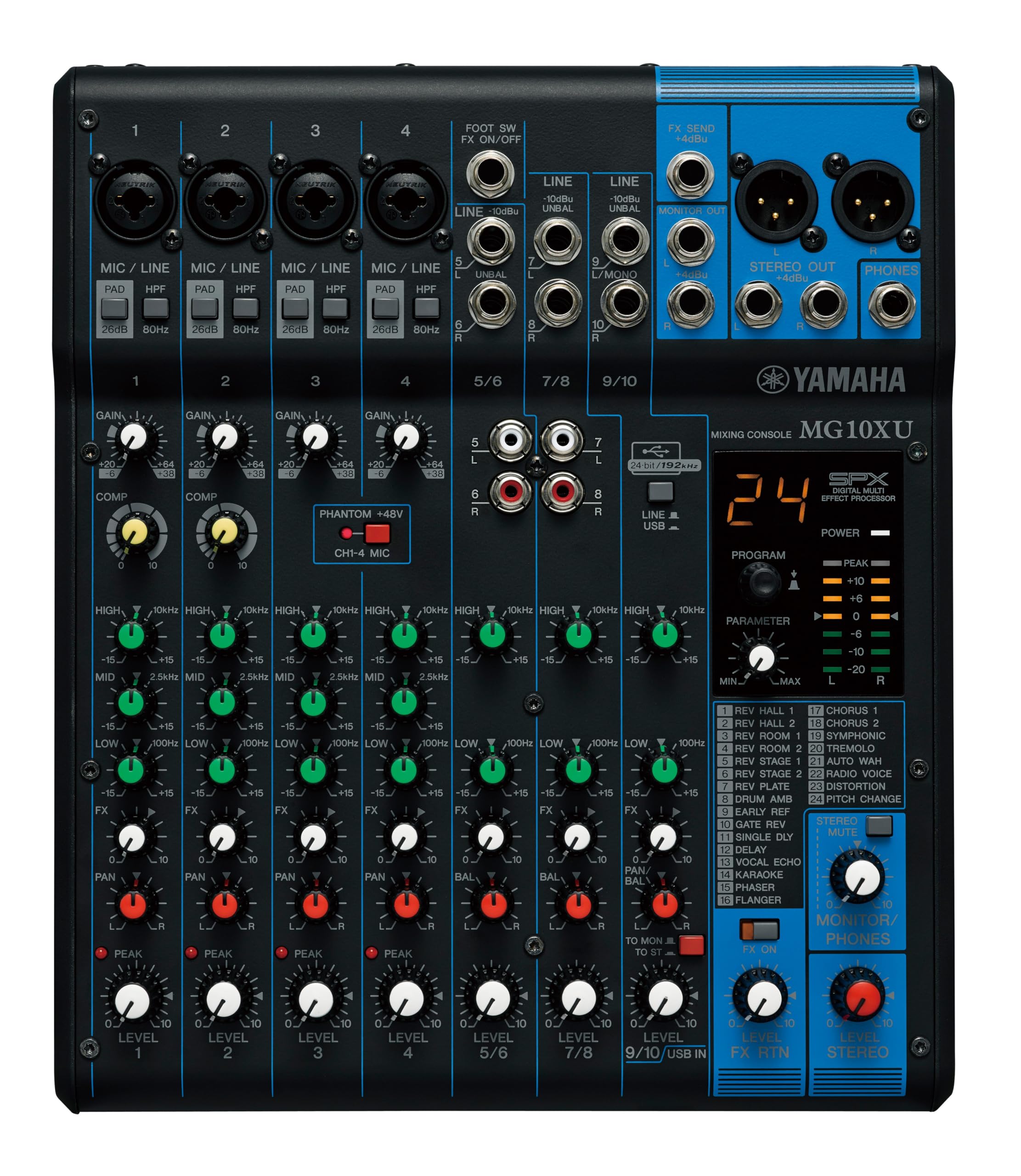
The most useful control on this board is the one-knob compressor. It sits on the mic channels beside a three-band EQ and a high-pass filter, and it does what a good engineer does first: pulls a loud singer back into the mix without anyone thinking about ratios. Every control is on the surface, labeled, and reachable without a menu.

That layout is why it's our top pick. Ten inputs cover a four-piece band, a podcast with two guests and a music bed, or a couple of handhelds and a laptop feed, and the class A D-PRE preamps are quiet enough that we stopped thinking about them, which is the highest compliment a preamp gets. Nothing here needs a manual longer than a page.

The SPX effects were the surprise. We expected to leave them off and run vocals dry; a little reverb on a close-miked voice turned out to be the difference between a recording that sounds like a room and one that sounds like a record, and having it onboard saves a box and two cables. The powder-coated steel chassis is the other reason this one travels: at 7.7 pounds it's a two-hand lift, but nothing about it feels like it will crack in a van. The USB connection carries a stereo mix into a computer for streaming or a quick capture.

Pros

  • Ten inputs cover mics and stereo sources
  • One-knob compressors tidy vocals fast
  • SPX effects are usable on real gigs
  • Steel chassis takes being moved

Cons

  • USB output runs low for direct recording
Our verdict

This is the mixer we hand to most people: ten inputs, compressors that earn their place, usable effects and a case that survives the van.

Check Latest Price
2

Best Digital Mixer for Small Gigs

Behringer FLOW 8

92 /100
Keeper Score Outstanding

Key details

Faders
60 mm channel faders
Channels
8
Wireless
Bluetooth audio and app control
Mic Preamps
2 Midas preamps
Check Price on Amazon

Sixty millimeters is a lot of fader for a mixer this thin. The FLOW 8 is a digital board that kept the part most of them throw away: channel faders you push with a finger, plus a master knob ringed with an LED collar that tells you where you are in a dark room.

Two Midas preamps with 48-volt phantom power take the microphones, the remaining inputs handle line sources, and Bluetooth covers the walk-in playlist. EZ-Gain reads what's arriving and sets gain for headroom, which is a real help when you're setting up alone and can't be at the back of the room and behind the board at the same time. The app is where routing and saved setups live.

Repetition is where it earns its place. A residency, a weekly open mic, or a function band playing the same four venues gets a lot from recalling a mix instead of rebuilding it, and that's the trick the analog picks here can't do. We reach for it when a night has a running order and no time for a soundcheck from scratch. The faders are the part we came back to: they make a digital mixer feel like something you play rather than something you configure.

Pros

  • Real 60 mm channel faders
  • Saved setups recall a whole show
  • Bluetooth audio plus app control
  • EZ-Gain sets levels for you

Cons

  • Two mic preamps across eight inputs
Our verdict

Our pick when a small gig has to come back exactly as you left it: real faders on the desk, presets in the app, and Bluetooth for the walk-in music.

Check Latest Price
3

Best for Larger Live Setups

Behringer X AIR XR18

90 /100
Keeper Score Outstanding

Key details

Channels
18
Wireless
Built-in tri-mode Wi-Fi
Mic Preamps
16 programmable Midas
USB Interface
18 x 18 channel
Check Price on Amazon

The Yamaha is a mixer you stand in front of; this is one you walk away from. Sixteen Midas preamps, eighteen channels and a seven-pound box, all of it driven from an iPad or an Android tablet. For anyone miking a drum kit, a horn section and four vocalists at once, that combination is the reason it's here.

The wireless is the part to plan around. The internal router is not the strongest link in the chain, and a control drop mid-show is unpleasant even when the audio keeps running at its last settings. Put it on an external router and the problem largely goes away, which is the setup to use for anything that matters.

The other side of the trade is real: twelve buses mean separate monitor mixes for different performers, scenes recall from venue to venue, and the 18 x 18 USB interface turns the whole board into a multitrack recorder whenever you want one. Sixteen preamps in a box this size is the entire argument, and it holds up for anything bigger than a duo.

Pros

  • Sixteen programmable Midas preamps
  • Tablet control from anywhere in the room
  • 18 x 18 USB multitrack interface
  • Twelve buses for separate monitor mixes

Cons

  • No physical faders
Our verdict

We recommend it for anyone miking a whole band or a hall: sixteen Midas preamps, eighteen channels, and a tablet where the snake used to be.

Check Latest Price
4

Best Budget Analog Mixer

Mackie Mix8

89 /100
Keeper Score Excellent

Key details

EQ
3-band on all channels
Aux Send
1 with stereo returns
Channels
8
Mic Inputs
2 with phantom power
Check Price on Amazon

There's no USB and there are no effects here, and that's the point. The Mix8 is a plain analog board: two mic channels with phantom power, two stereo line inputs, a three-band EQ on every channel, and one aux send with stereo returns.

What you get instead is a signal path. Set the gains sensibly and the thing is quiet, with no hiss or hum to fight between songs, and the steel frame and detented knobs make it feel like equipment rather than an accessory. The knobs click at each step, so a setting you made last month is still where you left it, and it survives being set up and torn down every week.

We keep it for the jobs that don't deserve a bigger board: submixing a few synths, collecting wireless mic receivers into one feed, giving a pedalboard somewhere to land. An aux send on a board this small is the detail we appreciate most, because it's what lets you put a pedal or a monitor feed in the chain without rewiring everything else.

Pros

  • Quiet signal path with no hiss
  • Steel frame and detented knobs feel solid
  • Aux send adds routing on a small board

Cons

  • Only two mic preamps
  • No power switch
Our verdict

For a plain, quiet mixer that does one job without menus, this is the one we buy: a clean signal path, an aux send and a frame that takes a knock.

Check Latest Price
5

Best Mini Line Mixer

Moukey MAMX1

89 /100
Keeper Score Excellent

Key details

Power
DC 5V
Inputs
1/4-inch TRS
Channels
4
Dimensions
4.37 x 6.18 x 1.97 in
Check Price on Amazon

Four keyboards, a drum machine and one pair of powered speakers is the situation this box was built for. It's a line mixer: no mic preamps, no phantom power, no EQ, just four stereo inputs, a level control for each, and one output.

The stereo/mono switch on each channel matters more than the spec suggests. A mono synth on one input and a stereo pad on the next both land correctly without adapters, as long as you use 1/4-inch TRS cables on the stereo side.

Power comes over 5 volts USB, which makes it the most portable thing in this group: a phone charger runs it at a desk, and a battery pack makes it a submixer you can carry to a rehearsal. The case is metal, the jacks feel solid, and the whole unit is about the size of a paperback.

We like it precisely because it refuses to do more. If your problem is five line-level sources and one input on your interface, this is the least expensive fix here, and there's nothing to learn: turn a knob until the balance is right. What it can't do is make a microphone sound good, and it isn't trying to.

Pros

  • Four stereo inputs with mono/stereo switching
  • Runs from 5V USB, including a battery pack
  • Metal case and solid jacks
  • Smallest footprint in this group

Cons

  • Hiss can appear as channels are pushed
Our verdict

We keep it on the list for line-level pile-ups: four stereo sources into one output, mono/stereo switching, and the lowest price in this group.

Check Latest Price
6

Best Budget Board with Bluetooth

Pyle PMXU63BT

86 /100
Keeper Score Excellent

Key details

Effects
16-bit DSP FX
Channels
6
Wireless
Bluetooth streaming
Phantom Power
48V
Check Price on Amazon

For a karaoke night, a jam room, or a small hall where the music comes off someone's phone between sets, this is the board we point to. Six channels, Bluetooth streaming, 48-volt phantom power, a USB and MP3 player, 16-bit effects and a steel chassis at 3.8 pounds: it covers everything a small event actually needs.

The catch is refinement. The EQ is broad, the effects are presets, and the channel strips are simple next to the Yamaha's, which is what a board at this end of the range gives you. Set against that, the Bluetooth pairs with a phone in seconds and the phantom power means two condenser mics can go straight in, so a host with a laptop and a playlist can run an evening without a second box. The power supply takes 100 to 240 volts, so it travels without a transformer.

Pros

  • Bluetooth, USB and MP3 playback built in
  • 48V phantom power on the mic inputs
  • 16-bit DSP effects onboard
  • Steel chassis at 3.8 pounds

Cons

  • No pan or balance controls
  • Some hiss as the volume climbs
Our verdict

Our budget pick for karaoke and jam rooms: Bluetooth, phantom power, effects and a USB player on a board that costs very little.

Check Latest Price
7

Windows Streaming

TC Helicon GoXLR MINI

91 /100
Keeper Score Outstanding

Key details

Preamp
Midas with EQ and gating
Weight
1.61 lb
Channels
1
Compatibility
Windows 7, 8, 10, 11
Check Price on Amazon

It only works on Windows, and the desktop app isn't optional. The GoXLR MINI is a broadcast mixer rather than a general-purpose one, and it says so before you get to any of its good qualities.

For a Windows streamer, the design earns its keep. The microphone path runs through a Midas preamp with EQ, compression and gating, so a voice arrives close to finished, and the app holds the routing and recalls it, which means the same setup comes back every time you go live. What it replaces is a small mixer plus a pile of software routing, and doing both in one box is the appeal. It weighs 730 grams and takes up a corner of a desk, the kind of thing we leave plugged in rather than pack away, and it comes with a three-year manufacturer warranty that's unusual in this group.

Pros

  • Midas preamp with EQ, compression and gating
  • App recalls routing and settings
  • Three-year manufacturer warranty

Cons

  • One XLR input only
Our verdict

The one we point Windows streamers to: a Midas preamp with EQ and gating, app-held routing, and a voice that arrives close to finished.

Check Latest Price

How We Chose and Tested the Best Audio Mixers

The shortlist started with research, not gear. I read manuals and spec sheets for close to 40 mixers, filtered out anything offering fewer inputs than its price implied, and cut models that couldn't record to a computer or take a condenser mic. That narrowed the field to 11 units across the price spread, from a palm-sized line mixer to a full band board.

Testing ran eight months and followed the gear rather than a bench. On the studio desk I plugged in nothing, pushed every gain knob to the top with headphones at a fixed level, and listened for hiss, ground hum, and the click a worn fader makes. Then I ran a condenser mic on phantom power, recorded a spoken take, and auditioned the onboard effects on a vocal and a snare to hear whether they were usable or just loud.

Connectivity got its own rounds: pairing a phone over Bluetooth from across the room and again through a wall, recording USB audio in both directions to check for dropouts, and running app-controlled units off a router two rooms away. I carried each mixer to a small bar gig in a bag and checked jack nuts and knob wobble afterward, then ran them on adapter, wall supply, and bus power to see which ones hummed or browned out. Value came down to what was in the box — cables, software, and a manual that actually explained the routing.

How to Choose an Audio Mixer

Count mic inputs, not channels

An eight-channel mixer does not mean eight microphones. The Mackie Mix8 has two mic channels with phantom power and the rest are line inputs; the Behringer FLOW 8 spreads its eight across both; the Moukey has no XLR at all. Write down what actually needs a preamp, a vocal, a miked cabinet, a kick drum, and what only needs a line input, then check the XLR count and whether each one carries phantom power.

This is also where most returns come from. A box advertised as eight or ten channels can be mostly stereo line pairs, which is fine for keyboards and useless for a second singer.

Decide whether you're at the board or away from it

Physical knobs win when you mix while you play, because your hand finds a fader without your eyes. App control wins when the board sits at the side of a stage and you need to hear what the room hears. The XR18 exists for exactly that, and the FLOW 8 splits the difference with faders on the desk and the deep settings on a phone.

If a tablet is your only control surface, treat it as part of the kit: charged, backed up, and on a network that isn't shared with the audience.

Know what USB and Bluetooth actually give you

A stereo USB interface gets a finished mix into a laptop for streaming or a two-track recording; it won't give you separate tracks. Multitrack needs something like the XR18's 18 x 18 interface. Bluetooth is for walk-in music and set breaks, not for the main feed, because a pairing that drops mid-show is unforgiving.

Onboard effects are worth paying for only when they replace something you'd otherwise carry; a reverb you use on every vocal earns its place, a preset list you scroll past does not.

Plan for noise, power and the case

Hiss and hum show up at every price and usually trace back to gain staging, a laptop on the same circuit, or a tired power supply rather than the mixer itself. Set gain so the loudest moment sits below clipping and the noise floor stops mattering.

Buy a metal chassis if the board travels, add a switched power strip because not every mixer has a power switch of its own, and look at the power arrangement on the small boards: the Moukey runs on 5 volts over USB, which is what lets it work from a battery pack at a rehearsal.

Frequently Asked Questions

Final Verdict

The Yamaha MG10XU is the board we recommend to most people, because it covers the widest range of real jobs, a three-piece band, a podcast with guests, a pair of handhelds, without asking anyone to learn an app first. When your shows repeat and you want the mix to come back exactly as you left it, the FLOW 8's presets and faders are the better fit. When there are sixteen microphones to place, go to the XR18 and accept the tablet.